


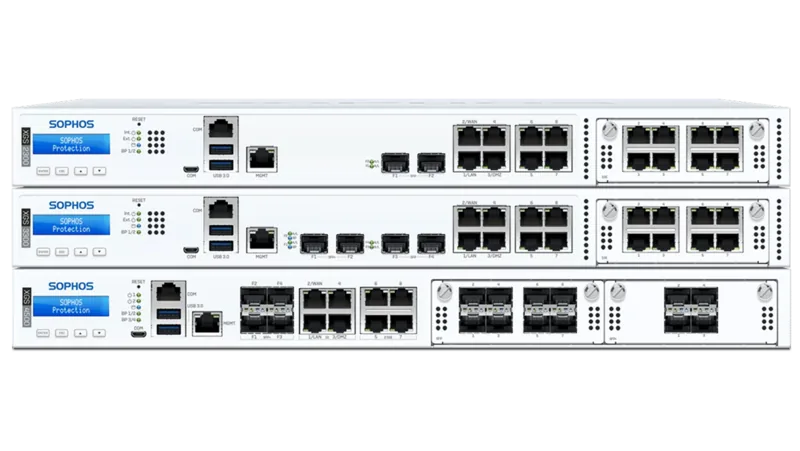
Sophos XG 230 Rev. 2 Manual
PDF manual · 26 Pages
English



Quick check
Incorrect answer, please try again.
Chat with your Sophos XG 230 Rev. 2 manual using AI
Get instant AI answers from your Sophos XG 230 Rev. 2 manual
Ask anything about the Sophos XG 230 Rev. 2. Answers come from this manual, with the pages they are based on.
Ask a Question
Do you recommend XG 230 Rev. 2?
Yes NoFrequently Asked Questions
The default LAN management address is `172.16.16.16`. You access the web console through HTTPS on port `4444`, so the full address is `https://172.16.16.16:4444`.
Is this answer helpful?
Connect Port 1/LAN to your internal network and connect your administration PC to the same network. Set your PC to the matching subnet, then open the browser and log in to the admin console.
Is this answer helpful?
The default username is `admin` and the default password is `admin`. These credentials are used for the initial web console login and should be changed after setup.
Is this answer helpful?
Yes, Internet access is required for device registration with Sophos ID and for license synchronization. You can adjust network settings first if the appliance needs help reaching the Internet.
Is this answer helpful?
The network configuration wizard supports bridge and gateway deployment modes. You can choose the mode that best matches your network design and then adjust IP, gateway, DNS, and time settings.
Is this answer helpful?
The LEDs show power state, SSD activity, Ethernet link/activity, connection speed, SFP status, and LAN bypass state. They help you quickly confirm whether ports and power are working as expected.
Is this answer helpful?
Advantages and Disadvantages
Advantages

- Compact 1U rackmount design fits neatly into standard IT racks and saves space.
- Multiple connectivity options include fixed GbE ports, SFP, USB, and expansion support.
- Browser-based setup makes initial configuration easier for administrators.
- LED indicators provide quick visibility into power, link, speed, and bypass status.
- License registration and wizard-driven setup help speed up deployment.
Disadvantages

- Initial setup still requires network knowledge and correct PC/IP configuration.
- The device must be registered online before full activation and license sync.
- Default admin credentials are convenient but should be changed immediately.
- WAN setup depends on the ISP connection type, which can add complexity.
- The same guide covers multiple models, which may create confusion for some users.
Product Specification
WAN
2x SFP
LAN
6x 1000Base-T, 1x expansion slot
Wireless
N/A
additional ports
3x USB-A 2.0, 1x USB Micro-B, 1x RJ-45 Management, 1x HDMI
Dimensions (WxHxD)
17.24x1.73x13.54in, 1U
Weight
11.46 lbs
Special features
Display, optional external redundant power supply (redundant power supply)
Manufacturer's warranty
one year
Product Description
Sophos XG 230 Rev. 2 1U Rackmount Firewall
The Sophos XG 230 Rev. 2 1U Rackmount is built for teams that want a compact security appliance with straightforward setup and dependable network visibility. In a single rack unit, it combines fixed Gigabit copper ports, SFP connectivity, bypass pairs, USB expansion, and a front LCD for quick on-device navigation. It is designed to fit cleanly into a standard server rack while still offering the flexibility needed for small and mid-sized business networks.
What makes this model appealing is its balance between hardware practicality and guided deployment. The Sophos XG 230 Rev. 2 1U Rackmount Manual walks you through the essentials: mount the device, connect the LAN and WAN, power it on, then open the web-based admin console from a management PC. The default setup is intentionally simple, with a dedicated LAN address and browser access over HTTPS, making first-time administration accessible even in busy IT environments.
Once connected, the appliance is ready for registration and license synchronization through a Sophos ID. This step unlocks the full configuration experience and leads into the Network Configuration Wizard, where you can choose between bridge and gateway modes, adjust interface IP settings, and align DNS, gateway, and time settings with your local environment. That makes the XG 230 a practical choice for organizations that want both speed and control during rollout.
Hardware details are equally useful. The front and rear layout includes RJ45 and SFP interfaces, a power switch, support for redundant external power, and clear LED indicators for power, link activity, speed, SSD status, and bypass state. These small touches help administrators troubleshoot connections quickly without guessing. The appliance’s bypass capability is especially valuable in environments where uptime matters and network continuity is a priority.
Overall, the Sophos XG 230 Rev. 2 stands out as a well-rounded rackmount security gateway that favors clarity, manageability, and dependable connectivity. For teams looking to deploy a firewall appliance with a clean setup path and a familiar web management workflow, it offers a strong foundation.
Notes
- Default management access starts at
https://172.16.16.16:4444 - Initial PC settings must match the appliance LAN subnet
- Register the device before syncing the license
- Change default credentials early for better security
Search for 67,732 Manuals online


Type-in Brand or Model