

Sophos SG 310 Rev. 2 Manual
PDF manual · 23 Pages
English



Quick check
Incorrect answer, please try again.
Chat with your Sophos SG 310 Rev. 2 manual using AI
Get instant AI answers from your Sophos SG 310 Rev. 2 manual
Ask anything about the Sophos SG 310 Rev. 2. Answers come from this manual, with the pages they are based on.
Ask a Question
Do you recommend SG 310 Rev. 2?
Yes NoFrequently Asked Questions
Connect a workstation to the appliance LAN (E0) and set its IP to any address in 192.168.0.2–192.168.0.254 with netmask 255.255.255.0. Open https://192.168.0.1:4444 in a browser and accept the security prompt to reach WebAdmin.
Is this answer helpful?
The default internal LAN interface (E0) uses IP 192.168.0.1 with subnet mask 255.255.255.0. DHCP proxy/functionality is enabled by default for initial deployments; adjust settings in WebAdmin to match your network.
Is this answer helpful?
The appliance ships with a 30-day trial. To activate a full license, create an account at https://myutm.sophos.com, apply the purchased activation/upgrade keys, generate the license file, and upload it to the appliance via WebAdmin.
Is this answer helpful?
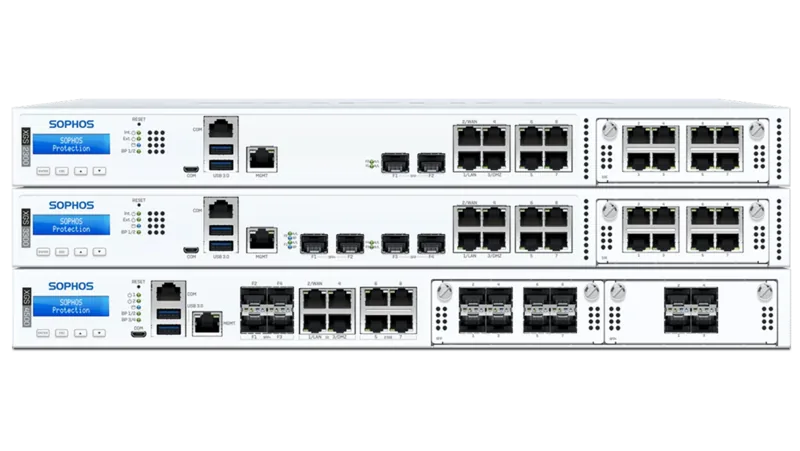
The SG 310 provides 8 fixed GbE copper ports (including two bypass pairs), 2 SFP ports, 2 SFP+ ports, USB 3.0 ports, HDMI, and a COM (RJ45) console. This supports mixed copper and fiber topologies and high-speed uplinks.
Is this answer helpful?
LEDs indicate power/SSD status, link/activity, and speed. RJ45 ports show ACT/LNK (left) and speed (right); SFP/SFP+ have similar ACT/LNK indicators and color coding for 1 Gbps/10 Gbps. LAN bypass LEDs show bypass active or off.
Is this answer helpful?
Install the SG 310 into a standard 1U rack using the supplied rails and brackets. Connect the provided power cable(s) and any redundant external supply if used. The power switch is on the rear; the appliance signals successful boot with five beeps.
Is this answer helpful?
Technical support and documentation are available via Sophos support portals for your region (e.g., sophos.com/support) and through local Sophos sales or resellers listed on official contact pages.
Is this answer helpful?
Advantages and Disadvantages
Advantages

- Multiple high-speed interfaces: 8x GbE, 2x SFP, 2x SFP+ for flexible copper/fiber connectivity.
- Hardware LAN bypass pairs for resilient inline deployments and minimal downtime.
- Compact 1U rackmount chassis with included rails and brackets for straightforward installation.
- WebAdmin GUI and initial setup wizard simplify configuration and centralized management.
- Redundant external power support and clear LED diagnostics for easy maintenance.
Disadvantages

- 30-day trial license requires MyUTM activation and license upload for long-term use.
- Default IP/subnet requires workstation reconfiguration for initial WebAdmin access.
- May be overkill for very small deployments that need only basic routing/firewalling.
- Physical rackmount form factor may not suit environments without rack space.
- Feature set and performance details may require reviewing official specs for high-throughput needs.
Product Specification
WAN
2x SFP+
LAN
8x 1000Base-T, 2x SFP, 1x expansion slot
Wireless
N/A
Additional ports
3x USB-A 2.0, 1x USB 2.0 Micro-B, 1x RJ-45 Management, 1x HDMI
Dimensions (WxHxD)
17.24x1.73x15.98in, 1U
Weight
12.79 lbs
Special features
Display, optional external redundant power supply (redundant power supply)
Product Description
Sophos SG 310, Rev. 2, 1HE Rackmount — Powerful Edge Security Simplified
The Sophos SG 310, Rev. 2, 1HE Rackmount delivers a compact, enterprise-grade security gateway designed for small to mid-sized networks that need robust protection without complexity. Built in a 1U chassis, the SG 310 combines multiple high-speed interfaces, hardware redundancy options, and an intuitive web-based management interface to streamline deployment and day-to-day administration. Its balanced feature set makes it suitable for branch offices, SMB data centers, and managed service environments.
Key features at a glance
Equipped with eight fixed GbE copper ports (including two bypass pairs), two SFP and two SFP+ ports, and external power redundancy support, the SG 310 offers flexible connectivity for mixed copper and fiber networks. A multifunction LCD, USB 3.0 ports, HDMI, and a COM (RJ45) console port help with onsite monitoring and maintenance. The appliance ships with a 30-day trial license, and full licensing is managed via Sophos MyUTM for easy activation and updates.
Deployment and configuration
Mounting the SG 310 in a standard rack is straightforward with included rails and brackets. Default network settings simplify initial access: the LAN port uses 192.168.0.1 with WebAdmin available at https://192.168.0.1:4444. After powering on (the device signals boot completion with five beeps), administrators configure a workstation on the LAN subnet and log into WebAdmin to run the initial setup wizard or perform manual configuration. The built-in WebAdmin GUI centralizes firewall, VPN, routing, and UTM services for consistent policy management.
Operational insights
LED indicators on Ethernet, SFP, and SFP+ ports provide immediate status for link, activity and speed. LAN bypass LEDs indicate bypass state. Power supply and SSD LEDs show device health. These visual cues simplify troubleshooting and day-to-day monitoring. Comprehensive online support and region-based sales contacts are available from Sophos for licensing and technical assistance.
Why choose the SG 310
This appliance is tailored for organizations seeking a reliable, hardware-accelerated perimeter device that balances performance, physical flexibility, and manageable administration. Its mix of copper and fiber ports, plus bypass pairs, makes it suitable for high-availability and inline inspection scenarios where minimal latency and predictable failover behavior are required.
Notes
- Default LAN: 192.168.0.1/24; WebAdmin port: 4444.
- Device emits five beeps at successful boot completion.
- License activation is performed via https://myutm.sophos.com.
- Rackmount hardware (rails/brackets) and power cable included.
Search for 67,706 Manuals online


Type-in Brand or Model