
Sony XAV-AX1005DB Manual
PDF manual · 156 Pages
English


Quick check
Incorrect answer, please try again.
Chat with your Sony XAV-AX1005DB manual using AI
Get instant AI answers from your Sony XAV-AX1005DB manual
Ask anything about the Sony XAV-AX1005DB. Answers come from this manual, with the pages they are based on.
Ask a Question
Do you recommend XAV-AX1005DB?
Yes NoFrequently Asked Questions
No. Apple CarPlay on this model requires a wired USB connection. Connect your iPhone to the USB port with a certified Lightning cable to use CarPlay features.
Is this answer helpful?
When Apple CarPlay is active, Bluetooth pairing is disabled for new devices and some Bluetooth functions are limited. For hands-free and streaming via Bluetooth, disconnect CarPlay and use Bluetooth connection procedures in the settings menu.
Is this answer helpful?
The unit offers EXTRA BASS, a 10-band EQ (EQ10) with custom adjustment, subwoofer level and phase control, crossover filters (high/low pass), balance/fader and DSO (Dynamic Stage Organizer) to tailor output to your car and speaker setup.
Is this answer helpful?
Yes. The receiver includes a DAB/DAB+ tuner with Auto Tune, station list, Soft/Hard Link and Antenna Power settings. Connect a compatible DAB antenna and set Antenna Power to ON if the antenna requires power; run Auto Tune on first use to populate stations.
Is this answer helpful?
No. For safety, video playback is disabled while the vehicle is moving; video is permitted only when the parking brake is engaged and a safety lock condition is met.
Is this answer helpful?
Supported audio formats include MP3, WMA, AAC, FLAC and WAV; video formats include MP4, Xvid, WMV and MKV within specified bitrates and resolutions. DRM-protected and some multi-channel files are not supported.
Is this answer helpful?
Factory reset is available in the General settings to initialize all options. Firmware updates are done via USB following instructions on Sony’s support site; do not remove the USB device during update.
Is this answer helpful?
Advantages and Disadvantages
Advantages

- Apple CarPlay and comprehensive Bluetooth support for safe smartphone use and wireless audio streaming.
- DAB/DAB+ tuner plus FM/AM for broad radio reception and auto-tune/station list features.
- Extensive audio tuning: EXTRA BASS, 10-band EQ, crossover, subwoofer level/phase and DSO.
- Touchscreen interface with gesture commands, steering wheel control compatibility and rear camera input.
- Firmware updatable via USB and clear troubleshooting/messages for easier maintenance.
Disadvantages

- No wireless Apple CarPlay — iPhone must be connected by USB for CarPlay functionality.
- Limited to single Bluetooth device connection at a time; pairing disabled while CarPlay runs.
- Video playback restricted by parking brake for safety, limiting passenger entertainment while driving.
- USB current limit (1.5 A) may not support power-hungry devices or fast charging.
- Display resolution (800×480) is modest compared with higher-resolution head units.
Product Specification
Type
Moniceiver, 1-DIN with 2-DIN front
Display
6.2", LCD, 800x480 Pixels, Touchscreen
Navigation
yes (Apple CarPlay)
TMC
no
Tuner
FM, MW, LW, DAB+
Media
USB storage
Audio formats
AAC, FLAC, MP3, WAV, WMA
Video formats
AVC, FLV, MKV, MPEG-4, WMV, Xvid
Power
4x 55W Peak
Connections
3x pre-amplifier output, 1x AUX In, 1x Video In, 1x USB (Front), Bluetooth
Software features
Apple CarPlay
Features
Hands-free system, 10-band equalizer
Product Description
Sony XAV-AX1005DB — Feature-rich in-dash multimedia receiver
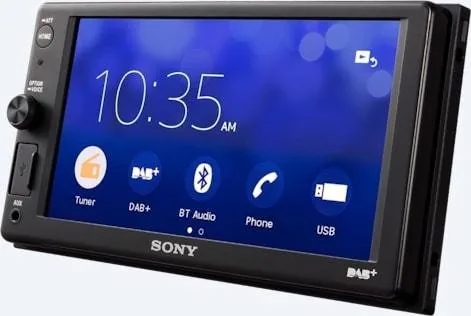
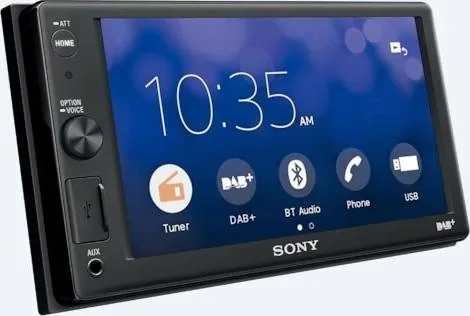
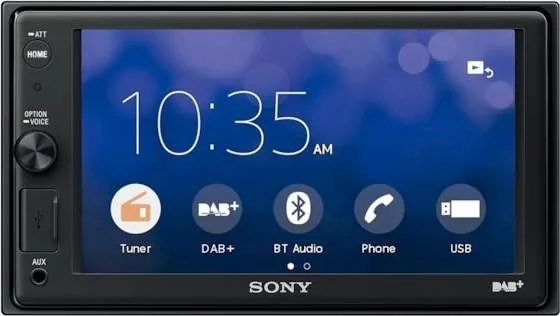
The Sony XAV-AX1005DB is a modern car AV receiver designed to bring advanced connectivity, clear sound and intuitive control to your dashboard. With a wide 6.2-inch touchscreen, comprehensive smartphone integration and robust audio tuning options, it targets drivers who want a balanced mix of convenience, safety and audio performance.
Equipped with Apple CarPlay support, the unit displays and controls iPhone apps safely via the touchscreen when connected by USB. Native Bluetooth (A2DP/HFP/AVRCP/PBAP) enables wireless audio streaming and hands-free calling, while a high-sensitivity DAB/DAB+ tuner and conventional FM/AM provide flexible radio options. USB mass-storage playback supports common audio and video formats, and a dedicated AUX input and rear camera input add versatility for legacy devices and parking assistance.
On the audio side, the XAV-AX1005DB offers a built-in four-channel amplifier with 55 W × 4 peak output and extensive sound shaping: EXTRA BASS, a 10-band EQ (EQ10), subwoofer level and phase control, crossover filters, DSO (Dynamic Stage Organizer) and balance/fader adjustments. These let you tailor the sound to different vehicles and speaker setups. The unit also supports an external power antenna/output for compatible setups and can drive or control external amplifiers.
Installation and usability are addressed with a compact mounting footprint, steering wheel control compatibility (custom or preset modes), a supplied microphone for calls, and extensive on-screen options for camera guide lines, wallpaper/dimmer settings and touch-panel calibration. Safety-conscious features include a parking-brake-dependent video enable, a monitor-off setting, and various warnings and precautions to reduce driver distraction.
The receiver includes firmware update capability via USB, multilingual menus, and detailed troubleshooting and diagnostic messages to help resolve connection, playback or radio reception issues. Physical specifications emphasize a crisp TFT LCD (800 × 480 display resolution) and robust I/O: USB, AUX, camera in, speaker outputs, and wiring harness support for power and remote controls.
Whether you prioritize smartphone integration, superior radio reception with DAB+, or deep audio customization, the Sony XAV-AX1005DB delivers a rich feature set suitable for everyday drivers and audio enthusiasts alike. Its combination of connectivity, tuning options and vehicle-focused safety makes it a strong choice for upgrading stock car entertainment.
Notes
- Apple CarPlay requires iPhone 5 or later and a certified Lightning cable; Bluetooth pairing is unavailable while CarPlay is active.
- Video playback is locked unless the parking brake is engaged for safety.
- Use recommended speaker impedances (4–8 ohms) and follow installation cautions to avoid battery drain in vehicles without ACC.
Search for 67,706 Manuals online


Type-in Brand or Model
Lukas Wagner
10 months ago
I have a Golf 6 and want to retrofit CarPlay and DAB. Is the radio easy to install yourself, and does everything work reliably?
Manual.ly
10 months ago
Yes. Reviewers say the device can be retrofitted in an older Golf 6 without major issues, especially when you use the correct wiring harness. The self-installation is described as straightforward because the harness makes the connections simple. CarPlay and DAB are reported to work as expected and reliably after installation. One minor drawback mentioned is the front USB port: if you prefer a more convenient USB position (for example, rear or side access), you may want to consider that before buying.