
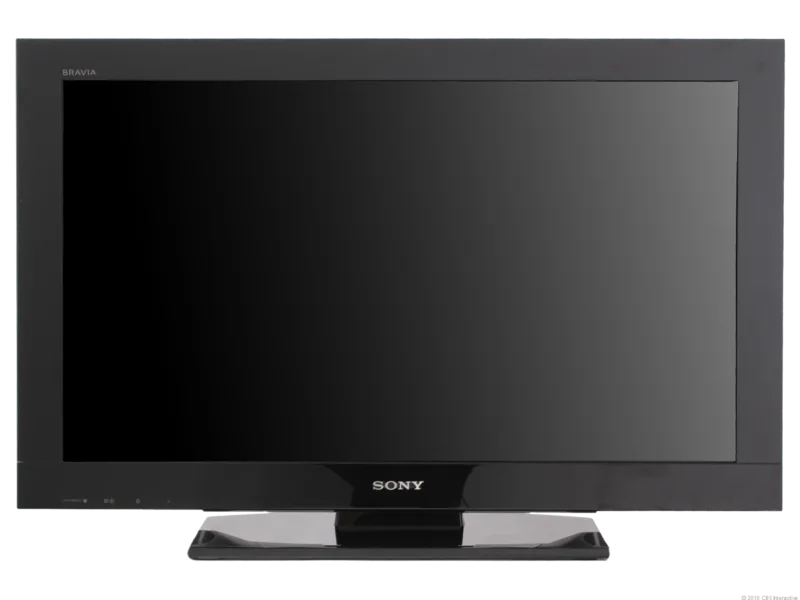
Sony KDL-22BX300 Manual
PDF manual · 32 Pages
English


Quick check
Incorrect answer, please try again.
Chat with your Sony KDL-22BX300 manual using AI
Get instant AI answers from your Sony KDL-22BX300 manual
Ask anything about the Sony KDL-22BX300. Answers come from this manual, with the pages they are based on.
KDL-22BX300 Maintenance Schedule
Unplug the AC power plug and clean it regularly to prevent dust accumulation which could cause insulation deterioration and fire.
Periodic vacuuming of the ventilation openings is recommended to ensure proper ventilation and prevent dirt or dust collection.
Ask a Question
Do you recommend KDL-22BX300?
Yes NoFrequently Asked Questions
Use HDMI cables for the best quality if your device supports it. Connect to HDMI IN 1 or 2. For older devices, use Component (Y/PB/PR) or Composite (Video/Audio) jacks. Select the correct input source by pressing the Input button on the remote or TV panel.
Is this answer helpful?
Yes, the TV supports USB playback for photo (JPEG), music (MP3), and video (MPEG-1, MPEG-2) files. Insert the USB drive into the USB port, press MENU, select Photo, Music, or Video, and navigate to your file using the directional buttons.
Is this answer helpful?
First, check that the AC power cord is securely plugged in and the standby light is red. Press the Power button to turn it on. Verify the correct input source is selected. If using external equipment, ensure cables are firmly connected and the device is powered on.
Is this answer helpful?
Eco mode reduces power consumption by adjusting the backlight brightness. You can access it via the Settings menu under 'Eco'. Options include 'Power Saving' to dim the screen and 'Idle TV Standby' to turn off the TV after a period of inactivity.
Is this answer helpful?
Sony strongly recommends having wall installation performed by qualified dealers or licensed contractors due to safety risks. Use only approved Wall-Mount Brackets like SU-WL100. Ensure the wall can support four times the TV's weight and follow all bracket instructions carefully.
Is this answer helpful?
Advantages and Disadvantages
Advantages

- Compact size ideal for small rooms and secondary viewing areas
- USB media playback supports photos, MP3s, and MPEG videos directly
- HDMI inputs provide high-quality digital audio and video connectivity
- Eco mode reduces power consumption through backlight adjustment
- BRAVIA Sync allows single-remote control of compatible devices
Disadvantages

- Limited screen size may not suit large living spaces
- No smart internet connectivity or streaming apps included
- Speaker output is modest at 5W + 5W requiring external audio for movies
- Wall mounting requires separate bracket purchase and professional help
- Basic menu interface lacks advanced customization found in newer models
Product Description
Sony KDL-22BX300 LCD TV: Essential Guide for Optimal Viewing
The Sony KDL-22BX300 is a compact and efficient LCD television designed to bring high-quality visuals into smaller living spaces, bedrooms, or home offices. As part of the BX300 series, this model combines the reliability of Sony engineering with user-friendly features that enhance your daily entertainment experience. Whether you are catching up on news, watching movies, or connecting external devices, understanding how to operate this TV ensures you get the best performance from its hardware.
Key Features and Performance
This television boasts a 22-inch screen with a native resolution suitable for standard definition and high-definition content playback. It supports multiple input options, including HDMI, Component, and Composite connections, allowing seamless integration with DVD players, game consoles, and personal computers. The inclusion of USB ports enables direct playback of photos, music, and video files from storage devices, turning your TV into a multimedia hub without the need for additional equipment.
For audio enthusiasts, the KDL-22BX300 offers various sound modes such as Cinema, Sports, and Music, which automatically adjust equalization settings to match the content being viewed. The Intelligent Volume feature helps maintain consistent loudness levels between programs and advertisements, preventing sudden spikes in volume. Additionally, the Eco mode helps reduce power consumption by adjusting backlight brightness, making it an energy-efficient choice for environmentally conscious users.
Setup and Connectivity
Setting up the Sony KDL-22BX300 is straightforward. The initial configuration wizard guides users through channel tuning, language selection, and location settings. For those looking to mount the TV on a wall, compatible brackets are available, though professional installation is recommended to ensure safety and stability. When connecting external devices, using HDMI cables provides the best picture quality, supporting resolutions up to 1080p. The BRAVIA Sync feature allows users to control connected compatible devices with a single remote, simplifying the viewing experience by reducing clutter and operational complexity.
Maintenance and Troubleshooting
Regular maintenance involves cleaning the screen with a soft, dry cloth and ensuring ventilation holes remain unobstructed to prevent overheating. If issues arise, such as no picture or sound, checking cable connections and verifying input sources usually resolves minor problems. The built-in self-diagnosis function aids in identifying hardware faults by flashing indicator lights, providing specific error codes for service personnel. By following these guidelines, owners can extend the lifespan of their Sony KDL-22BX300 and enjoy uninterrupted entertainment.
Search for 67,706 Manuals online


Type-in Brand or Model