
Sony Handycam HDR-CX330 Manual
PDF manual · 32 Pages
English


Quick check
Incorrect answer, please try again.
Chat with your Sony Handycam HDR-CX330 manual using AI
Get instant AI answers from your Sony Handycam HDR-CX330 manual
Ask anything about the Sony Handycam HDR-CX330. Answers come from this manual, with the pages they are based on.
Ask a Question
Do you recommend Handycam HDR-CX330?
Yes NoFrequently Asked Questions
Turn off the camcorder, attach the battery, pull out the Built-in USB Cable, and connect it to the AC Adaptor and a wall outlet. The POWER/CHG lamp turns orange while charging and turns off when fully charged.
Is this answer helpful?
Yes, by default, the camcorder uses Dual Video REC to record movies in HD and MP4 formats simultaneously. You can also take photos during movie recording by pressing the PHOTO button.
Is this answer helpful?
Use the Wi-Fi function and install the PlayMemories Mobile app. You can connect via NFC for Android devices or manually select the SSID and enter the password displayed on the camcorder.
Is this answer helpful?
The camcorder supports SD, SDHC, and SDXC memory cards (Class 4 or faster) up to 64 GB, as well as Memory Stick Micro (Mark2) media up to 16 GB.
Is this answer helpful?
No, the camcorder is not dustproof, dripproof, or waterproofed. Do not expose it to rain, sea water, or moisture, as this may cause irreversible damage.
Is this answer helpful?
Advantages and Disadvantages
Advantages

- Dual Video REC captures HD and MP4 simultaneously for easy sharing
- Built-in projector in PJ models allows direct video projection
- Wi-Fi and NFC support enable wireless transfer to smartphones
- Compact and lightweight design with 30x optical zoom G Lens
Disadvantages

- Not waterproof or dustproof, requiring careful handling
- Overheat protection may stop recording during extended use
- Battery life limits continuous recording time significantly
- Some advanced functions require additional software installation
Product Description
Sony HDR-CX330 Handycam (instruction manual) - Read, Download & Print Free
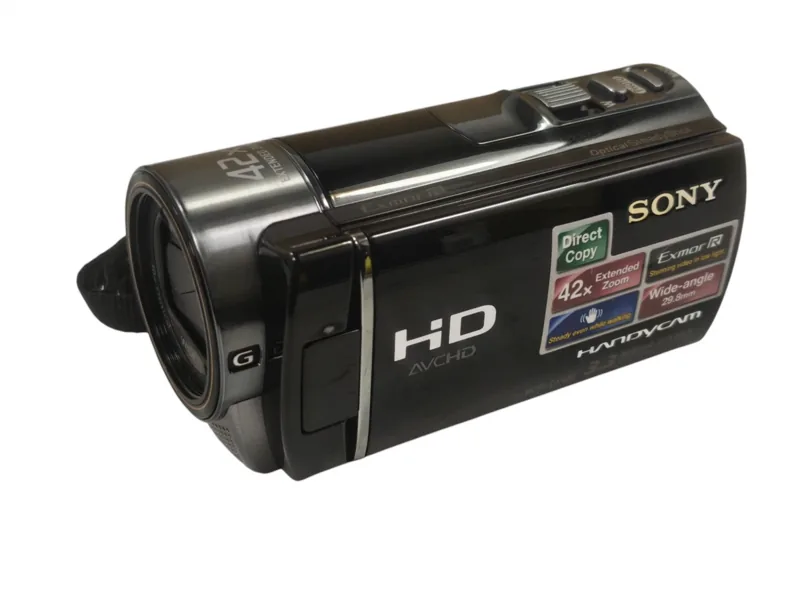
The Sony HDR-CX330 is a versatile digital HD video camera recorder designed for capturing high-quality memories with ease. This guide provides comprehensive instructions on getting started, recording, playback, and saving images to ensure you get the most out of your device. Whether you are a novice or an experienced videographer, understanding the features of this camcorder enhances your creative potential.
Getting Started and Basic Operations
Before using the Sony HDR-CX330, it is essential to charge the battery pack correctly. The process involves connecting the built-in USB cable to an AC adaptor and a wall outlet. Once charged, turning on the power is as simple as opening the LCD monitor. Users can then customize settings such as language, date, and time. For recording, open the lens cover and press the START/STOP button. The device supports Dual Video REC, which records in both HD and MP4 formats simultaneously, making sharing on smartphones and social media platforms straightforward.
Playback and Viewing Options
Reviewing your footage is intuitive with the View Images button. You can navigate through events, play movies, and view photos directly on the 2.7-inch LCD screen. For larger viewing experiences, connect the camcorder to a TV via HDMI. Additionally, specific models like the PJ series feature a built-in projector, allowing you to project your videos onto any surface without external equipment. This unique feature makes the Sony HDR-CX330 ideal for family gatherings and presentations.
Saving and Sharing Your Memories
Transferring files to your computer is seamless using PlayMemories Home software. This application allows you to import, edit, and share your content across various networks. Furthermore, the Wi-Fi function enables wireless transfers to smartphones and tablets. By installing the PlayMemories Mobile app, you can use your smartphone as a remote commander or instantly send MP4 movies and photos. These connectivity options ensure that your memories are always accessible and easy to share with friends and family.
Search for 67,706 Manuals online


Type-in Brand or Model