
Sony Alpha 7S III ILCE-7SM3 Manual
PDF manual · 535 Pages
English


Quick check
Incorrect answer, please try again.
Chat with your Sony Alpha 7S III ILCE-7SM3 manual using AI
Get instant AI answers from your Sony Alpha 7S III ILCE-7SM3 manual
Ask anything about the Sony Alpha 7S III ILCE-7SM3. Answers come from this manual, with the pages they are based on.
Alpha 7S III ILCE-7SM3 Maintenance Schedule
The built-in clock may exhibit time errors. Adjust the date and time at regular intervals via MENU > Setup > Area/Date.
Use the Sensor Cleaning function in the Setup menu to clean dust from the image sensor.
Ask a Question
Do you recommend Alpha 7S III ILCE-7SM3?
Yes No
Sarah Jenkins
5 months ago
Is this camera suitable for professional 4K video work and fast action shots?
Frequently Asked Questions
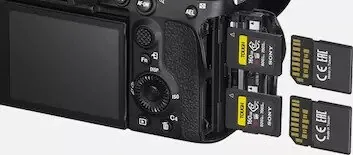
This camera supports both CFexpress Type A and SD/SDHC/SDXC memory cards. For best performance with 4K video, use high-speed cards like VPG200 for CFexpress or V90 for SD cards.
Is this answer helpful?
Yes, you can charge the NP-FZ100 battery inside the camera using a USB Type-C cable connected to a USB-PD compatible power source. However, charging via the Multi/Micro USB terminal is not supported.
Is this answer helpful?
No, the Sony Alpha 7S III does not have in-body image stabilization. You must use lenses with optical stabilization (OSS) to achieve steady handheld footage.
Is this answer helpful?
Install the Imaging Edge Mobile app on your phone. Connect the devices via Wi-Fi by scanning the QR code displayed on the camera screen or selecting the camera manually in the app.
Is this answer helpful?
Yes, the body is designed to be dust-resistant and splash-resistant. However, it is not guaranteed to be completely waterproof, so avoid submerging it or exposing it to heavy rain.
Is this answer helpful?
In High+ mode, the camera can shoot continuously at up to 10 frames per second. Other modes offer lower speeds like Hi, Mid, or Lo depending on your needs.
Is this answer helpful?
Advantages and Disadvantages
Advantages

- Exceptional low-light performance with ISO range up to 102400
- Fast and accurate Real-Time Tracking and Eye AF for humans and animals
- Supports high-bitrate 4K recording at up to 120fps for smooth slow motion
- Dual card slots compatible with CFexpress Type A and SD cards for redundancy
- Fully articulating touchscreen monitor ideal for vlogging and angled shots
Disadvantages

- No internal image stabilization (requires stabilized lenses)
- Lower resolution sensor may limit large print sizes compared to higher MP models
- Battery life can be reduced when using 4K recording or Wi-Fi features
- Complex menu system requires time to master for beginners
- Heat generation during extended 4K recording sessions
Product Specification
Type
Mirrorless
Effective Megapixels
12.1 Megapixels
Sensor
Full-frame, CMOS 1.40x0.94in, 8.40µm Pixel Size, BSI
Autofocus
Hybrid, 759 Areas (345 Contrast Detection, 759 Phase Detection)
Resolutions
max. 4240x2384(16:9)/4240x2832(3:2)/3776x2832(4:3)/2832x2832(1:1) Pixels (JPEG/HEIF/RAW), 14bit
Lens Mount
Sony E, Crop Factor 1.0
Image Stabilizer
Optical, compensates up to 5.5 Exposure Steps
Display
3.0" LCD, Live View, Touchscreen, 1.44 Million Dots, Tiltable, Swivel, 180° Flip-up
Viewfinder
0.64" OLED, 9.44 Million Dots, 100% Field of View, 0.90x Magnification
Flash
Flash Shoe
Flash Sync Speed
1/250s, First Curtain, Second Curtain
Video Function
XAVC S, 3840x2160@120p (16:9), 1920x1080@120p (16:9)
Sensitivity (ISO)
80-102400, expandable to 40-409600
Shutter Speed
1/8000-30s
Continuous Shooting
max. 10 Frames/sec
Memory Card
2x CFexpress Type A (shared), 2x SD/SDHC/SDXC (UHS-II, shared)
Connections
USB-C 3.2 (5Gb/s, Charging), HDMI, Microphone, Headphone, Accessory Shoe
Wireless
Wi-Fi 5 (WLAN 802.11a/b/g/n/ac), NFC, Bluetooth 5.0
Power Supply
Li-ion Battery (NP-FZ100), Continuous Power via USB
Color
Black
Dimensions (WxHxD)
5.08x3.81x3.18in
Weight with Battery and Card
24.64oz
Manufacturer Warranty
2 Years
Product Description
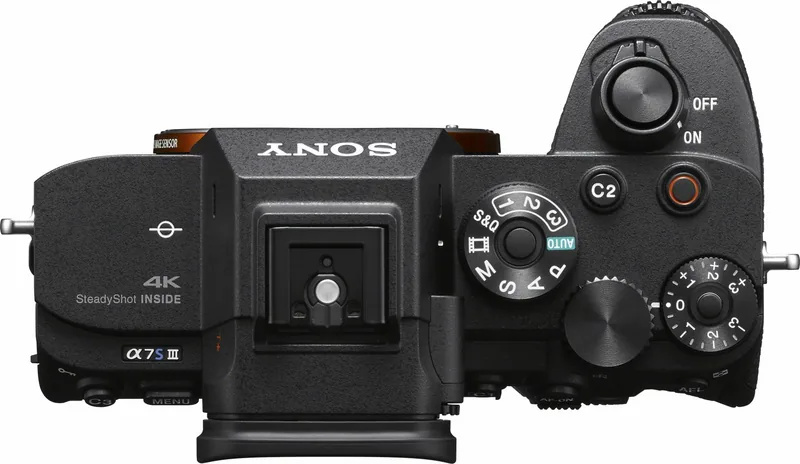
Sony Alpha 7S III Body Manual: The Ultimate Low-Light Powerhouse
The Sony Alpha 7S III Body stands as a beacon for professional videographers and hybrid shooters who demand uncompromising performance in challenging lighting conditions. This camera redefines the standards of full-frame imaging with its remarkable 12-megapixel sensor, optimized specifically for capturing stunning footage in low-light environments without sacrificing dynamic range or color fidelity.
When you unbox this device, you are greeted by a robust body designed for durability and ease of use. The manual guides you through essential setup steps, from charging the high-capacity NP-FZ100 battery to inserting compatible CFexpress Type A or SD memory cards. The dual card slots ensure that your critical data is backed up instantly, a vital feature for professionals working on tight deadlines.
One of the standout features highlighted in the operational guide is the advanced autofocus system. With phase detection technology and real-time tracking, the camera locks onto subjects with incredible speed and accuracy. Whether you are shooting fast-moving sports or intimate portraits, the Eye AF function ensures your subject remains sharp, even when they move erratically across the frame. The camera also supports sophisticated focus modes like Continuous AF and DMF, giving you total control over your composition.
Video capabilities are where the Alpha 7S III truly shines. It records stunning 4K video at up to 120 frames per second, allowing for beautiful slow-motion effects while maintaining high bitrates for professional grading. The inclusion of S-Log3 and HLG profiles provides filmmakers with the flexibility needed for post-production workflows. Additionally, the flexible exposure control allows independent adjustment of shutter speed and aperture, mimicking the precision of cinema cameras.
Connectivity is seamless with built-in Wi-Fi and Bluetooth, enabling instant transfer of images to smartphones via the Imaging Edge Mobile app. You can also manage your workflow remotely using a computer or tablet. The camera features a bright electronic viewfinder and a fully articulating touchscreen monitor, making it easy to shoot from any angle. Custom buttons and dials allow you to tailor the interface to your specific shooting style, ensuring that your most-used functions are always within reach.
Key Notes for Users
- Always format new memory cards in the camera before first use for optimal stability.
- The camera is dust and splash resistant but not waterproof; avoid extreme conditions.
- Use USB-PD compatible chargers for fast charging capabilities.
- Ensure lenses are compatible with the E-mount for full functionality.
Search for 67,706 Manuals online


Type-in Brand or Model
Mandy Harris
6 months ago
Does the Sony a7s3 support ND filters and does it have a rotating flip-out screen?
Manual.ly
6 months ago
The Sony a7s3 features a fully articulating rotating flip-out screen, which is highly praised for versatile shooting angles. Regarding built-in ND filters, this model does not include them; however, the camera offers excellent internal codec options that reduce the need for external recorders. Many users recommend using third-party lens filters or an external ND solution if needed.