
SolidRun MicroSOM i2 Manual
PDF manual · 26 Pages
English



Quick check
Incorrect answer, please try again.
Chat with your SolidRun MicroSOM i2 manual using AI
Get instant AI answers from your SolidRun MicroSOM i2 manual
Ask anything about the SolidRun MicroSOM i2. Answers come from this manual, with the pages they are based on.
Ask a Question
Do you recommend MicroSOM i2?
Yes NoFrequently Asked Questions
It is best suited for embedded systems that need a compact compute module with strong multimedia, networking, and interface flexibility. It fits industrial devices, smart appliances, and custom carrier-board products.
Is this answer helpful?
The MicroSOM i2 uses the Freescale i.MX6 family with a dual lite ARM Cortex-A9 configuration. The platform is part of a broader family that also includes solo, dual, and quad variants.
Is this answer helpful?
It combines small size, rich I/O options, onboard networking, and support from reference platforms. That makes it easier to build custom embedded products without starting from a blank slate.
Is this answer helpful?
Yes, the platform supports WiFi 802.11 b/g/n and Bluetooth 4.0 through an onboard wireless subsystem. Availability can depend on the exact module version and configuration.
Is this answer helpful?
The module supports HDMI, LVDS, MIPI DSI, and parallel display options. This gives designers several paths for attaching screens, from simple panels to richer multimedia displays.
Is this answer helpful?
Yes. The main challenges are pin multiplexing, power-rail sequencing, and carrier-board layout. These are manageable, but they require careful attention during hardware design.
Is this answer helpful?
Advantages and Disadvantages
Advantages

- Very compact 47 x 30 mm MicroSOM format with strong processing capability for embedded products.
- Wide interface range including HDMI, LVDS, MIPI, USB, Ethernet, CAN, and serial connectivity.
- Integrated ecosystem with CuBox-i and HummingBoard examples helps speed up development and validation.
- Flexible configurations let teams choose performance, memory, and wireless options for different use cases.
Disadvantages

- Carrier-board design is complex because many pins are multiplexed and require careful planning.
- Power sequencing and supply rail rules must be followed closely during integration.
- Some hardware details vary by revision, which can complicate reuse across versions.
- Mechanical and connector constraints may limit placement under the module on the carrier board.
Product Specification
Platform
HummingBoard
Manufacturer
SolidRun
Type
SoC module
SoC
NXP i.MX6DualLite, 2x 1.00GHz (ARM Cortex-A9)
Memory
1GB DDR3 RAM
Power supply
Carrier board, 5.0V
GPU
Vivante GC880, Vivante GC320
Video outputs
1x HDMI 1.4, 1x LVDS, 1x MIPI DSI
Video inputs
1x MIPI CSI
Audio
1x S/PDIF (In/Out)
External connectors
N/A
Internal connectors
N/A
GPIO
75-Pin
GPIO Standards
I2C, SPI, PWM, CAN bus, JTAG
Wireless
N/A
LAN
1x Gb LAN
Additional interfaces
Hirose DF40 SoM-Interface
Additional microcontroller
N/A
Dimensions
1.85x1.18in (WxD)
Special features
requires carrier board, extended operating temperature range
Scope of delivery
1x SoC module
Note
Interfaces only usable via carrier board!
Product Description
SolidRun MicroSOM i2: Compact Power for Embedded Designs
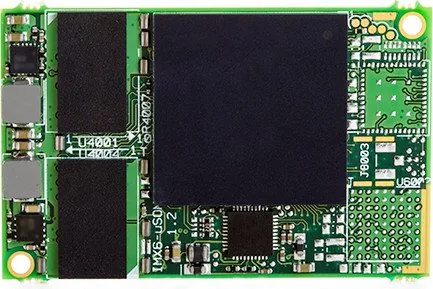
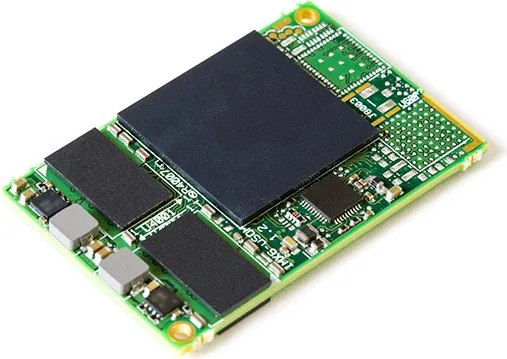
The SolidRun MicroSOM i2 Manual points to a small but capable module built for designers who want serious computing performance without a bulky footprint. Based on the Freescale i.MX6 dual lite ARM Cortex-A9 platform, the MicroSOM i2 brings a balanced mix of processing, graphics, multimedia, and connectivity into a very compact form factor. For embedded projects, that combination is often the difference between a simple board and a truly flexible product platform.
A Small Module with Big Design Potential
At just 47 x 30 mm, the MicroSOM i2 is designed to fit into space-sensitive systems while still offering the kind of I/O options that usually belong to much larger hardware. It supports a range of display paths such as HDMI, LVDS, and MIPI DSI, along with camera input, USB, Ethernet, CAN, and multiple serial interfaces. That makes it suitable for industrial controllers, smart displays, media devices, and connected appliances.
Built for Real-World Embedded Work
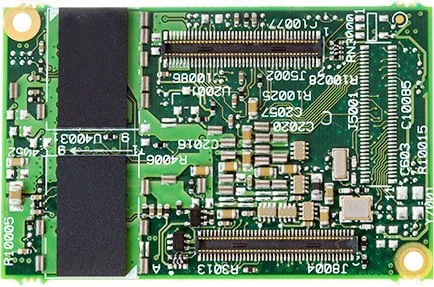
One of the strongest aspects of the MicroSOM i2 is its integration level. The module combines the i.MX6 processor family with DDR3 memory, power management, Gigabit Ethernet, and wireless options. Depending on the carrier board, developers can expose different sets of interfaces through multiple board-to-board connectors. This gives engineers flexibility to tailor the hardware to a target application without redesigning the compute core each time.
The module also benefits from SolidRun’s ecosystem. Companion platforms such as CuBox-i and HummingBoard show how the MicroSOM approach can be used in production-ready products and development-friendly reference designs. That makes the i2 more appealing to teams that want to move from prototyping to deployment with less friction.
Notes for Integrators
Power sequencing matters, and the module expects careful rail handling during startup. Pin multiplexing is also important, since many signals can serve more than one role. In practice, the MicroSOM i2 rewards thoughtful carrier design with a very adaptable and efficient embedded computing foundation.
Why it stands out
- Compact size with a feature-rich ARM A9 platform.
- Multiple display and camera interfaces for flexible product designs.
- Integrated Gigabit Ethernet, WiFi, and Bluetooth support.
- Strong ecosystem with supporting boards and reference examples.
Things to keep in mind
- Carrier-board design is critical because interface routing is highly multiplexed.
- Power rails and startup timing need careful attention.
- Some features vary by revision and module configuration.
- Mechanical and connector choices affect integration depth.
Search for 67,706 Manuals online


Type-in Brand or Model