
SolaX Power X3-Fit G4 Manual
PDF manual · 40 Pages
English



Quick check
Incorrect answer, please try again.
Chat with your SolaX Power X3-Fit G4 manual using AI
Get instant AI answers from your SolaX Power X3-Fit G4 manual
Ask anything about the SolaX Power X3-Fit G4. Answers come from this manual, with the pages they are based on.
X3-Fit G4 Maintenance Schedule
Verify that the inverter LED indicators, LCD display, and touch keys are in normal condition.
Check battery input and AC output wires for damage or aging.
Keep inverter panels clean and verify their safety condition.
Have the installer or SolaX arrange qualified personnel to perform safety tests. Record the data in an equipment log.
Check rear cooling fins from time to time. Clean them with a soft dry cloth or brush when dirt causes reduced power or overheating.
Free maintenance reminders
Timed to your purchase date. Always free, unsubscribe anytime.
Ask a Question
Do you recommend X3-Fit G4?
Yes NoFrequently Asked Questions
The X3-FIT G4 supports high-voltage lithium and lead-acid batteries. Nominal battery voltage must not exceed 400 V and maximum battery voltage must not exceed 800 V. Battery communication uses CAN with an RJ45 connector and the battery BMS must be compatible with the inverter.
Is this answer helpful?
EPS is available on the E version only and requires an external changeover device for safe transfer. EPS output power depends on the inverter rating and connected battery capacity; ensure EPS loads remain within EPS output rating to avoid overload faults.
Is this answer helpful?
Yes, connecting a compatible meter via RS485 is required for export-control and hybrid functionality. If the meter communication is absent or incompatible, the inverter may shut down with a 'Meter fault' alert.
Is this answer helpful?
Yes — up to ten inverters can be connected in a parallel system (one Master, others Slaves). Parallel operation requires identical firmware versions, proper CAN/CAT cabling, and setting the Master via DIP switch and LCD parallel settings.
Is this answer helpful?
Only qualified electricians should service the inverter. Disconnect AC and DC supplies, wait at least 5 minutes for internal capacitors to discharge, verify UDC+ to UDC- voltage is below 35 V with a high-impedance meter, and use insulated tools and PPE when handling batteries or high-voltage connections.
Is this answer helpful?
Firmware updates are done via USB: create an 'Update' folder with 'ARM' and 'DSP' subfolders and place corresponding firmware files. Battery must remain on and voltage >180 V during upgrade. Follow specified file names and USB formatting to avoid bricking the inverter.
Is this answer helpful?
The inverter includes anti-islanding (AFD), over/under voltage and frequency protections (fast and slow), residual current detection, overcurrent and thermal protections, and configurable grid-code profiles (VDE, AS/NZS, CEI, EN) for regional compliance.
Is this answer helpful?
Advantages and Disadvantages
Advantages

- Hybrid functionality: integrates PV grid-tie with high-voltage battery support for self-consumption and backup.
- Multiple work modes (Self-use, Feed-in, Force Time Use, Backup) to adapt to tariffs and blackout needs.
- Comprehensive communications: CAN for BMS, RS485 meter, LAN, optional WiFi/GPRS and DRM support.
- High reliability and safety features: anti-islanding, RCD, insulation monitoring, surge and thermal protections.
- Scalable: supports up to 10-unit parallel systems with centralized master control for larger installations.
Disadvantages

- Requires qualified electrician for installation and configuration; many advanced settings need installer password.
- EPS output is limited by battery size; under-sizing batteries can cause overloads and EPS interruptions.
- Meter compatibility is mandatory for export-control; incompatible meters cause operational faults.
- Parallel systems demand identical firmware across inverters and careful CAN/communications setup.
- Firmware upgrade and some advanced features require careful procedures (USB folder structure, battery voltage limits).
Product Specification
Note
Prices partly include 0% VAT tax rates for AT and DE
Output phases
3-phase
Efficiency
98.0% max., 97.7% ηEU
Input
MC4
Interfaces
USB, 1x RS-485
Protection class
IP65
Ambient temperature
-40F to +158F
Dimensions
19.80x19.80x7.83 in (WxHxD)
Weight
66.14 lb
Product Description
SolaX Power X3-FIT G4 Manual — Overview
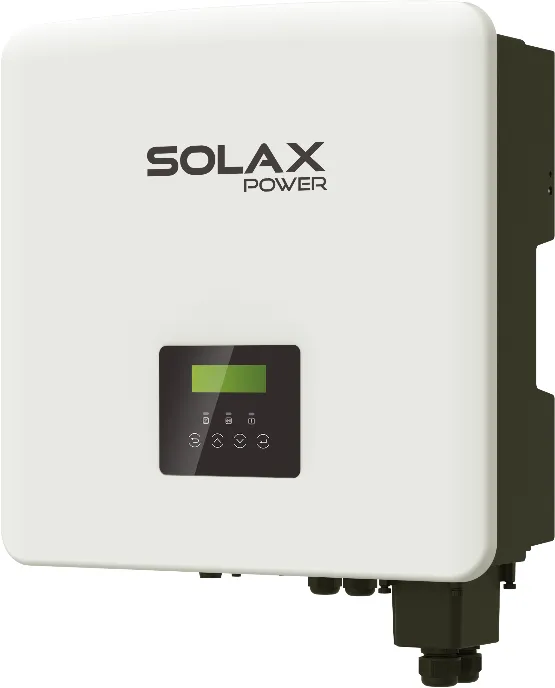
The SolaX Power X3-FIT G4 is a three-phase hybrid inverter designed for residential and light-commercial energy storage systems. Combining PV grid-tie performance with high-voltage battery support, the X3-FIT G4 optimizes self-consumption, supports export-control modes, and provides emergency backup through an EPS output (E version). It supports multiple work modes—Self-use, Feed-in Priority, Force Time Use and Backup—so owners can prioritize load, battery or grid depending on tariffs and blackout frequency. The inverter manages charging and discharging for high-voltage lithium and lead-acid batteries, communicates with BMS via CAN, and integrates with meters, DRM, RS485, LAN and optional WiFi collectors for monitoring and export control.
Key features and operation
X3-FIT G4 supports nominal AC power in 8.0 kW and 10.0 kW models, transformerless topology, and high charge/discharge efficiency (~96%). It includes built-in protections: anti-islanding (AFD), residual current detection, over/under voltage, overcurrent, overheat, and earth/insulation monitoring. The E version provides an EPS port for off-grid emergency loads (with an external changeover device). Installation supports up to 10 inverters in parallel (one master, up to nine slaves) for expanded capacity and centralized energy management.
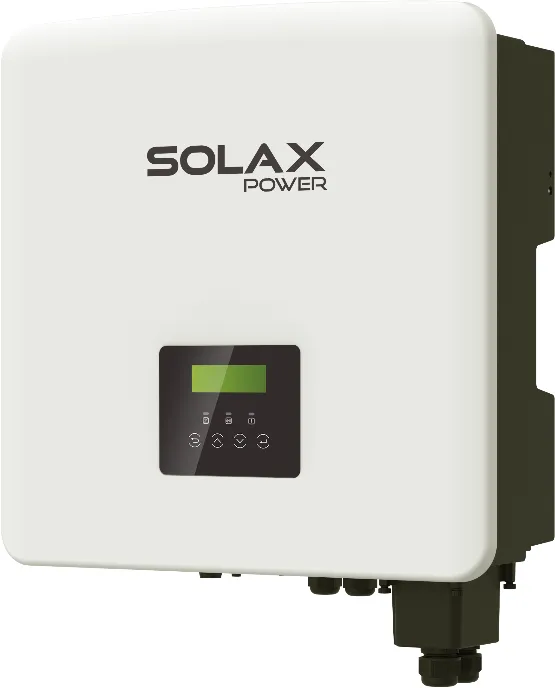
The unit’s control panel features a backlit 20x4 LCD and a simple keypad for local setup and diagnostic access. Firmware updates are supported via USB; monitoring and remote control are available through RS485, LAN, WiFi pocket devices or DRM signaling. The inverter includes configurable grid compliance profiles (VDE, AS/NZS, CEI, EN variants) and advanced settings for reactive power, export limits, hot-standby, DRM, PU (volt-watt) and phase power balance to meet regional grid codes.
Installation and safety notes
Designed for outdoor IP65 mounting, the X3-FIT G4 requires qualified electricians for installation. Key installation points include proper earthing, AC and EPS wiring, meter integration (mandatory for export control), and a non-polarized DC breaker for battery isolation. After disconnection, internal capacitors can remain charged—wait at least 5 minutes and verify DC voltage < 35 V before servicing. Follow local regulations for RCD/RCM selection (type B where necessary) and install SPDs where lightning protection is used.
Maintenance and troubleshooting
Routine checks include cleaning cooling fins, inspecting wiring and connectors, and reviewing LED/LCD status. The manual lists comprehensive fault codes and corrective actions (grid lost, overcurrent, bus voltage, BMS faults, RCD and relay faults). Most diagnostics are viewable on the LCD and via connected monitoring devices. Periodic professional safety checks (annual) are recommended.
Notes
- EPS output power depends on battery capacity and inverter rating—avoid overloads.
- Meter connection is required for export-control features; compatible meter and correct RS485 wiring are essential.
- Parallel operation requires consistent firmware versions across units and correct CAN wiring.
Search for 67,706 Manuals online


Type-in Brand or Model