
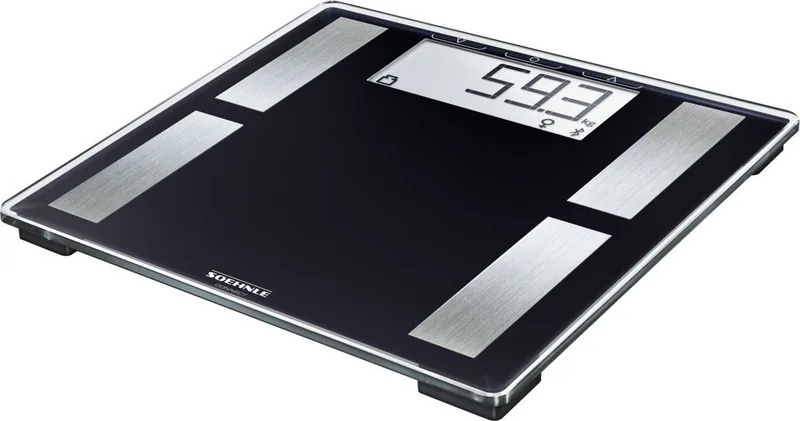
Soehnle Shape Sense Connect 50 Manual
PDF manual · 84 Pages
English



Quick check
Incorrect answer, please try again.
Chat with your Soehnle Shape Sense Connect 50 manual using AI
Get instant AI answers from your Soehnle Shape Sense Connect 50 manual
Ask anything about the Soehnle Shape Sense Connect 50. Answers come from this manual, with the pages they are based on.
Ask a Question
Do you recommend Shape Sense Connect 50?
Yes NoFrequently Asked Questions
No. The device is not suitable for individuals with electronic implants like pacemakers because bioimpedance technology uses electrical currents that may interfere with medical devices.
Is this answer helpful?
Activate Bluetooth on your smartphone. Download the Soehnle Connect App from the store. Follow the in-app guide to pair the device once it is powered on.
Is this answer helpful?
The scale supports a maximum weight of 180 kilograms or 396 pounds. Exceeding this limit will trigger an overload error on the display.
Is this answer helpful?
It uses bioimpedance analysis which is generally accurate for general fitness tracking. Results vary based on hydration levels and body composition.
Is this answer helpful?
Use the plus and minus buttons to select a memory slot. Hold the confirm button to clear or overwrite data as per the manual instructions.
Is this answer helpful?
You need three 1.5 V AAA batteries. The display indicates when they are low to avoid power loss during critical measurements.
Is this answer helpful?
Yes. There is a switch on the reverse side of the scale to toggle between metric and imperial units for your region.
Is this answer helpful?
Advantages and Disadvantages
Advantages

- Bluetooth connectivity allows sync with Soehnle Connect App and other health platforms like Google Fit and Apple Health.
- Provides detailed bioimpedance analysis including body fat percentage and muscle proportion estimates accurately.
- Features multiple memory slots to track progress for different family members or users over time easily.
- Includes a basic metabolic rate calculation to help users understand their daily calorie needs effectively.
Disadvantages

- Not safe for users with electronic implants such as pacemakers due to bioimpedance technology limitations.
- Surface must be hard and level. Carpeted floors affect measurement accuracy significantly during use.
- Requires three AAA batteries which need regular replacement to maintain consistent power for operations.
- Weight limit is capped at 180 kg which may be insufficient for some heavier individuals seeking scale usage.
- Slip hazard warning applies on wet surfaces which requires careful placement and usage conditions.
Product Specification
Power Source
Battery operated (3x AAA battery)
Material
Glass, Stainless Steel
Color
Black, Stainless Steel
Max Capacity
396.83 lb
Graduation
0.22 lb
Units of Measure
kg, lb, st
Analysis Data
BMI, Calorie Needs, Body Fat, Body Water, Muscle Mass
Memory Function
User Memory (for 8 Users)
Display
Yes
Features
Automatic User Recognition, Auto On Function (Step-on), Auto Off Function
Smart Home
App Control (Bluetooth)
Platform Size
12.20x12.20in (WxD)
Product Description
Discover Your Health Goals
Using the Soehnle Shape Sense Connect 50 digital body analysis scale Manual provides clear insights into your daily health status without ambiguity. This innovative device goes beyond simple weight tracking to offer comprehensive body composition data. Users can monitor changes in body fat content, water percentage, and muscle proportion over time. The integrated bioimpedance analysis technology ensures that readings reflect true physiological changes rather than just scale weight fluctuations.
To enhance the user experience, the device syncs seamlessly with the Soehnle Connect mobile application via Bluetooth. This feature allows for automatic data transfer to your smartphone or tablet. You can visualize your progress through graphs and charts within the app interface. Compatibility extends to Google Fit and Apple Health platforms for a holistic fitness dashboard. The scale supports multiple users by storing data in specific memory slots which recognize individuals automatically after the initial setup phase. The application also tracks weight differences to the last weighing and compares them against standard BMI norms for better context.
Safety remains a priority with specific design considerations. The scale features a sturdy glass platform but requires a hard surface for accurate readings. Soft carpets can interfere with the sensor precision significantly during operation. A warning indicates that the device is not suitable for anyone with electronic implants like pacemakers due to electrical current flow concerns. It also advises against placing the unit on wet floors due to slipping hazards during operation. Regular cleaning with a damp cloth keeps the sensors clear without water immersion risks damaging the internal electronics.
Powering the unit requires three standard AAA batteries. The display shows a low battery icon when replacements are needed to prevent measurement disruptions. Users can calibrate the scale by ensuring it is placed flat on a rigid surface before stepping on it. The weight capacity reaches up to 180 kilograms with high resolution for detailed tracking. Age settings allow for personalized metabolic rate calculations to aid in dietary planning. The device calculates a basic metabolic rate in kcal per day.
Important Notes This device is not intended for medical diagnosis. The weight limit is strict at 180 kg. If the weight exceeds this, an overload error appears. Warranty is valid for three years provided no misuse occurs. The manufacturer advises regular updates to the Connect App for optimal performance. Ensure hands are dry before stepping on the scale for accurate impedance measurement.
Search for 67,706 Manuals online


Type-in Brand or Model
Lisa Schmidt
5 months ago
Does the scale require a mandatory cloud account for data sync, or is Bluetooth-only usage supported?
Manual.ly
5 months ago
No, cloud connectivity is not mandatory. Measurements can be synced via Bluetooth directly to the app and Google Fit without forcing cloud storage. However, please note that the device manual provides limited instructions, so you may want to start the sync process immediately after taking a measurement.