
Soehnle Fit Connect 300 HR Manual
PDF manual · 51 Pages
English



Quick check
Incorrect answer, please try again.
Chat with your Soehnle Fit Connect 300 HR manual using AI
Get instant AI answers from your Soehnle Fit Connect 300 HR manual
Ask anything about the Soehnle Fit Connect 300 HR. Answers come from this manual, with the pages they are based on.
Fit Connect 300 HR Maintenance Schedule
If not used for an extended period, fully charge the battery once every 3 to 6 months to ensure functionality.
Wipe the display with a soft, damp cloth. Do not use aggressive detergents, hard-bristled brushes, or sharp objects.
Free maintenance reminders
Timed to your purchase date. Always free, unsubscribe anytime.
Ask a Question
Do you recommend Fit Connect 300 HR?
Yes NoFrequently Asked Questions
It tracks heart rate, steps, distance, calories burned, activity time, and daily movement progress. In training mode, it also shows timer data and heart-rate zone information.
Is this answer helpful?
Yes. It pairs with the Soehnle Connect app through Bluetooth. The app helps sync, review, and manage recorded activity data more comfortably.
Is this answer helpful?
No. It is splash-resistant, but it should not be held under water or used for swimming. It should be cleaned carefully and kept dry after use.
Is this answer helpful?
Yes. Once worn correctly on the skin, it can automatically detect and display pulse rate. Proper contact with the skin is important for accurate measurement.
Is this answer helpful?
No. It is intended for private fitness and wellness use only. It should not be used as a substitute for medical measurement or diagnosis.
Is this answer helpful?
Charge it fully before first use. If it is not used for a long time, the battery should still be fully charged every 3 to 6 months to help maintain battery health.
Is this answer helpful?
Advantages and Disadvantages
Advantages

- Tracks steps, heart rate, calories, distance, and daily goals in one device.
- Bluetooth syncing with the Soehnle Connect app makes data review easy.
- Training mode adds timer tools and heart-rate zone feedback.
- OLED display shows key stats clearly during everyday use.
Disadvantages

- Not waterproof, so it cannot be used for swimming or full water exposure.
- Battery and charging need occasional attention, especially during long storage.
- Limited data storage compared with advanced sport wearables.
- Best suited for basic fitness tracking, not medical or professional monitoring.
Product Specification
Display
monochrome, OLED, Touchscreen, rectangular
Operating System
proprietary
Interfaces
Bluetooth 4.0
Heart Rate Measurement
integrated
Measurement Functions
Time, Pedometer, Distance, Sleep Monitoring, Heart Rate, Calorie Consumption
Other Functions
Date, Calendar, Alarm Clock, Message Notification (iOS, Android), Call Notification (iOS, Android)
Navigation
no
Compatibility
from Android 4.4, from iOS 9.0
Power Supply
Battery
Operating Time
5 days (typical)
Case Colors
black
Strap Colors
black, green, silver
Length (Strap)
5.20-8.39in
Special Features
Vibration, waterproof
Product Description
Soehnle Fit Connect 300 HR Activity Tracker: A Simple Companion for Daily Fitness
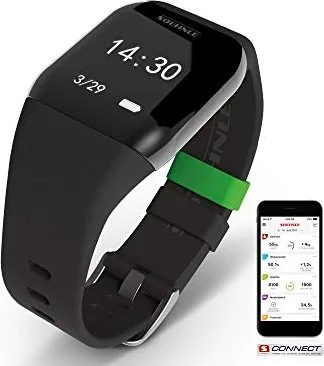
The Soehnle Fit Connect 300 HR Activity Tracker is designed for people who want an easy way to follow their daily movement, heart rate, and workout progress. In everyday use, it records steps, distance, calories burned, activity duration, and whether you have reached your movement goal. With built-in pulse tracking, it also adds a helpful layer for anyone who wants to monitor exercise intensity without dealing with overly complex settings.
Smart tracking made practical
One of the most appealing parts of the Soehnle Fit Connect 300 HR Activity Tracker is how it combines a compact display module with a removable wrist strap. The OLED screen shows time, date, battery status, pulse rate, daily activity, reminders, and training data. This makes the tracker feel more like a lightweight daily assistant than a complicated sports device.
The device works together with the Soehnle Connect app, where your data is transferred via Bluetooth and can be reviewed in a clearer, more detailed format. The app also supports Google Fit and Apple Health, which is useful if you like keeping your wellness data in one place. Setup is straightforward: charge the tracker, pair it with your phone or tablet, and begin customizing goals, alarms, and movement reminders.
Designed for everyday wellness
The tracker is meant for private household use, not medical diagnostics, which is an important distinction. It can automatically measure pulse when worn directly against the skin and offers a training mode with timer functions and heart-rate zone views. That makes it suitable for casual workouts, brisk walks, or anyone building more consistent movement habits.
The Soehnle Fit Connect 300 HR Activity Tracker Manual also highlights practical care tips, such as gentle cleaning, splash resistance rather than full waterproofing, and the need to recharge the battery every few months when unused. These details show that the product is built for convenience, but still needs thoughtful handling.
Why it stands out
With its simple interface, app connection, and useful activity summaries, this tracker fits users who want motivation without unnecessary complexity. It covers the essentials well and adds a few training-focused features that make daily fitness tracking feel more engaging.
Notes
- Splash-proof, not waterproof
- Not intended as a medical device
- Works best when worn directly on the skin
- Bluetooth sync makes review and storage easier
Search for 67,706 Manuals online


Type-in Brand or Model
Sebastian Hackett
7 months ago
How fast does the fitness tracker show SMS notifications, and does it also track workouts like deadlifts if it does not detect steps?
Manual.ly
7 months ago
SMS and other notifications are delivered over Bluetooth, so the delay depends on your phone. First, make sure the Soehnle Connect app is allowed to run in the background and that notifications are enabled for the app. Also check battery optimization (turn it off for the app) and keep Bluetooth connected. If delays persist, restart the watch/app, then re-pair the device and sync again in the Connect app. For tracking: this model mainly counts steps and may not record activities with little walking motion (for example, weightlifting). In the Connect app you can monitor your daily step progress and overall training history; non-step workouts may not be fully addable depending on your app version and available logging features.