
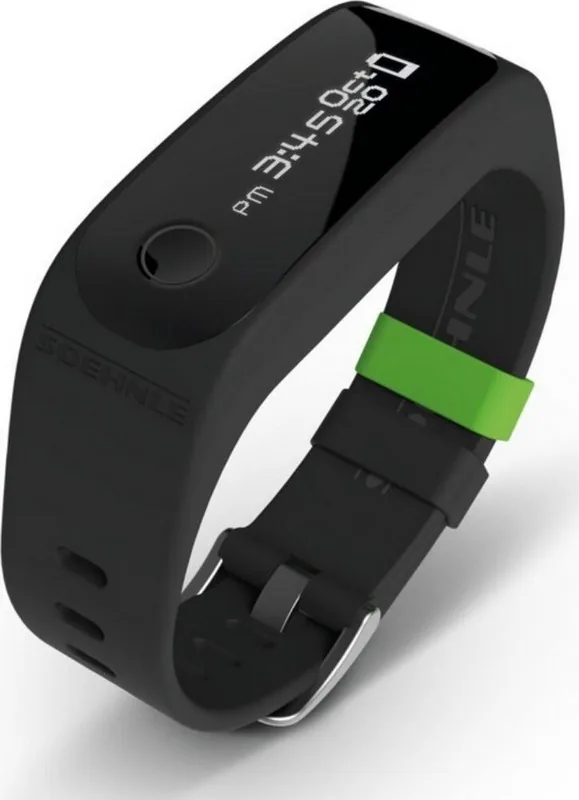
Soehnle Fit Connect 100 Manual
PDF manual · 47 Pages
English



Quick check
Incorrect answer, please try again.
Chat with your Soehnle Fit Connect 100 manual using AI
Get instant AI answers from your Soehnle Fit Connect 100 manual
Ask anything about the Soehnle Fit Connect 100. Answers come from this manual, with the pages they are based on.
Ask a Question
Do you recommend Fit Connect 100?
Yes NoFrequently Asked Questions
It tracks daily steps, distance covered, activity duration, calorie consumption, sleep duration, sleep phases, and progress toward a daily movement goal. It can also show time, date, battery status, alarms, and missed notifications.
Is this answer helpful?
The display module is removed from the wrist strap and plugged into a standard active USB port. Make sure the contacts are aligned properly, otherwise charging will not start. A full charge is recommended before first use.
Is this answer helpful?
Yes. The Soehnle Connect app is compatible with both Apple Health and Google Fit, allowing you to connect your activity data with other wellness platforms if you want a broader view of your health routine.
Is this answer helpful?
No. It is splash resistant, but not waterproof. That means it can handle light moisture, but it should not be held under water or worn for swimming or showering.
Is this answer helpful?
Switch to the sleep mode display by touching the sensor button, then press and hold the sensor button for about five seconds. The tracker will begin recording sleep-related movement and rest data.
Is this answer helpful?
Open the Soehnle Connect app and pull down on the main dashboard. The stored data on the tracker will be transferred automatically via Bluetooth, as long as Bluetooth is enabled on your phone or tablet.
Is this answer helpful?
Advantages and Disadvantages
Advantages

- Tracks steps, distance, calories, activity time, and daily goals in one compact device.
- Sleep mode adds useful insight into sleep duration and phases.
- Bluetooth syncing works with the Soehnle Connect app for easy analysis.
- Compatible with Google Fit and Apple Health for broader fitness tracking.
Disadvantages

- Splash resistant only, so it should not be used underwater.
- Battery and data storage are limited to about 14 days.
- Not a medical device, so it is not meant for health diagnosis.
- Needs the app and a smartphone or tablet for full functionality.
Product Specification
Display
monochrome, OLED, Touchscreen, rectangular
Operating system
proprietary
Interfaces
Bluetooth 4.0
Heart rate measurement
no
Measurement functions
Time, Pedometer, Distance, Sleep monitoring, Calorie consumption
Other functions
Date, Calendar, Alarm clock, Message notification (iOS, Android), Call notification (iOS, Android)
Navigation
no
Compatibility
from Android 4.4, from iOS 9.0
Power supply
Battery
Operating time
14 days (typical)
Case colors
black
Strap colors
black, green, silver
Length (Strap)
5.20-8.39 in
Special features
Vibration, water resistant
Product Description
Soehnle Fit Connect 100 Activity Tracker Manual: A Smart Everyday Fitness Companion
The Soehnle Fit Connect 100 Activity Tracker is designed for people who want a simple way to follow their daily movement and sleep habits without turning fitness tracking into a chore. Compact, lightweight, and easy to wear, it focuses on the essentials: steps, distance, activity time, calorie consumption, and progress toward a daily movement goal. For anyone comparing options and looking for guidance, the Soehnle Fit Connect 100 Activity Tracker Manual highlights a device that balances practical features with straightforward operation.
What makes this tracker appealing is its user-friendly approach. The removable display module charges through USB, and setup is handled through the Soehnle Connect app. Once paired via Bluetooth, the tracker automatically syncs time and date, while the app becomes the control center for goals, alarms, movement reminders, and display settings. It is also compatible with Google Fit and Apple Health, which makes it easier to keep wellness data in one place.
The OLED display shows key information at a glance, including time, battery status, and several tracking modes. A single sensor button lets you cycle through functions such as step count, calorie burn, distance, activity duration, missed calls, and sleep tracking. The sleep mode is especially useful for users who want a fuller picture of rest patterns, since it records sleep duration and phases as well as movement during the night.
From a design perspective, the Fit Connect 100 is practical rather than flashy. It is splash resistant, meant for everyday private use, and built with a lithium-polymer battery that should be charged regularly even during long storage periods. The tracker is not a medical device, but it can still serve as a motivating tool for healthier routines and better awareness of daily habits.
This model is best suited for users who want a reliable entry-level activity tracker with app support and essential wellness functions. It does not try to do everything, but it covers the basics well and keeps the experience clear and manageable.
Notes
- Not waterproof; avoid full immersion.
- Day-based stats reset automatically at midnight.
- Charge the battery every 3–6 months if unused for a long time.
- Keep the display clean with a soft, damp cloth only.
Search for 67,706 Manuals online


Type-in Brand or Model
Luna Silvestri
10 months ago
Does the smartwatch have reliable Bluetooth with iPhones? My first unit would not connect to my iPhone 7s for days. What can I do before requesting an exchange?
Manual.ly
10 months ago
Bluetooth should connect reliably, but occasional pairing issues can happen. Please try: (1) Restart both the watch and your iPhone, then place them close together. (2) In the iPhone Bluetooth settings, forget the watch and then re-pair using the app's pairing screen. (3) Make sure the watch firmware and your app are up to date. (4) Disable and re-enable Bluetooth on the iPhone, and remove any existing duplicate pairing. If it still fails to connect after these steps (especially over multiple days), contact support with your order details and we can help with troubleshooting and, if needed, arrange a replacement.