
snom C300 Manual
PDF manual · 36 Pages
English



Quick check
Incorrect answer, please try again.
Chat with your snom C300 manual using AI
Get instant AI answers from your snom C300 manual
Ask anything about the snom C300. Answers come from this manual, with the pages they are based on.
Ask a Question
Do you recommend C300?
Yes NoFrequently Asked Questions
The C300 supports Bluetooth 5.0 (pairing up to 8 devices, one active), USB-C connection to a PC, a USB-A port for charging external devices, NFC one-tap pairing, and a 3.5 mm headset jack for private calls.
Is this answer helpful?
The built-in lithium-ion battery provides around 24 hours of talk time and up to five days standby when connected via Bluetooth. Charging typically takes about 8 hours via the USB-C input; the power LED indicates charging status.
Is this answer helpful?
Yes, but only one Bluetooth device can be actively connected at a time. When you connect the C300 to a Windows PC via USB, the speakerphone becomes the PC’s audio device and may override Bluetooth media playback until disconnected.
Is this answer helpful?
For NFC, enable NFC on your phone and touch its NFC zone to the speakerphone’s NFC area; follow any PIN prompts (0000). For Bluetooth, press and hold the Bluetooth key to enter pairing mode, then select 'Snom C300' from your device’s Bluetooth list and enter PIN 0000 if prompted.
Is this answer helpful?
Pressing mute silences all six microphones; the circular LEDs turn red to indicate muted status. Press the mute key again to unmute. You can also mute the ringing tone by pressing the mute key while the speakerphone rings.
Is this answer helpful?
Use the Snom Connect app (available on iOS and Android) to change settings and apply firmware updates. The app includes online help and guides for device configuration and updating.
Is this answer helpful?
Follow manufacturer safety instructions: indoor use only, avoid high humidity and explosive environments, maintain body distance for RF exposure, and dispose of the device and batteries according to local electronic and battery recycling regulations (EU Directives 2012/19/EU and 2006/66/EC).
Is this answer helpful?
Advantages and Disadvantages
Advantages

- Six-microphone beamforming array for clear voice pickup and reduced background noise.
- Multiple connectivity options: Bluetooth 5.0, USB-C, USB-A, and NFC for easy pairing.
- Long battery life with ability to charge external devices via USB-A port.
- Compact, professional gray design suited for huddle rooms and remote work.
- Intuitive controls and LED indicators for power, battery, Bluetooth, volume, and mute.
Disadvantages

- Only one Bluetooth device can be actively connected at a time.
- USB audio priority may interrupt Bluetooth media when PC is connected.
- Charging an external device requires the C300 to be powered and sufficiently charged.
- No mention of advanced DSP features like echo cancellation presets in the basic guide.
- Replacement battery access not intended for end users (built-in Li-ion).
Product Specification
Interfaces
1x USB-A (Port), 1x USB-C (Port), 1x 3.5mm Jack (Port, Audio In/Out), Bluetooth 5.0 LE, NFC
Connection Range
32.81 ft
Microphone Range
5.91 ft
Number of Microphones
6 (integrated)
Frequency Range
100Hz-20kHz (Speaker)
Output Power
3W
Power Supply
Battery, USB-C (Port)
Standby Time
120h
Talk Time
24h
Color
grey
Dimensions
5.08x5.08x1.20in
Weight
0.77 lb
Product Description
snom C300 grau — Powerful Portable Conference Speakerphone
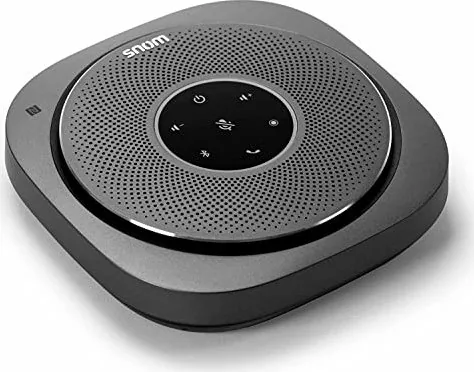
The snom C300 grau is a compact, professional-grade Bluetooth conference speakerphone designed for clear, reliable calls and mobile collaboration. Dressed in a subtle gray finish, the C300 blends a refined aesthetic with rugged functionality aimed at meetingrooms, huddle spaces, remote-work setups, and on-the-go conferencing needs. Its six-microphone array with beamforming captures voices from around the table while minimizing background noise, delivering intelligible, natural-sounding speech even in noisy environments.
Connectivity is a highlight: Bluetooth 5.0 provides fast pairing and stable wireless audio with phones and tablets, while USB Type-C and Type-A ports enable easy connection to Windows PCs and fast charging. NFC makes one-tap pairing with compatible phones effortless. When connected to a PC by USB, the C300 becomes the system’s external audio device, seamlessly switching between media and call audio depending on the active source.
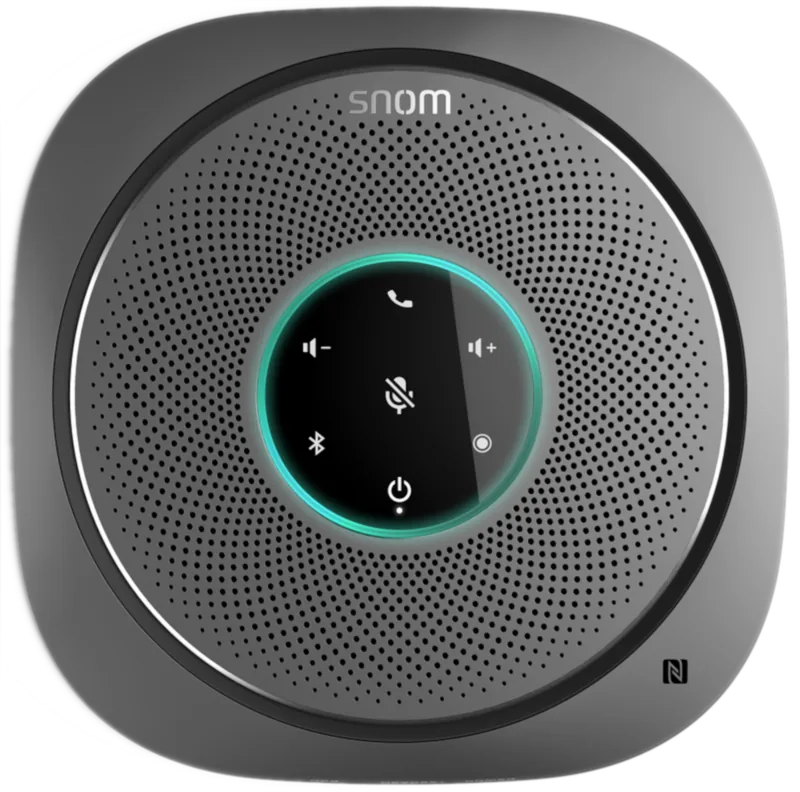
Battery life and portability are engineered for real-world use. The built-in lithium-ion battery supports long talk times and multi-day standby when paired via Bluetooth, and the device can charge external gadgets via its USB-A port while running. Eight circular LED indicators give immediate visual feedback for power, Bluetooth status, battery level, volume, and microphone activity, so users always know the device’s state at a glance.
Controls are straightforward: dedicated keys for power, Bluetooth, call handling, volume, mute, and a reset function sit around the device, enabling effortless call management. The mute key instantly silences all six microphones and signals the status with a red LED ring for privacy. A 3.5 mm headset jack allows private conversations and compatibility with wired headsets.
Beyond daily use, the snom C300 supports firmware updates and configuration via the Snom Connect app, ensuring the speakerphone stays current with new features and security improvements. Robust safety and compliance specifications, including FCC, CE, and SELV considerations, make the C300 suitable for professional deployment across regions.
Whether you need a reliable speakerphone for hybrid meetings, mobile conferencing, or shared desk environments, the snom C300 grau offers balanced audio performance, sensible features, and easy connectivity in a portable, gray chassis.
Notes
- Battery: built-in Li-ion (approx. 24 hours talk time, ~8 hours to fully charge).
- Audio: 3W RMS speaker, 6-microphone beamforming array, 100 Hz–20 kHz response.
- Ports: USB-C (input), USB-A (host/charging), 3.5 mm headset jack.
- Pairing: Bluetooth 5.0 (up to 8 stored devices, one active), NFC one-touch pairing.
- Compliance: FCC Part 15, CE, Industry Canada; follow disposal and safety instructions.
Search for 67,706 Manuals online


Type-in Brand or Model