
SMS Flipster Manual
PDF manual · 22 Pages
English



Quick check
Incorrect answer, please try again.
Chat with your SMS Flipster manual using AI
Get instant AI answers from your SMS Flipster manual
Ask anything about the SMS Flipster. Answers come from this manual, with the pages they are based on.
Ask a Question
Do you recommend Flipster?
Yes NoFrequently Asked Questions
The mount supports up to 30 kilograms, ensuring stability for the Samsung Flip display during use.
Is this answer helpful?
No, mounting fittings are not included due to varying wall types. You must select appropriate materials for your wall or ceiling based on expert advice.
Is this answer helpful?
You can manually flip the display between landscape and portrait positions using the bracket adjustment screws provided in the kit.
Is this answer helpful?
The five-year warranty covers defects from manufacturing or materials, provided the product is not damaged by external factors or misuse.
Is this answer helpful?
It is recommended to consult a specialist or shop for help selecting the correct mounting materials suitable for your specific wall construction.
Is this answer helpful?
Send the product and original receipt to SMS. You pay return shipping, while SMS covers the cost of sending the item back after repair.
Is this answer helpful?
Yes, provided you follow the instructions carefully and ensure your wall can support four times the combined weight of the equipment.
Is this answer helpful?
Advantages and Disadvantages
Advantages

- Supports up to 30kg weight capacity for stability.
- Allows seamless switching between landscape and portrait modes manually.
- Includes a comprehensive five-year warranty for manufacturing defects.
- Adjustable tilt angle helps reduce screen glare effectively.
- Detailed installation guide provided in multiple languages.
Disadvantages

- Mounting hardware and screws must be sourced separately by the user.
- Installation requires drilling which may damage walls if not handled carefully.
- Wall must support four times the total weight of screen and bracket.
- Requires professional assistance to choose correct wall material fittings.
- Warranty void if modified by non-authorized personnel.
Product Specification
Type
Wall Mount
Number of Monitors
1
Screen Size
up to 55"
Mobility
tiltable (-5 deg, 0 deg), rotatable (90 deg)
Distance from Wall
4.06 in
Max Load
66.14 lbs
VESA
200x200, 300x200, 300x300, 400x200, 400x300, 400x400
Color
white
Product Description
Introduction to the SMS Icon Flipster Wall System
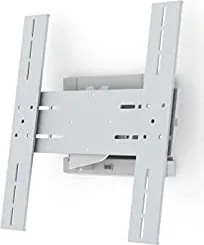
The SMS Icon Flipster Wall is designed specifically for the Samsung Flip, offering professionals a robust solution for dynamic presentation spaces. This versatile wall mount allows users to switch effortlessly between landscape and portrait orientations using the manual flipster mechanism. When you review the SMS Icon Flipster Wall Manual, you will find detailed steps to ensure a secure setup that accommodates screens up to thirty kilograms. The design prioritizes flexibility, enabling teams to adjust screen height and tilt for optimal viewing angles in various office environments. Safety remains a top priority during installation. The instructions emphasize selecting appropriate wall fixtures based on the specific construction of your wall or ceiling. Installers must verify that the wall can support at least four times the combined weight of the screen and bracket to prevent accidents. This precaution highlights the commitment to user safety found in every aspect of the product design.
Comprehensive Features and Warranty Coverage
The bracket system includes essential components like screw kits and plastic spacers to ensure stability. The manual flip feature eliminates the need for motorized mechanisms, reducing potential points of failure. Users can lock the screen in place once adjusted, maintaining a professional appearance throughout the workday. The included warranty covers manufacturing defects for five years, providing long-term peace of mind. This coverage applies to issues resulting from production or materials, barring normal wear and tear or external damages. It is crucial to follow the provided guidelines regarding mounting hardware, as fittings are not included. This ensures that the mounting solution suits the specific structural needs of the installation site. Consulting a specialist is recommended to determine the correct hardware for your specific wall type. Additionally, the product dimensions ensure you have clearance around the mount for easy access.
Installation Guidelines and Safety Precautions
For environments where screen presentation needs to shift frequently, such as boardrooms or conference areas, this mount provides a sturdy foundation. The tilt angle can be adjusted between zero and negative five degrees to reduce glare during presentations. The assembly process requires careful attention to screw tightening and bracket alignment. Detailed diagrams illustrate each step from drilling holes to securing the display panel. The product dimensions ensure compatibility with standard Samsung Flip units while allowing for necessary clearance. Proper cable management options are available through specific assembly configurations to hide wires and maintain a clean aesthetic. By adhering to the installation protocols, businesses can maximize the utility of their digital signage without compromising safety or functionality. The warranty process requires the original receipt and product return for claims within the five-year period. Owners pay return shipping to the service center while SMS covers the cost of sending the repaired item back. This support structure ensures that customers receive assistance whenever necessary without unnecessary financial burden beyond shipping costs.
Search for 67,732 Manuals online


Type-in Brand or Model