
SilverStone Hydrogon H90 ARGB Manual
PDF manual · 6 Pages
English



Quick check
Incorrect answer, please try again.
Chat with your SilverStone Hydrogon H90 ARGB manual using AI
Get instant AI answers from your SilverStone Hydrogon H90 ARGB manual
Ask anything about the SilverStone Hydrogon H90 ARGB. Answers come from this manual, with the pages they are based on.
Ask a Question
Do you recommend Hydrogon H90 ARGB?
Yes NoFrequently Asked Questions
The Hydrogon H90 ARGB supports a range of Intel and AMD sockets, including common Intel LGA115x, LGA1200, LGA1700 and multiple AMD mounting options. Check the included mounting kit and manual for exact socket compatibility and required screws or backplates.
Is this answer helpful?
Connect the ARGB cable to a motherboard or controller 5V ARGB header with matching pin orientation. Verify the +5V pin definition and direction against the cooler’s documentation before plugging in to avoid damaging the LED circuitry or controller.
Is this answer helpful?
The H90 ARGB is optimized for SFF and mid-range CPUs; it performs well for moderate gaming and productivity loads. Extremely high-TDP processors or heavy sustained workloads may benefit from larger air or liquid cooling solutions for lower peak temperatures.
Is this answer helpful?
SilverStone typically offers a limited one-year warranty in North America and Australia for this product. Warranty covers manufacturing defects under specified conditions; exclusions include misuse, natural disasters, unauthorized modification, and missing warranty labels. Check regional support for exact terms and RMA procedures.
Is this answer helpful?
Yes. The manual advises using the AMD backplate provided with your motherboard for AMD installations. Using the correct backplate ensures secure mounting and proper contact between the cooler base and CPU IHS.
Is this answer helpful?
The low-profile H90 ARGB is designed to minimize interference with RAM modules and PCIe slots, but clearance varies by motherboard and memory height. Confirm component clearances before installation, especially in compact cases.
Is this answer helpful?
Contact SilverStone support for your region or the place of purchase. Provide proof of purchase and follow the RMA instructions on SilverStone’s website. Shipping costs may be handled per regional warranty terms; an RMA number is typically required before sending the product.
Is this answer helpful?
Advantages and Disadvantages
Advantages

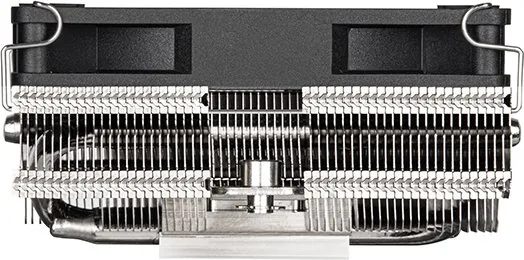
- Compact low-profile design ideal for small form factor builds and tight case clearances.
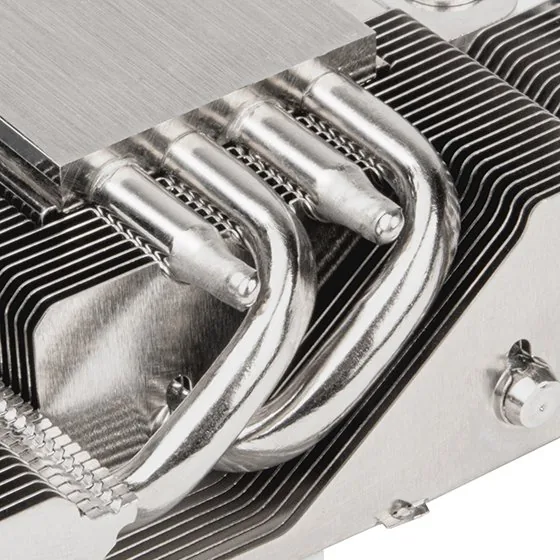
- Effective heat transfer with heat pipes and dense fin stack for solid mid-range cooling performance.
- Addressable RGB lighting supports synchronization with compatible +5V ARGB controllers and motherboards.
- Broad socket compatibility (various Intel and AMD mounts) increases platform flexibility.
- Installation hardware included and designed to avoid interference with RAM and PCIe slots.
Disadvantages

- Performance may be limited compared with larger tower coolers under heavy sustained loads.
- Requires careful attention to ARGB +5V pin orientation to prevent lighting/controller issues.
- One-year limited warranty in some regions may be shorter than competitors’ offerings.
- Compatibility depends on correct use of motherboard-supplied backplates for some AMD installs.
- Installation in very compact or unconventional cases may still be challenging despite small footprint.
Product Specification
Type
Top-blow cooler
Dimensions with fan
3.74x1.89x3.74in (WxHxD)
Dimensions without fan
3.74x1.30x3.74in (WxHxD)
Fan
1x 3.62x3.62x0.59in, 500-2600rpm, 77.7m³/h, 45.73 CFM, 1.3-34.6dB(A), 0.09inH2O
Weight with fan
0.67 lb
Connector
4-Pin PWM, 3-Pin ARGB (+5V/DATA/GND)
AMD Socket
AM5, AM4
Intel Socket
2011-0/2011-1/2011-3/2066, 1700, 1150/1151/1155/1156/1200
Lighting
RGB
Special features
4 Heatpipes (6mm)
Product Description
SilverStone Hydrogon H90 ARGB Manual Overview
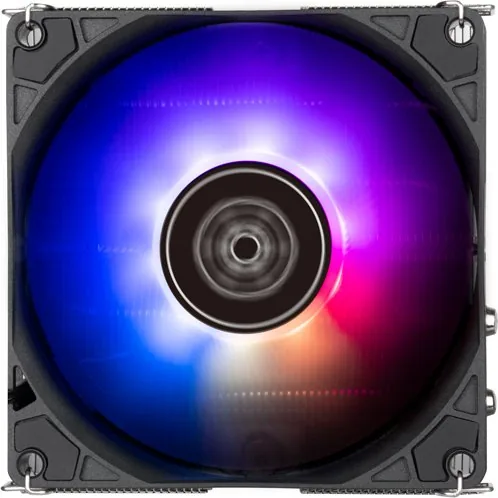
The SilverStone Hydrogon H90 ARGB is a compact, high-performance CPU cooler designed for small form factor (SFF) builds that need efficient cooling without sacrificing style. With a low-profile heatsink, a high-quality fan, and addressable RGB lighting, the H90 ARGB balances thermal performance and visual appeal. It supports a wide range of Intel and AMD sockets and includes mounting hardware to fit modern platforms, making it a flexible choice for mini-ITX and micro-ATX systems.
Design and Performance
Engineered for tight cases, the Hydrogon H90 ARGB features a dense fin stack paired with heat pipes that rapidly transfer heat away from the CPU. The included fan delivers strong airflow and static pressure suited to the fin geometry, keeping core temperatures under control during everyday use and moderate gaming or productivity workloads. The cooler’s compact footprint helps preserve RAM and PCIe clearance, an important advantage in cramped chassis.
ARGB Lighting and Compatibility
A defining feature is the integrated ARGB lighting that connects to a +5V ARGB header. SilverStone stresses verifying the motherboard or controller pinout before connecting to ensure correct +5V pin orientation. The cooler works with common motherboard lighting ecosystems when pin definitions match, letting users synchronize lighting effects with other components.
Installation and Mounting
The H90 ARGB ships with mounting brackets and screws for multiple Intel and AMD sockets. The manual emphasizes using the AMD backplate supplied with the motherboard for AMD installations and following the correct screw and standoff sequence for Intel variants (including LGA115x, LGA1200, LGA1700, and other supported platforms). Proper connector alignment for the ARGB and CPU_FAN headers is highlighted to avoid damage.
Warranty and Support
SilverStone provides region-specific warranty terms—typically a one-year limited warranty in North America and Australia—with details and RMA procedures available from regional support contacts. Warranty coverage focuses on manufacturing defects and excludes damage from misuse, natural disasters, or unauthorized modifications. Customers are advised to retain proof of purchase and contact SilverStone or authorized resellers for service.
Notes
- Confirm ARGB +5V pin orientation before connecting.
- Use the motherboard-supplied AMD backplate for AMD CPU installs.
- Keep purchase receipts for warranty claims.
Search for 67,706 Manuals online


Type-in Brand or Model