
SilverStone EC04-P Manual
PDF manual · 9 Pages
English



Quick check
Incorrect answer, please try again.
Chat with your SilverStone EC04-P manual using AI
Get instant AI answers from your SilverStone EC04-P manual
Ask anything about the SilverStone EC04-P. Answers come from this manual, with the pages they are based on.
Ask a Question
Do you recommend EC04-P?
Yes NoFrequently Asked Questions
It supports USB 3.0 at a maximum transfer speed of 5Gbit/s while maintaining compatibility with USB 2.0 and 1.1 standards for older devices without speed loss.
Is this answer helpful?
The card adds four total USB ports, consisting of two external USB-A 3.0 ports and one internal dual port connector for additional usage flexibility.
Is this answer helpful?
Yes, it requires one peripheral 4pin power connector from the system power supply to ensure stable operation under load for all connected devices.
Is this answer helpful?
Compatibility includes Windows XP, Vista, and 7 on both 32-bit and 64-bit architectures as stated in the official specifications provided.
Is this answer helpful?
Installation is straightforward involving placing the card in a PCIe slot and connecting cables, though driver software must also be installed for operation.
Is this answer helpful?
Yes, the card supports simultaneous operation of multiple USB 3.0, 2.0, and 1.1 devices without performance bottlenecks affecting speed.
Is this answer helpful?
It uses a low profile single lane X1 PCI Express form factor suitable for compact or small form factor computer cases specifically designed for space efficiency.
Is this answer helpful?
Advantages and Disadvantages
Advantages

- Provides four total USB 3.0 ports using two external and one internal dual port connector for maximum flexibility.
- Utilizes NEC uPD72020 controller for reliable 5Gbit/s transfer speeds with compatibility for USB 2.0 and 1.1.
- Low profile single lane PCI Express 2.0 form factor fits small form factor cases effectively.
- Supports simultaneous operation of multiple USB devices without system bottlenecks or performance issues.
- Includes built-in power connector receiving extra power from system power supply for stability.
Disadvantages

- Requires a spare 4pin Molex power connector for additional system power to operate correctly.
- Driver installation for the Renesas Electronics controller is mandatory for full hardware functionality.
- Limited to single lane PCIe x1 which may impact performance on very busy PCIe buses.
- Low profile only version restricts use in standard full-height cases without adapters.
- Operating system support stops at Windows 7 which is quite dated for modern hardware needs.
Product Specification
External
2x USB-A 3.0
Internal
1x USB 3.0 Header (5 Gb/s, 2x USB 3.0)
Interface
PCIe 2.0 x1
Chipset
NEC Renesas UPD720201
Features
low profile PCB
USB Notation
Link
Product Description
Enhancing System Connectivity with SilverStone EC04-P
Modern computing requires fast data transfer speeds and ample connectivity options to handle diverse peripherals efficiently. The SilverStone EC04-P addresses these needs by providing a robust expansion solution for desktop systems. This card installs into a standard single-lane PCI Express 2.0 x1 slot, making it suitable for a wide variety of motherboards. It focuses on delivering high-performance USB 3.0 capabilities to users who need more ports than the rear I/O panel provides. This card is a great add-on for systems that require connections to multiple USB 3.0 devices. It offers maximum compatibility and flexibility for expanding your computer interface to meet daily tasks.
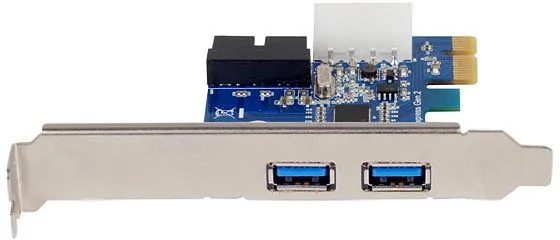
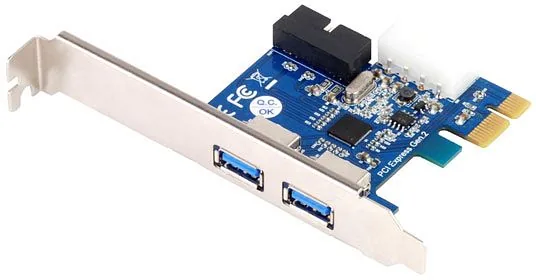
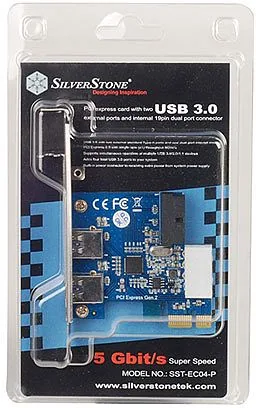
The product features two external USB-A 3.0 ports and one internal dual port connector. This configuration allows for significant flexibility in system organization. You can easily connect external hard drives, keyboards, and mice while utilizing internal headers for front panel connectivity. The internal connector uses a dual port design, effectively adding four total USB 3.0 ports to your computer. This setup is ideal for video editors, gamers, or anyone managing large files requiring quick movement. It supports simultaneous operation of multiple USB 3.0, 2.0, and 1.1 devices without bottlenecks. Many users appreciate the ability to connect SilverStone USB 3.0 enclosures like the RVS02 and TS07 directly for storage expansion. Power requirements are met via a 15Vdc peripheral 4pin power connector which supports the board well.
Performance is driven by the NEC uPD72020 USB 3.0 controller. This chipset supports transfer speeds reaching a maximum of 5Gbit/s. The interface is backwards compatible with USB 2.0 which utilizes 480Mbit/s and USB 1.1 for legacy equipment protection. The card also includes a built-in 4pin peripheral power connector receiving extra power from the system power supply. This ensures stable operation even when drawing significant current without overloading the bus. Installation is straightforward and involves placing the card in the PCIe slot and connecting the necessary cables. Users must install the Renesas Electronics USB 3.0 host controller driver for full functionality. Compatibility includes Windows XP, Vista, and 7 on both 32-bit and 64-bit systems. This expansion card is an excellent choice for system builders looking to enhance legacy hardware or modernize compact builds. The low profile form factor accommodates small form factor cases where space is limited. With reliable connectivity and proven hardware, the EC04-P remains a valuable component for expanding digital workflow efficiency on your workstation. Enjoy the super speed transfer speed once devices are plugged in. This ensures your system remains efficient and fast for all connected data storage and input needs. Ensure you check the device manager after driver installation to confirm the controller is active and ready for use.
Search for 67,706 Manuals online


Type-in Brand or Model
Kevin Miller
6 months ago
Can this USB 3.0 card be installed easily on older motherboards and does it support high transfer speeds?
Manual.ly
6 months ago
Yes, the card works well with older motherboards lacking onboard USB 3.0 headers. Installation is simple and does not block adjacent expansion slots. Users report transfer speeds up to 100MB/s with external hard drives. Drivers are available on the manufacturer support site or from the included CD. Please ensure your case USB 3.0 cables have the required 4-pin Molex power connector.