
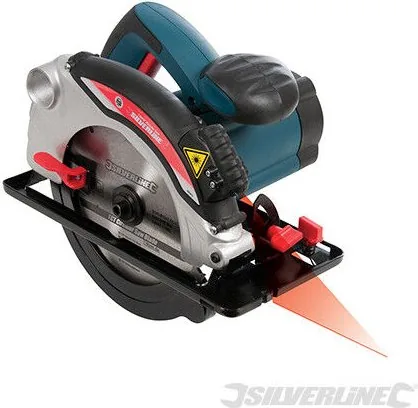
Silverline Tools Silverstorm 1400W 285873 Manual
PDF manual · 52 Pages
English



Quick check
Incorrect answer, please try again.
Chat with your Silverline Tools Silverstorm 1400W 285873 manual using AI
Get instant AI answers from your Silverline Tools Silverstorm 1400W 285873 manual
Ask anything about the Silverline Tools Silverstorm 1400W 285873. Answers come from this manual, with the pages they are based on.
Silverstorm 1400W 285873 Maintenance Schedule
Verify the lower guard moves freely and closes instantly. Do not operate if it does not close properly.
Check the power cord for damage or wear before every use. Repairs must be done by an authorized service center.
Regularly check that all fixing screws, nuts and bolts are tight as they may vibrate loose over time.
Keep the tool clean to prevent internal wear. Use a soft brush or dry cloth; never use caustic agents or water.
Replace both carbon brushes simultaneously if excessively worn, causing loss of power or sparking.
Ask a Question
Do you recommend Silverstorm 1400W 285873?
Yes NoFrequently Asked Questions
The product comes with a 3-year guarantee from the date of purchase. You must register the product online within 30 days of purchase to qualify. Keep your sales receipt for any warranty claims related to material or workmanship defects.
Is this answer helpful?
No, the laser guide uses 2 x AAA batteries. If the laser does not operate, the batteries may need replacing. Ensure they are inserted correctly and the laser switch is on before use.
Is this answer helpful?
This saw is designed for hard and soft woods and natural composites. Use an additional compatible blade if you need to cut other materials. Do not use metal cutting discs as this voids the warranty.
Is this answer helpful?
Always wear eye protection and hearing protection due to sound exceeding 85dB. Safety shoes and dust masks are also recommended. Avoid loose clothing and ensure hair is tied back to prevent entanglement with moving parts.
Is this answer helpful?
Loosen the depth locking knob to adjust the base plate. Set the depth so only a small portion of the blade teeth extends below the workpiece. Retighten the knob securely before cutting to prevent shift during operation.
Is this answer helpful?
Yes, but it must match the blade thickness. Adjust it so the blade body is thinner than the riving knife and the kerf is wider. Ensure it is centralised behind the saw blade for optimal kickback prevention.
Is this answer helpful?
The maximum cutting depth at 0 degrees is 63mm. At 45 degrees, the maximum depth reduces to 40mm. Ensure the cut does not exceed these dimensions to prevent motor strain or unsafe operation.
Is this answer helpful?
Advantages and Disadvantages
Advantages

- Powerful 1400W motor for consistent hard and soft wood cutting
- Integrated laser guide ensures accurate straight cuts every time
- Riving knife prevents kickback hazards during operation
- 3-year warranty offers long-term protection for owners
- Bevel range up to 45 degrees provides versatile cutting angles
Disadvantages

- Sound pressure levels reach 98dB requiring hearing protection
- Weighted vibration levels may cause discomfort during long use
- 2 meter power cable may limit reach in large workspaces
- Dust extraction requires a separate vacuum or collection system
- Heavy build requires careful handling for overhead tasks
Product Specification
Type
Circular saw
Power
1400W
No-load speed
4500 RPM
Blade diameter
7.28 inches
Cutting capacity
2.56 inches (Cutting depth at 0 deg), 1.77 inches (Cutting depth at 45 deg bevel)
Arbor size
0.79 inches
Features
Softgrip, Auxiliary handle, Parallel guide, Dust extraction, Laser line
Weight
9.52 lbs
Product Description
Discover Precision with the Silverline 1400W Electric Hand Circular Saw
When tackling woodworking projects, having the right tool makes all the difference. The Silverline 1400W Electric Hand Circular Saw Manual provides essential guidance for users seeking power and accuracy. This robust saw features a 1400W motor that delivers consistent performance for both hard and soft wood cutting. With a maximum cutting depth of 63mm at 0 degrees, it handles substantial material with ease. The integrated laser guide ensures straight cuts every time, reducing waste and improving efficiency on your job site. It also features a 185mm blade size which is standard for many heavy duty applications.
Safety remains a top priority with this circular saw model. The user guide outlines critical safety steps including wearing eye protection, ear protection, and avoiding damp environments due to electrical risks. The double insulated construction adds an extra layer of protection against electric shock. A riving knife is included to prevent kickback, a common hazard when cutting wood. Users must adjust the blade depth so only a small portion of the teeth extends below the workpiece to maintain control during operation. The lower guard functions automatically to cover the blade when not in use, minimizing accidental contact risks. Users should check the lower guard for proper closing before each use to ensure functionality.
Maintenance is straightforward with regular care. Users should inspect cords for damage before each use and keep the unit clean from dust accumulation. Dust extraction ports allow connection to collectors, keeping the workspace tidy. If carbon brushes wear out, they can be replaced to restore motor power. The 3-year guarantee offers peace of mind, provided the product is registered online within thirty days of purchase. Remember to keep your sales receipt for any warranty claims related to material or workmanship defects. Cleaning should be done with a soft brush to prevent damage to plastic parts.
Operating this saw requires attention to detail. Always ensure the switch is off before plugging in the power cable. Secure your workpiece with clamps to prevent movement during cutting. Stand at an angle to the tool rather than directly behind it to avoid injury if kickback occurs. The bevel range allows cuts between 0 and 45 degrees, offering versatility for various joinery tasks. By following the instructions found in the Silverline 1400W Electric Hand Circular Saw Manual, operators can achieve professional results safely and efficiently. Store the tool in a dry place out of reach of children when not in use.
Notes
- Always wear hearing protection as sound levels may exceed 85dB.
- Do not use the saw in wet conditions to avoid electrical shock hazards.
- Register your tool promptly to activate the warranty period.
- Check for blade tension regularly to maintain safety standards during cuts.
- Ensure laser batteries are replaced if the beam becomes dim.
Search for 67,732 Manuals online


Type-in Brand or Model