
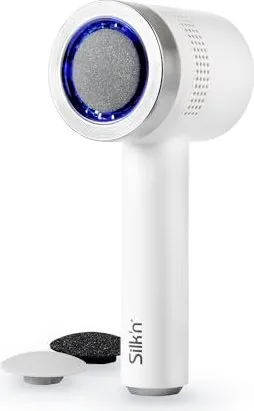


Silk'n VacuPedi Manual
PDF manual · 220 Pages
English



Quick check
Incorrect answer, please try again.
Chat with your Silk'n VacuPedi manual using AI
Get instant AI answers from your Silk'n VacuPedi manual
Ask anything about the Silk'n VacuPedi. Answers come from this manual, with the pages they are based on.
VacuPedi Maintenance Schedule
Remove grinding disc and filter. Wipe main body with damp cloth, brush dust from chamber/discs, wash filter/ring/cover under running water, and dry thoroughly.
Inspect the grinding disc during cleaning. Replace it if it is worn out to ensure effective treatment.
Check the filter during cleaning. Replace it if it contains too much dust or cannot be cleaned effectively.
Ask a Question
Do you recommend VacuPedi?
Yes NoFrequently Asked Questions
No, the device is strictly for dry skin treatment. Using it on wet feet or near water poses a risk of electric shock and may damage the product.
Is this answer helpful?
A full charge takes approximately 2.5 hours. The LED lights will blink slowly while charging and turn solid blue when complete.
Is this answer helpful?
Stop using the product immediately. Do not treat the same spot for more than 2-3 seconds continuously. Consult a doctor if irritation persists.
Is this answer helpful?
Yes, you can purchase new grinding discs and filters directly from the official website www.silkn.eu when they become worn out.
Is this answer helpful?
Children aged 8 and above may use it under supervision, but children under 8 must stay away from the device and its packaging.
Is this answer helpful?
Replace the filter if it becomes too dusty or clogged to ensure proper suction and hygiene during your treatments.
Is this answer helpful?
Advantages and Disadvantages
Advantages

- Vacuum system collects dust for a cleaner experience
- Three interchangeable discs for different skin types
- Two-speed settings for customized pressure
- Long battery life of nearly two hours per charge
- Easy to clean with washable parts
Disadvantages

- Cannot be used while charging
- Not waterproof; keep away from water sources
- Requires dry skin only; no additives allowed
- Battery removal requires dismantling and damages cover
- Limited to foot use only
Product Specification
Operating Mode
Battery Powered
Speed Settings
2
Features
Charging Indicator Light
Attachments
Grinding Disc
Package Contents
Protective Cap, 3x Attachments, 3x Filters, Cleaning Brush
Product Description
Silk'n VacuPedi Electric Callus Remover - Read, Download & Print Free
Achieve silky smooth feet at home with the Silk'n VacuPedi Electric Callus Remover. This innovative device is designed specifically to gently and effectively remove calluses from dry skin without the need for harsh chemicals or painful soaking. The VacuPedi utilizes a unique vacuum system that simultaneously grinds away rough skin and sucks up the dust, keeping your bathroom clean and your skin healthy.
The product comes with three interchangeable grinding discs: Fine, Medium, and Coarse. This allows you to customize your treatment based on the thickness of your calluses. For particularly rough areas, start with the coarse disc, then switch to finer settings for sensitive zones. The device features two speed settings, indicated by blue LED lights, giving you full control over the intensity of the treatment. A simple press of the control button turns the unit on, off, or adjusts the speed.
Hygiene and safety are paramount in the design of the VacuPedi. The unit is intended for private use only and should never be used on wet skin, open wounds, or other body parts. It includes a removable filter and dust chamber that can be easily cleaned under running water after each use. Before starting any new treatment, it is recommended to perform a quick skin sensitivity test on a small area of your foot. The rechargeable battery offers approximately one hour and fifty minutes of continuous use after a full charge, which takes about two and a half hours via the included USB cable and wall adapter.
Proper storage ensures the longevity of your device. Always ensure all parts are completely dry before reassembling and storing the unit in a cool, dry place away from direct sunlight. The cover protects the grinding disc during storage. With its ergonomic design and efficient suction technology, the Silk'n VacuPedi makes professional-grade pedicures accessible from the comfort of your own home.
Important Notes
- Do not use oils or lotions before treatment; the skin must be completely dry.
- Limit treatment on any single spot to 2-3 seconds to prevent irritation.
- Keep children under eight years old away from the device.
- Replace filters and discs when worn out for optimal performance.
Search for 67,706 Manuals online


Type-in Brand or Model