
Silk'n ToothWave Manual
PDF manual · 166 Pages
English



Quick check
Incorrect answer, please try again.
Chat with your Silk'n ToothWave manual using AI
Get instant AI answers from your Silk'n ToothWave manual
Ask anything about the Silk'n ToothWave. Answers come from this manual, with the pages they are based on.
ToothWave Maintenance Schedule
Remove the brush head monthly to clean the handle groove and brush base with a cotton bud to remove debris.
Replace the brush head every 3 months or whenever bristles are damaged or worn.
Free maintenance reminders
Timed to your purchase date. Always free, unsubscribe anytime.
Ask a Question
Do you recommend ToothWave?
Yes NoFrequently Asked Questions
Silk'n ToothWave is a home-use toothbrush that combines vibration and DentalRF technology to reduce tooth discoloration, stains, plaque and tartar over time, helping to prevent gingivitis and tooth decay when used as directed.
Is this answer helpful?
Use the device for two minutes twice daily (morning and evening). Brush four mouth sections for 30 seconds each, cleaning between teeth and gently massaging gums; the device vibrates every 30 seconds to cue section changes.
Is this answer helpful?
Do not use if under 18 or if you have an active implanted electronic device (e.g., pacemaker), certain cancer histories, or severe immune suppression. Consult your physician if you have cardiac, neurological or uncontrolled endocrine conditions, or if pregnant or nursing.
Is this answer helpful?
Rinse bristles under lukewarm water after each use. Remove the brush head monthly to clean the handle groove and brush base with a cotton bud. Clean the charging cradle with a damp cloth after unplugging; do not use a dishwasher.
Is this answer helpful?
Replace the brush head every three months or sooner if bristles, silicone strip, or electrodes appear damaged, loose, bent or worn to ensure safe and effective DentalRF contact.
Is this answer helpful?
Check battery charge first. Press the control button to restart the device. If LEDs blink indicating a system error or restart doesn’t fix it, contact Silk'n customer service for assistance and do not attempt to open or repair the device.
Is this answer helpful?
Do not throw the device or battery in household waste. The Li‑ion battery must be removed before disposal; recycle the device and battery at designated collection points per WEEE/local regulations. Note battery removal requires opening the casing and voids warranty.
Is this answer helpful?
Advantages and Disadvantages
Advantages

- Combines DentalRF technology with vibration for enhanced stain, plaque and tartar reduction.
- Multiple vibration modes plus a no-vibration option to suit sensitivity levels.
- IP67-rated for short immersion and timed 2-minute treatment with 30s section cues.
- Comprehensive safety and usage guidance with replaceable brush heads and simple maintenance.
- Rechargeable Li‑ion battery with USB charging and compact charging cradle included.
Disadvantages

- Not suitable for people with pacemakers, implants, certain cancers, or immunosuppression.
- Battery is non-user-replaceable; end-of-life battery removal requires opening casing and voids warranty.
- Initial first charge may require extended charging time (noted 24 hours).
- Brush head contains electrodes and silicone strip—damage can cause hazards or breakage during use.
- Device repair is prohibited; opening voids warranty and risks exposure to electrical components.
Product Specification
Type
Sonic toothbrush
Operating mode
Battery operated
Brush head
elongated
Cleaning programs
3
Timer
4x 30 seconds
Special features
Charging indicator light
Operating time
56min (14 days)
Scope of delivery
Charging station, 2x brush heads
Product Description
Silk'n ToothWave — Quick Guide and Manual Overview
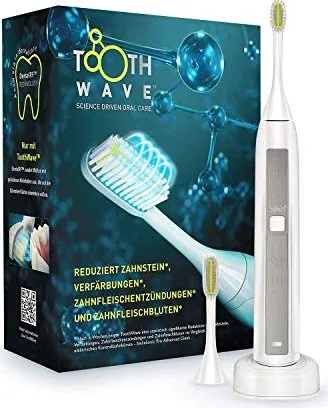
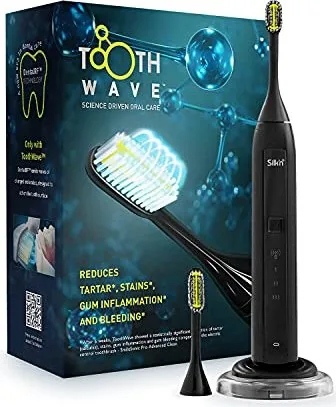
Silk'n ToothWave is a rechargeable home-use electric toothbrush that pairs sonic vibration with proprietary DentalRF™ technology to target stains, plaque and tartar. Designed for daily morning and evening use, the unit combines a soft-bristled brush head containing two DentalRF electrodes and a silicone strip that helps transmit the RF current across tooth surfaces while interacting with toothpaste to improve cleaning effects. The device offers multiple vibration levels (low ~274Hz, medium ~300Hz, high ~400Hz) plus a mode without vibration; DentalRF is active in all modes.
The package typically includes two brush heads (small and large), a handle, a charging cradle with USB adapter and cable, a transparent base, and warranty documentation. The brush head must remain undamaged and maintain good bristle contact with teeth to ensure safe DentalRF transfer; replace brush heads every three months or when worn.
Safety features include IP67-rated resistance for short immersion, LED indicators for DentalRF, vibration mode and battery status, and timed 2-minute treatments with 30-second section vibrations to guide quadrant brushing. A full treatment plan recommends brushing four sections for 30 seconds each, twice daily. The device is suitable for use with dental implants but carries standard contraindications: not for users under 18, those with active implanted electronic medical devices (e.g., pacemakers/defibrillators), certain cancer histories, immunosuppression, or uncontrolled systemic conditions — consult a physician or dentist when indicated (pregnancy, recent oral surgery, severe gum injury, heart/neurological conditions, etc.).
Charging and maintenance: first charge can require long charging time (manual notes 24 hrs for first charge), battery LED shows charge state; only use the supplied USB adapter. Clean brush head and handle after each use with lukewarm water; monthly removal of brush head to clean the handle groove is recommended. Charging cradle components can be disassembled for cleaning; do not use dishwasher. Troubleshooting covers common issues (device not starting, system errors indicated by blinking LEDs) and advises contacting Silk'n customer service if restart fails.
At end of life the device and Li‑ion battery must be recycled per local regulations. Battery removal requires opening the casing (voids warranty and will render device unusable) — the manual includes stepwise removal instructions for disposal. Technical specs list model H7001, DentalRF + vibration tech, RF 3.3 MHz at ~3W, vibration 275–400Hz, system weight ~115 g, and listed adapter/input/output ratings.
Notes
- Use only the supplied USB wall adapter for charging.
- Replace brush heads every 3 months or when bristles show wear.
- Stop use and consult a dentist if pain, persistent bleeding, or other adverse effects occur.
- Do not open or attempt to repair the device (risk of harm and voids warranty).
Search for 67,706 Manuals online


Type-in Brand or Model