
Silk'n Silkylocks HD1PEU001 Manual
PDF manual · 114 Pages
English



Quick check
Incorrect answer, please try again.
Chat with your Silk'n Silkylocks HD1PEU001 manual using AI
Get instant AI answers from your Silk'n Silkylocks HD1PEU001 manual
Ask anything about the Silk'n Silkylocks HD1PEU001. Answers come from this manual, with the pages they are based on.
Silkylocks HD1PEU001 Maintenance Schedule
Wipe the housing and attachments with a damp cloth after unplugging and cooling. Allow them to dry completely before storage.
Open the removable filter and scrub away hairs and dust on both internal and external sides using a toothbrush. Replace the filter.
Ask a Question
Do you recommend Silkylocks HD1PEU001?
Yes No
molestiae_qui
5 months ago
Is the build quality truly premium compared to other hair dryers in this price range?
Frequently Asked Questions
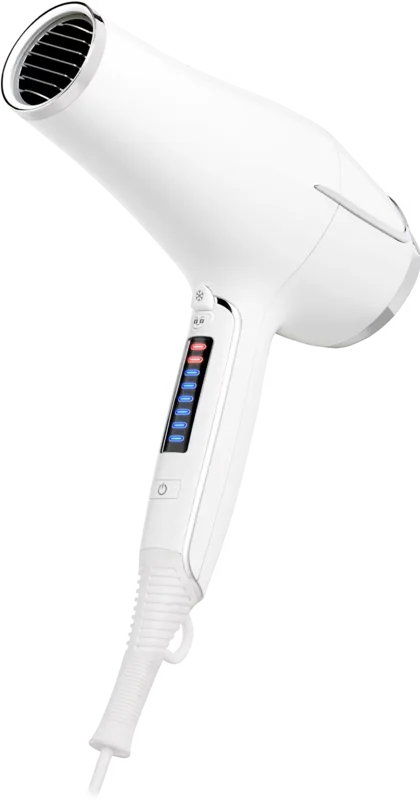
Press the power button to turn on the dryer. Slide your finger up on the Smart Touch Display to increase heat and speed, or slide down to decrease them. You can choose from six fan settings and eight heat levels.
Is this answer helpful?
If the dryer overheats, the Active Overheating Protection will shut it off automatically. Unplug the unit, let it cool down for a few minutes, and ensure the air inlet is not blocked by hair or debris before turning it back on.
Is this answer helpful?
No, do not use the hair dryer near bathtubs, showers, or washbasins. Water poses a serious electric shock risk. If used in a bathroom, always unplug the device after use.
Is this answer helpful?
You should check and clean the removable inlet filter regularly to prevent blockage. Open the filter and use a toothbrush to scrub away any accumulated hair or dust from both sides.
Is this answer helpful?
Yes, this product is covered by a two-year warranty according to European regulations. The warranty covers technical defects caused by faulty production processes. Contact customer service for claims.
Is this answer helpful?
Snap the concentrator or diffuser onto the front of the hair dryer until it clicks into place. To remove them, wait until they have cooled down completely and then pull them off gently.
Is this answer helpful?
Advantages and Disadvantages
Advantages

- Ionic technology reduces drying time and eliminates frizz effectively
- Smart Touch Display offers precise control over six fan and eight heat settings
- Active Overheating Protection ensures safety and extends device lifespan
- Includes both concentrator and diffuser for versatile styling options
- Removable filter makes maintenance simple and quick
Disadvantages

- Not suitable for commercial or professional salon use
- Must be unplugged immediately after use if used in a bathroom
- Cannot be used with extension cords or external timers
- Requires complete cooling before storing or cleaning accessories
- Plastic parts may crack if exposed to extreme heat or impact
Product Specification
Operation Mode
Mains operation (2.2kW)
Color
white
Display
yes
Temperature Settings
8
Cool Setting
yes
Speed Settings
6
Attachments
1x Styling nozzle, 1x Diffuser
Features
Ionization, Hanging loop, Overheat protection
Cable Length
5.9ft
Package Contents
2x Attachment
Product Description
Discover the Silk'n Silkylocks HD1PEU001 Hair Dryer
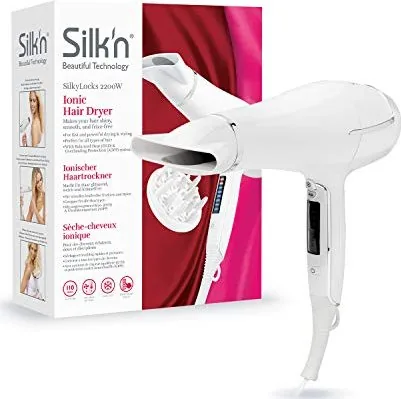
Achieve salon-quality results at home with the Silk'n Silkylocks HD1PEU001, a powerful 2200W Ionic Hair Dryer designed for smooth, shiny, and healthy-looking hair. This advanced device combines cutting-edge technology with user-friendly features to ensure efficient drying while protecting your locks from heat damage.
The core of this dryer lies in its innovative Ionic Technology, which releases a stream of negative ions to significantly reduce drying time and eliminate frizz. Coupled with Equilibrium Heat Distribution (EHD) technology, the dryer balances heat output to prevent burning, allowing you to style faster without compromising hair health. For added safety, the Active Overheating Protection (AOPP) system automatically shuts down the unit if it gets too hot, restarting only after cooling down for about fifteen minutes.
User experience is prioritized through a sleek Smart Touch Display that offers six fan speeds and eight heat settings. Simply slide your finger up or down on the screen to adjust airflow and temperature to your preference. Once set, the Lock Button prevents accidental changes during styling. The included Cool Shot button allows you to blast cold air for long-lasting hold, perfect for setting your final look.
Versatility is key with the included accessories. The Concentrator nozzle directs airflow precisely for straightening or smoothing sections with a brush, while the Diffuser provides a gentle breeze to enhance natural curls and waves or add volume at the roots. Cleaning is straightforward; the removable inlet filter can be easily scrubbed with a toothbrush to remove dust and hair, ensuring optimal performance. Always remember to unplug the device before cleaning and allow it to cool completely.
Built with safety in mind, this Class II double-insulated appliance includes warnings against use near water sources like bathtubs and advises against using extension cords. It is strictly for private use on human head hair. The package includes the main unit, a hanging loop for convenient storage, and all necessary attachments. With a weight of just 569 grams and dimensions of 214 x 87 x 286 mm, it is lightweight and easy to handle. Backed by a two-year warranty, the Silk'n Silkylocks HD1PEU001 is a reliable choice for anyone seeking professional-grade hair care tools.
Important Notes
- Always check the voltage rating before plugging into the mains.
- Do not block the air inlet or outlet during operation.
- Keep children under eight years away from the device and packaging.
- Dispose of the product according to local electronic waste regulations.
Search for 67,706 Manuals online


Type-in Brand or Model
Mary Butler
5 months ago
Does the touch control panel work reliably, and is there a way to lock it or remember settings?
Manual.ly
5 months ago
The touch controls are highly sensitive and respond to light touches. To prevent accidental changes, the device features a hold button that locks the settings. Additionally, the memory function retains your preferred strength and fan speed settings even after turning the unit off and on again.