
Siedle BTSV 850-03 Manual
PDF manual · 16 Pages
English



Quick check
Incorrect answer, please try again.
Chat with your Siedle BTSV 850-03 manual using AI
Get instant AI answers from your Siedle BTSV 850-03 manual
Ask anything about the Siedle BTSV 850-03. Answers come from this manual, with the pages they are based on.
Ask a Question
Do you recommend BTSV 850-03?
Yes NoFrequently Asked Questions
When a visitor rings, press the talk/speech button within 45 seconds of the last ringtone to accept the call. The mute button will flash when a call arrives.
Is this answer helpful?
Press the door release button and the door that placed the last call will open for three seconds. This function relies on correct wiring and installer setup.
Is this answer helpful?
Press the monitor button to display the camera image from the door station that rang last. This works only when no call is currently active.
Is this answer helpful?
Use the mute button to cycle volume through five levels (short press) and store a level by holding the mute button for three seconds. Pressing mute also cycles ringtone melodies; hold three seconds to save the selected melody.
Is this answer helpful?
Yes. The light, monitor and mute buttons can be reassigned to different functions by your electrical installer. Contact a qualified installer for programming options.
Is this answer helpful?
Clean only with a soft cloth dampened with mild soapy water. Avoid dry cleaning, aggressive or abrasive cleaners. Refer to the manufacturer’s site for detailed care instructions.
Is this answer helpful?
Installation, wiring for lighting and any service replacement should be carried out by a certified electrical installer to comply with warranty and safety requirements.
Is this answer helpful?
Advantages and Disadvantages
Advantages

- Clear audio and color video monitoring for the last-called door station
- Five-step ringtone volume and eleven selectable melodies with save function
- Dedicated door release and light controls for quick access and illumination
- Simple monitor, mute and brightness/color adjustments via physical controls
- Programmable button assignments allow installer customization
Disadvantages

- Monitor view only available when no call is active
- Advanced wiring and programming require a professional electrician
- Limited to camera(s) of the door station that called last (no multi-view)
- Basic UI lacks advanced network or app integration features
- No wet-cleaning or aggressive cleaners allowed; delicate surface care needed
Product Specification
Display
3.5" Color LCD
Image Sensor
N/A
Detection Range
N/A
Users
1
Package Contents
1x Indoor Station
Dimensions
10.94x4.17x1.81in
Product Description
Siedle Door Intercom BTSV 850-03 — Reliable Home Entry Communication
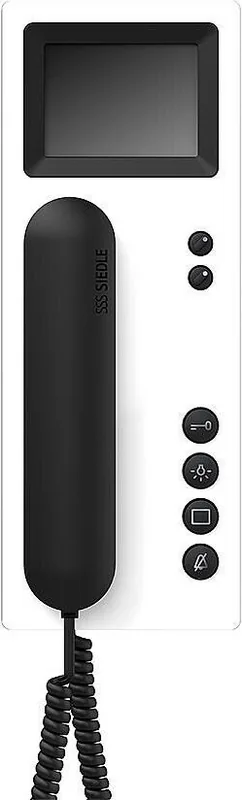
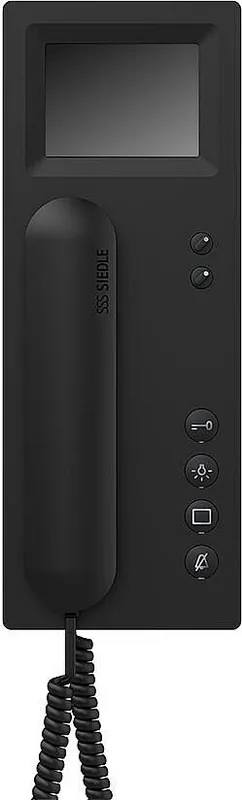
The Siedle Door Intercom BTSV 850-03 is a compact, user-friendly in-home intercom with a color monitor designed for safe and convenient door communication. Engineered for residential installations, it combines clear audio, visual monitoring and simple controls to manage visitors, open doors remotely and adjust settings with minimal effort.
Key features and usage
The unit differentiates between front-door and apartment-door calls with distinct ringtones and a flashing mute indicator. Calls can be answered by pressing the talk button within 45 seconds of the last ring. The integrated door-release button opens the last-called door for three seconds, allowing controlled access without leaving the living area. A dedicated light button can switch on connected entrance lighting when wired by a qualified electrician.
Volume and ringtone customization are straightforward. The ringtone volume offers five discrete levels and can be cycled and stored using the mute button. Eleven ringtone melodies are available; the system always presets the melody for the door that rang last, and melodies can be changed and saved via the same controls.
The color monitor shows the camera image from the last-called door station when the monitor button is pressed, provided no call is in progress. Two rotary controls let you fine-tune brightness and color for the best picture quality.
Practical setup and programming
Several buttons (light, monitor, mute) can be reassigned to other functions by an electrical installer for customized operation. Installation and any service replacement should be performed by a certified electrician to ensure correct wiring and maintain warranty compliance.
Care and maintenance
Clean the indoor unit only with a soft cloth dampened with mild soapy water. Avoid dry wiping, aggressive cleaners, and abrasive agents that can damage surfaces. Detailed care instructions and downloads are available from the manufacturer’s website.
Notes
- Designed for easy everyday use with clear icons and tactile buttons.
- Requires professional installation for lighting and advanced programming.
- Offers essential safety and convenience features without complex menus.
Search for 67,706 Manuals online


Type-in Brand or Model