
Siedle BTC 850-02 Manual
PDF manual · 16 Pages
English



Quick check
Incorrect answer, please try again.
Chat with your Siedle BTC 850-02 manual using AI
Get instant AI answers from your Siedle BTC 850-02 manual
Ask anything about the Siedle BTC 850-02. Answers come from this manual, with the pages they are based on.
Ask a Question
Do you recommend BTC 850-02?
Yes NoFrequently Asked Questions
You can accept a door call within 45 seconds after the last ringtone. If not answered within that period the call will time out according to system settings.
Is this answer helpful?
Press the door-release button; it opens the door that rang last for 3 seconds. The door-release key is dedicated and cannot be double-assigned.
Is this answer helpful?
Yes. Volume adjusts across five levels using the mute button; press briefly to step up volume and hold for three seconds to hear or save. You can select from 11 melodies and save the selection by holding the mute button for three seconds.
Is this answer helpful?
The BTC 850-02 supports call forwarding, internal group calls, collective announcements, Doormatic automatic door release, callback and internal callback request functions. Many of these require installer programming.
Is this answer helpful?
Yes. Advanced functions and button programming must be configured by your electrical installer to ensure correct operation and integration with the building system.
Is this answer helpful?
Clean only with a soft cloth dampened with a mild soapy solution. Avoid dry cleaning, aggressive detergents, and abrasive materials. Detailed care instructions are available from the manufacturer’s download resources.
Is this answer helpful?
Statutory warranty conditions apply. Service replacement or exchange of the unit is handled through your electrical installer as described by the manufacturer.
Is this answer helpful?
Advantages and Disadvantages
Advantages

- Distinct ringtones for front-door and apartment-door improve call source recognition.
- Five-step volume control and 11 melodies allow flexible audio customization.
- Backlit and double-assignable buttons enable programmable in-home control.
- Intercom features like call forwarding, group calls, and Doormatic enhance household communication.
- Simple door release and light controls provide quick, convenient responses to visitors.
Disadvantages

- Advanced functions require programming by an electrical installer, limiting DIY setup.
- Some functions depend on additional wiring or installer configuration (e.g., light control).
- Physical cleaning restrictions require mild methods to avoid surface damage.
- Door release opens for a fixed 3 seconds only, which may be inflexible for some installations.
- No built-in network or smartphone integration described; modern remote access features absent.
Product Specification
Display
N/A
Image Sensor
N/A
Detection Range
N/A
Participants
1
Package Contents
1x Indoor station
Dimensions
7.91x4.17x1.81in
Product Description
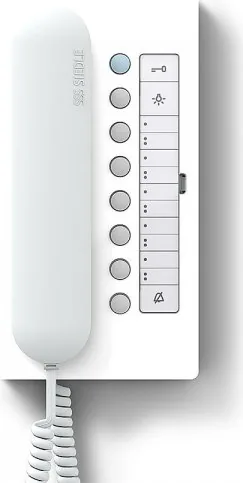
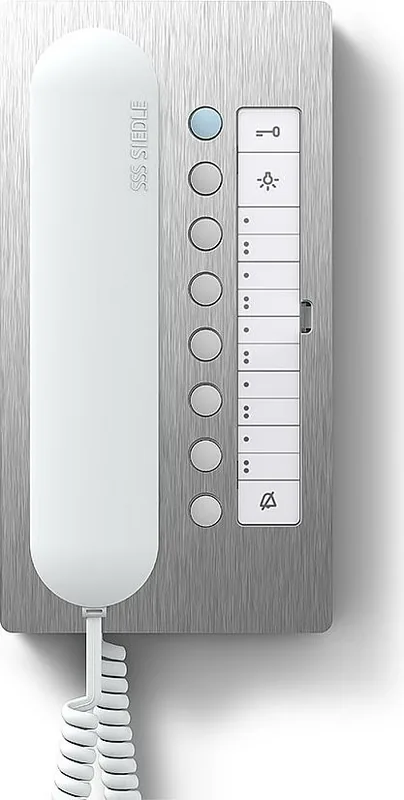
Siedle Door Intercom BTC 850-02 — Reliable Home Intercom
The Siedle Door Intercom BTC 850-02 is a user-focused indoor telephone designed for residential intercom systems. Engineered with clear call handling and intuitive controls, it supports distinct ringtones for front-door and apartment-door calls, a door release, lighting control, mute functionality, and customizable ringtone melodies. The device emphasizes simple operation: accept calls within 45 seconds of the last ring, open the door for 3 seconds with the door-release button, and toggle installed lighting via the light button.
Practical features and everyday use
The BTC 850-02 lets homeowners tailor sound settings with five ringtone volume levels and a choice of 11 melodies. Volume is adjusted using the mute button and can be saved by pressing and holding that button for three seconds. Buttons are backlit to indicate states and may be double-assigned (except the door-release key) for internal calls or control functions, enabling flexible in-home routing and automation.
Intercom-specific features enhance household communication: call forwarding routes door calls to another indoor unit, internal group calls connect several devices simultaneously, collective announcements broadcast to multiple phones, and a Doormatic feature can auto-release the door when the bell rings. Callback functions notify users with LEDs when a caller requests a return call, and internal callback requests can be set from the calling device.
Installation, programming and care
Most advanced functions must be programmed by a qualified electrical installer. Buttons and special modes rely on installer setup for features like forwarding, group calls, and Doormatic behavior. For safety and longevity, clean the indoor station only with a soft cloth dampened with mild soapy water; avoid dry cleaning, aggressive detergents, and abrasives. Warranty and service follow statutory conditions and replacements are handled via the installer.
Notes
- The unit supports distinct ringtones per door and stores melodies per the last ring source.
- Many convenience features require installer programming.
- LEDs and backlighting provide clear status feedback for mute, callbacks, and programmed button functions.
Search for 67,706 Manuals online


Type-in Brand or Model