
Siedle BFC 850-0 S Manual
PDF manual · 20 Pages
English



Quick check
Incorrect answer, please try again.
Chat with your Siedle BFC 850-0 S manual using AI
Get instant AI answers from your Siedle BFC 850-0 S manual
Ask anything about the Siedle BFC 850-0 S. Answers come from this manual, with the pages they are based on.
Ask a Question
Do you recommend BFC 850-0 S?
Yes NoFrequently Asked Questions
When the unit rings, the speech button flashes. Press the speech button within 45 seconds to accept the call; press briefly again to end the conversation. During the call the speech button stays lit.
Is this answer helpful?
During a call use the + and - on the speech button to change conversation volume. For ringtone volume, press and hold the mute button 3 seconds to hear the current level, then adjust with + or - and save by holding mute for 3 seconds.
Is this answer helpful?
A short press toggles all ringing tones on or off. When muted the mute button lights red; if someone rings while muted the button flashes to notify you of the visitor.
Is this answer helpful?
Press the door release button to open the door that last rang; the door is released for three seconds. Automatic door opening (Doormatic) can be programmed by your installer to open after a bell press.
Is this answer helpful?
Yes—when programmed by the electrical installer the intercom supports internal group calls and collective announcements (paging) to one or more Comfort hands-free devices simultaneously.
Is this answer helpful?
Clean only with a soft cloth dampened with mild soapy water. Avoid dry cleaning, aggressive detergents or abrasive agents to prevent surface damage. Detailed care instructions are available from Siedle resources.
Is this answer helpful?
Statutory warranty provisions apply. Any exchange or service-related replacement is performed by your electrical installer as part of the service process.
Is this answer helpful?
Advantages and Disadvantages
Advantages

- Hands-free one-button operation with clear visual status for calls.
- Customizable audio: adjustable conversation volume and 11 ringtone melodies.
- Installer-programmable intercom features: call forwarding, group calls, paging, callbacks.
- Convenient door control: dedicated door release opens last-ringing door for 3 seconds.
- Mute and manual talk-direction override for noisy environments.
Disadvantages

- Advanced functions require installer programming, not user-configurable alone.
- One-directional speech transmission may feel restrictive compared to duplex systems.
- Door-release and light functions depend on installer wiring and may be unavailable.
- Saving settings needs a specific 3-second button routine which may confuse some users.
- Service or replacement must go through an electrical installer, adding dependency.
Product Specification
Display
N/A
Image sensor
N/A
Detection range
N/A
Connection
2-wire
Scope of delivery
1x Outdoor station
Dimensions
3.58x7.91x1.06 in
Special features
Ringtone variants (11)
Product Description
Siedle BFC 850-0 S Bus hands-free telephone Comfort Intercom Manual
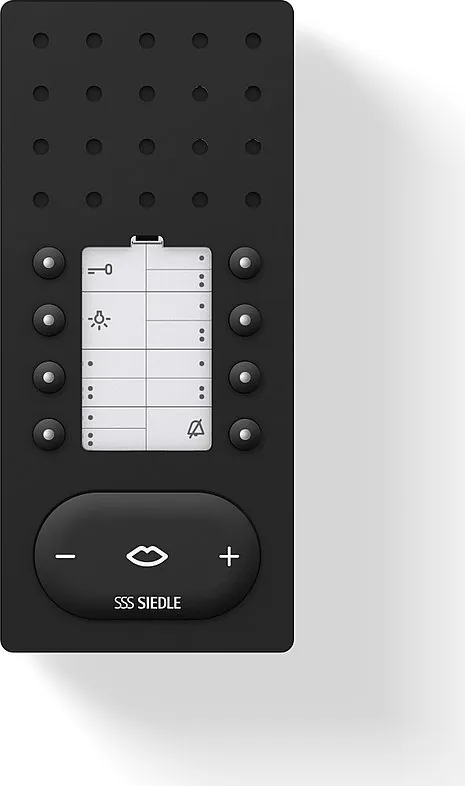
The Siedle BFC 850-0 S Bus hands-free telephone Comfort Intercom is a versatile indoor intercom unit designed for clear door communication, internal calls and building-wide paging. Built for apartment and multiroom environments, it supports distinctive ringtones for different entrances, adjustable speech and ringtone volumes, and a simple one-button hands-free conversation flow. The unit transmits audio in one direction at a time and automatically switches talk/listen direction, with a manual override for noisy door stations.
During an incoming call the speech button flashes and can be used to accept or end calls within a 45-second window. Volume control for conversation and ringtones is available via + and - controls on the speech button, with five ringtone volume steps and 11 ringtone melodies. Selected volume and melody settings can be saved by holding the mute button for three seconds.
Functional controls include a door release button that opens the door for three seconds for the last-ringing station, and a light button to switch connected lighting. A mute toggle silences all ringing tones and indicates status with a red LED; it also flashes when a visitor rings while muted.
All keys (except the door-release key) can be double-assigned for internal calls, switching or control functions and each key has an indicator lamp. Installer programming unlocks additional intercom features such as call forwarding, internal group calls, collective announcements (paging), automatic call acceptance, automatic door opening (Doormatic), and callback functions for missed internal calls.
The unit is intended to be configured and maintained by a qualified electrical installer. Cleaning should be done with a soft cloth and mild soapy water; abrasive or aggressive cleaners must be avoided. Warranty and service follow statutory provisions and replacement in a service case is handled by the installer.
Notes
- Installer programming is required to enable advanced intercom functions.
- Manual override of talk direction is useful when door station noise prevents automatic switching.
- Save preferred volume and melody settings by holding the mute button for 3 seconds.
Search for 67,706 Manuals online


Type-in Brand or Model