Chat with your Siedle Basic VIB 150-0 manual using AI
Get instant AI answers from your Siedle Basic VIB 150-0 manual
Ask anything about the Siedle Basic VIB 150-0. Answers come from this manual, with the pages they are based on.
Ask a Question
0/1000
Do you recommend Basic VIB 150-0?
YesNo
Frequently Asked
Questions
A
Press the speech (talk) button within 45 seconds of the last ringtone to accept the call. End the conversation by briefly pressing the speech button again. The device transmits voice in one direction at a time and switches automatically.
Is this answer helpful?
A
Press the door release button to open the door from which the last call originated; the door is released for three seconds. Double-pressing the door release button can also switch connected lighting on or off, if the installer has wired that function.
Is this answer helpful?
A
Double-press the speech button to toggle mute for all ringtones. A red LED lights to indicate mute; if a visitor rings while muted, the LED flashes to alert you.
Is this answer helpful?
A
Yes. You can choose among 11 ringtone melodies and set ringtone volume in five steps. During a call you can adjust speech volume in five steps. Hold speech and door release buttons for about 3 seconds to enter adjustment mode; settings are saved immediately.
Is this answer helpful?
A
Brightness and color can be increased in seven steps using the appropriate buttons. Adjustments are saved immediately. Specific control behavior and available colors depend on the installer’s configuration.
Is this answer helpful?
A
Clean only with a soft cloth dampened with a mild soap solution. Avoid dry cleaning, aggressive detergents, or abrasive cleaners, as they can damage surfaces. Detailed care instructions are available from the manufacturer’s download area.
Is this answer helpful?
A
Warranty conditions follow legal provisions. Service-related replacement or other interventions should be carried out by your authorized electrical installer; they handle exchange and servicing.
Is this answer helpful?
M: OA-GPT-5-NAN
Advantagesand
Disadvantages
Advantages
Simple, intuitive operation for accepting calls, speaking, and releasing doors.
Adjustable ringtone and speech volume with immediate storage (5 steps).
Supports 11 ringtone melodies and stores selection per door.
Forced one-way speech direction when ambient noise prevents auto-switching.
Installer-configurable buttons and optional lighting control for flexibility.
VS
Disadvantages
One-directional voice transmission at a time may limit natural two-way conversation flow.
Basic feature set—limited advanced video or smart-home integration described.
Requires professional electrician for certain configurations and servicing.
Mute disables ringtones entirely; visitor indication relies on LED only.
Programming times out after 10 seconds, which may interrupt longer adjustments.
M: OA-GPT-5-NAN
Product
Specification
Display
3.5" Color LCD
Image Sensor
N/A
Detection Range
N/A
Connection
2-Wire
Participants
1
Package Contents
1x Indoor Station
Dimensions
5.32x4.53x0.94in
Special Features
Ringtone Variants (11)
M: OA-GPT-54-NAN
Product
Description
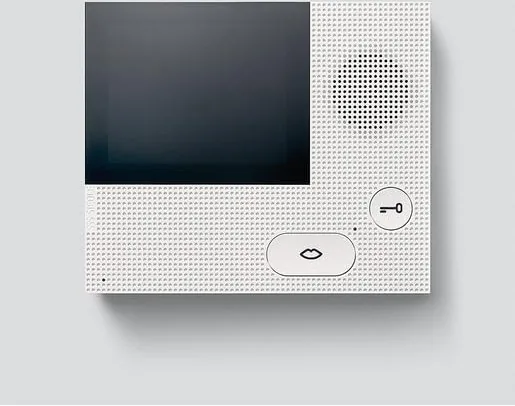
Siedle Basic VIB 150-0 Video Indoor Station
The Siedle Basic VIB 150-0 Video Indoor Station is a compact, user-friendly indoor station designed for secure and convenient door communication. It combines clear audio handling with basic video capabilities and a set of straightforward controls to manage door calls, door release, lighting, and ringtone settings. Intended for residential or small multi-occupant installations, this Indoor Station emphasizes reliability, simple operation, and durable construction.
Key features and user experience
The unit accepts door calls within 45 seconds of the last ring by pressing the speech button; pressing it again ends the conversation. The indoor station transmits voice in one direction at a time and performs automatic switching. If ambient noise prevents automatic switching, holding the speech button forces the voice direction toward the door station. A dedicated door release button opens the associated door for three seconds when pressed.
Users can mute ringtones by double-pressing the speech button; an LED indicator lights red to show mute status and flashes if someone rings while muted. Double-pressing the door release button (if connected by an installer) toggles the external lighting. The station supports selection among 11 ringtone melodies and stores the chosen melody per door. Volume for ringtones and speech can be adjusted in five steps, and brightness and color settings for indicators or displays can be changed in seven steps; all adjustments are saved immediately.
Buttons are assignable to alternative functions by an electrician for customized setups. The device is intended to be cleaned only with a soft cloth dampened with mild soapy water; abrasive or aggressive cleaners are not recommended. Programming times out after 10 seconds of inactivity. Warranty and service follow statutory provisions and replacement or servicing should be performed by an electrical installer.
Practical notes
Designed for easy daily operation: accept calls, speak, open doors, choose melodies and adjust volumes with intuitive button sequences.
Installer-configured options allow lighting control and alternative button assignments.
Care and service instructions emphasize gentle cleaning and professional handling for repairs.
Notes:
Call acceptance window: 45 seconds after last ring.