
Shuttle XPC slim DL20N Manual
PDF manual · 25 Pages
English



Quick check
Incorrect answer, please try again.
Chat with your Shuttle XPC slim DL20N manual using AI
Get instant AI answers from your Shuttle XPC slim DL20N manual
Ask anything about the Shuttle XPC slim DL20N. Answers come from this manual, with the pages they are based on.
Ask a Question
Do you recommend XPC slim DL20N?
Yes NoFrequently Asked Questions
Power on the motherboard and press the Delete key when prompted. This will open the main BIOS setup menu where you can configure various system settings.
Is this answer helpful?
Yes, under the CPU Configuration menu in the Advanced BIOS section, you can enable Intel Virtualization Technology to utilize VMM capabilities.
Is this answer helpful?
If you forget the password, you may need to clear the CMOS settings physically on the motherboard, but always refer to the official manual for safe procedures.
Is this answer helpful?
Yes, the Boot menu allows you to enable or disable booting from USB devices and set the priority order for booting from various sources.
Is this answer helpful?
Mostly yes. Inserting the Driver DVD usually triggers an AutoRun screen, but you can manually run Autorun if it does not appear automatically.
Is this answer helpful?
Advantages and Disadvantages
Advantages

- Compact and space-saving design ideal for small desks
- Advanced AMIBIOS allows deep hardware customization
- Integrated security features including TPM and Secure Boot
- Comprehensive driver DVD for easy software setup
- Energy-efficient power management options available
Disadvantages

- Limited upgrade paths due to slim form factor constraints
- BIOS interface may be overwhelming for novice users
- Dependent on specific manufacturer drivers for optimal performance
- No explicit mention of dedicated graphics card support
- Battery replacement requires careful adherence to guidelines
Product Specification
HDD
N/A
Flash
N/A
Rear Ports
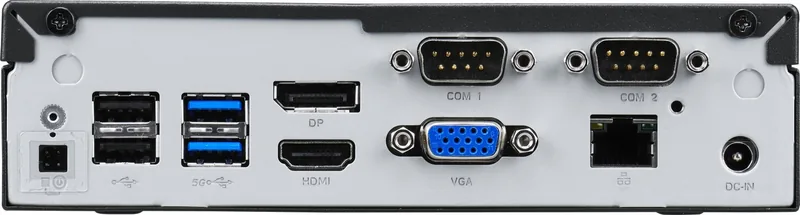
2x USB-A 3.0 (5Gb/s), 2x USB-A 2.0 (480Mb/s), 1x VGA, 1x HDMI 2.0b, 1x DisplayPort 1.4a, 1x RJ-45 1Gb LAN (Intel I211-AT), 2x serial, 1x DC-In hollow socket (power connection), 1x DC-In 4-pin (power connection)
Front/Side Ports
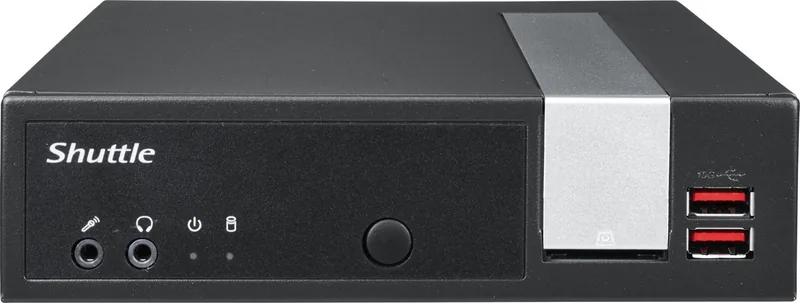
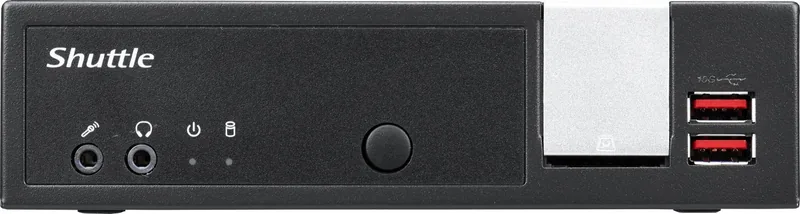
2x USB-A 3.1 (10Gb/s), 2x 3.5mm jack, 1x SD Card
Optical Drive
N/A
Camera
N/A
Power Supply
external 40W, 1x hollow plug
Dimensions
7.48x1.69x6.50in (WxDxH)
Volume
0.05cu ft (calculated)
Features
passive cooled (fanless), suitable for continuous operation, security lock (Kensington Security Slot), 3x Display Support, VESA mount (75x75/100x100)
Color
black
Warranty
three years
USB Spelling
Link
Product Description
Discover the Shuttle XPC slim DL20 (Complete System) - Read, Download & Print Free
The Shuttle XPC slim DL20 (Complete System) represents a pinnacle of compact computing efficiency, designed for users who demand powerful performance within a minimal footprint. This all-in-one solution eliminates the clutter of traditional towers, offering a sleek, space-saving design that fits seamlessly into any home office or professional environment. The system is built around a robust motherboard featuring advanced AMIBIOS capabilities, allowing for deep customization and optimization without the need for complex external hardware.
At the heart of this machine lies a sophisticated BIOS setup utility that grants users granular control over every aspect of their computer. From CPU configuration settings like Intel Virtualization Technology and Turbo Boost to detailed power management options such as EuP function and wake-on-LAN capabilities, the DL20 ensures you can tailor the system to your specific energy and performance needs. The inclusion of onboard high-definition audio, LAN functionality, and flexible SATA configurations makes it a versatile hub for multimedia and networking tasks.
Security is paramount in modern computing, and the Shuttle XPC addresses this with integrated TPM support and secure boot features. Users can easily manage supervisor and user passwords directly through the BIOS interface, ensuring that sensitive data remains protected from unauthorized access. The system also supports fast boot functions, significantly reducing the time between powering on the device and reaching the desktop environment.
Installation is streamlined with a dedicated driver DVD that includes all necessary components for Windows operating systems. The auto-run feature simplifies the process, guiding users through the installation of motherboard drivers, Adobe Reader, and comprehensive user manuals. Whether you are setting up a new workstation or upgrading an existing one, the Shuttle XPC slim DL20 provides a reliable and efficient platform that balances power with portability.
Notes:
- Ensure proper ventilation by not blocking air vents to prevent overheating.
- Replace batteries only with recommended equivalents to avoid damage.
- Always follow local disposal regulations for electronic waste and used batteries.
Search for 67,706 Manuals online


Type-in Brand or Model