
Shuttle XPC nano NS02EV2 Manual
PDF manual · 2 Pages
English



Quick check
Incorrect answer, please try again.
Chat with your Shuttle XPC nano NS02EV2 manual using AI
Get instant AI answers from your Shuttle XPC nano NS02EV2 manual
Ask anything about the Shuttle XPC nano NS02EV2. Answers come from this manual, with the pages they are based on.
Ask a Question
Do you recommend XPC nano NS02EV2?
Yes NoFrequently Asked Questions
The unit operates between 0 C and 40 C. Do not expose it to temperatures below 0 C or above 40 C.
Is this answer helpful?
Yes up to 500mA when system is shut down in AC mode. Do not connect storage devices via a USB hub.
Is this answer helpful?
Only the NS02E V2 has LAN with PoE. The NS02A V2 supports LAN without PoE features.
Is this answer helpful?
It supports one 2.5 inch HDD or SSD with a maximum height of 7mm only.
Is this answer helpful?
Yes it supports VESA standards of 75x75mm and 100x100mm for mounting flexibility.
Is this answer helpful?
Advantages and Disadvantages
Advantages

- Compact design ideal for tight spaces.
- Supports VESA mounting for flexible installation.
- USB charging capability when powered down.
- HDMI and PoE network port available on V2.
Disadvantages

- HDD height limited to 7mm maximum.
- Power adapter only included with NS02A V2 model.
- Single storage slot reduces upgrade flexibility.
- WLAN antenna is an optional extra component.
Product Specification
Form Factor
Mini-PC
CPU
ARM Cortex-A53, 8x 1.5 GHz (Rockchip RK3368)
RAM
2 GB DDR3L
SSD
N/A
HDD
N/A
Flash
16 GB eMMC
Rear Ports
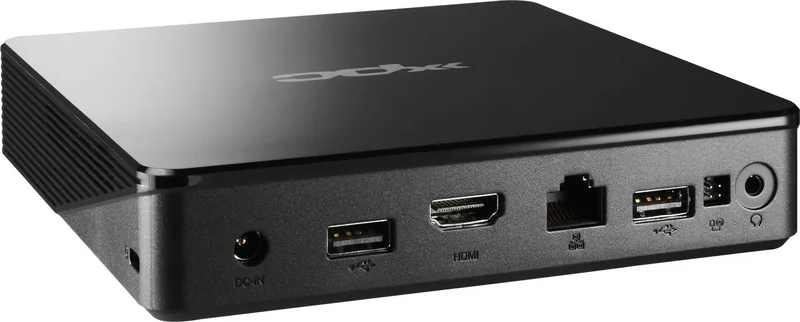
2x USB-A 2.0 (480 Mb/s), 1x HDMI 2.0, 1x 3.5mm jack, 1x RJ-45 1Gb LAN (Realtek RTL8211F), 1x DC input barrel jack (power connector)
Front/Side Ports
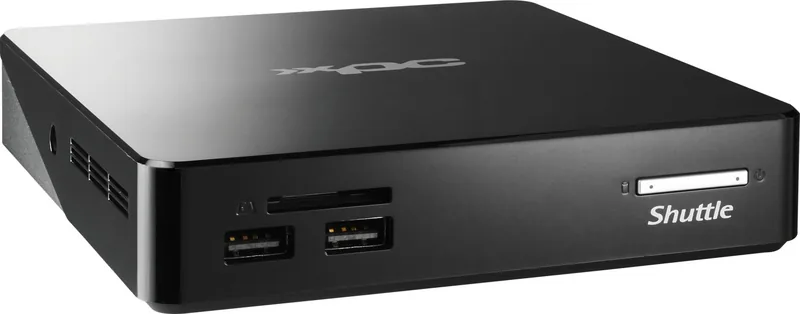
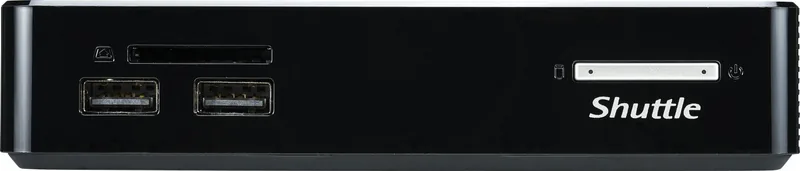
2x USB-A 2.0 (480 Mb/s), 1x SD Card
Wireless
Wi-Fi 5 (WLAN 802.11a/b/g/n/ac), Bluetooth 5.0
Optical Drive
N/A
Camera
N/A
Operating System
Android 8.1
Power Supply
external, 1x PoE, optional 1x DC barrel plug
Dimensions
5.55x1.14x5.55 in (WxHxD)
Weight
0.60 lbs
Volume
36.61 cu in (calculated)
Features
passively cooled (fanless), suitable for continuous operation, security lock (Kensington Security Slot), VESA mount (75x75/100x100 mm)
Color
Black
Warranty
2 years
USB Nomenclature
Link
Product Description
The Shuttle XPC nano NS02EV2 represents a pinnacle in mini PC technology designed for users who demand high performance within a minimal footprint. This compact system is ideal for digital signage home automation or as a silent office workstation. When navigating the setup process referring to guides helps ensure optimal configuration. Users often find that the Shuttle XPC nano NS02EV2 Manual provides essential insights into hardware specifications without overwhelming complexity. Connectivity is a strong point for this device. It features four USB 2.0 ports which allow for device charging even when the system is powered down in AC mode provided you do not connect storage devices via a USB hub. This feature is particularly useful for charging mobile devices overnight. Display options are secured with an HDMI port supporting high definition output for modern screens. For networking the NS02E V2 variant includes a LAN port with Power over Ethernet support simplifying installation in environments where separate power lines are impractical. The NS02A V2 also supports standard LAN connectivity but lacks PoE capabilities. This distinction is crucial for buyers checking box contents. Storage flexibility allows for one 2.5 inch HDD or SSD with a maximum height of 7mm. This ensures compatibility with many standard drives while maintaining the low profile. Expansion options include a built in SD card reader for quick data transfer. Installation is straightforward thanks to the modular design. The system supports VESA mounting standards of both 75x75 mm and 100x100 mm making wall or monitor attachment convenient. This feature makes it perfect for commercial displays or hidden setups where aesthetics matter. Power delivery varies by model significantly. The NS02A V2 includes a power adapter in the box. This means less immediate cost for initial setup. Conversely the NS02E V2 may require a separate procurement depending on the region and specific bundle. Operating conditions are defined for temperatures between 0 C and 40 C. Exceeding this range risks malfunction. Safety precautions recommend disconnecting power before opening the chassis to avoid electrical hazards. Always ensure the cord is disconnected to prevent shocks. Installation involves removing the back cover by unscrewing two bolts. Accessing the motherboard requires removing three specific screws before replacement. Connecting the storage drive involves sliding latches into the lock position for HDD1. Ensure the socket alignment is correct and only push horizontally to avoid cable damage. Do not turn or twist the cable during connection. An external power button connector interface is available for customized power solutions. Recovery mode can be accessed for system restoration when needed. Battery replacement must follow manufacturer guidelines strictly. Disposed batteries require proper handling. Always check the ventilation grilles are not blocked. Overall this PC delivers reliability. It includes a Kensington lock hole for security in public spaces. The headphone jack provides audio output for media playback. If you need to expand wireless capabilities perforations exist for optional WLAN antennas. The interface remains responsive and the build quality supports years of continuous operation. When installing the WLAN antenna start with step two if using the optional module otherwise proceed to step four. The opening for the antenna is located at the side of chassis. Use locks to affix the antenna from the outside securely. Clear the opening carefully to avoid damaging the casing. This ensures optimal signal strength. Correct battery replacement prevents computer damage. Only use types recommended by Shuttle. Dispose of used batteries according to manufacturer instructions to maintain environmental standards.
Search for 67,706 Manuals online


Type-in Brand or Model