
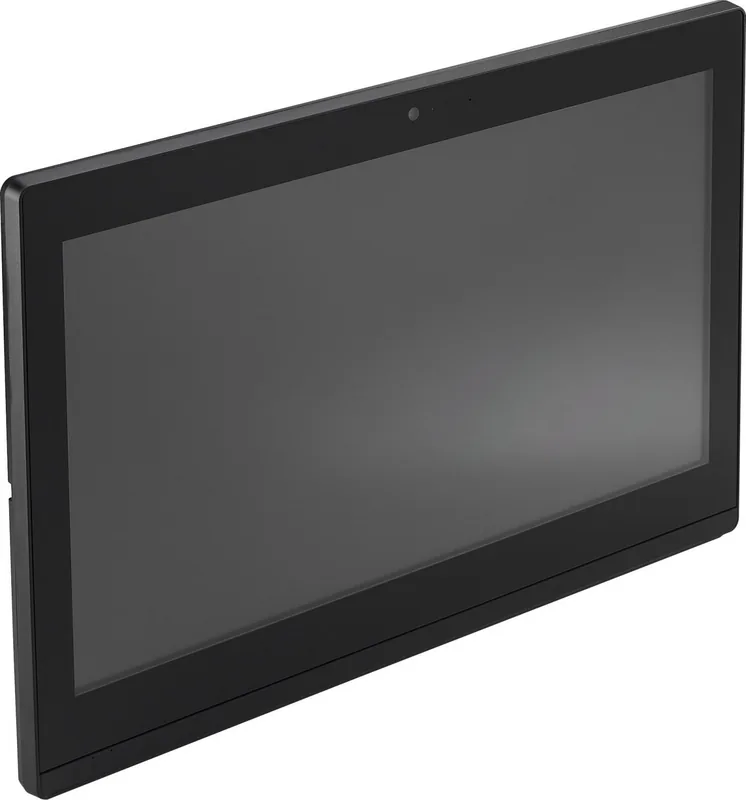
Shuttle P92U Manual
PDF manual · 25 Pages
English



Quick check
Incorrect answer, please try again.
Chat with your Shuttle P92U manual using AI
Get instant AI answers from your Shuttle P92U manual
Ask anything about the Shuttle P92U. Answers come from this manual, with the pages they are based on.
Ask a Question
Do you recommend P92U?
Yes NoFrequently Asked Questions
Press the Delete key on the keyboard when you see the prompt on the screen during startup.
Is this answer helpful?
Common hot keys include F1 for help, F4 to save and exit, Enter to confirm, and Arrow keys for navigation.
Is this answer helpful?
Yes, the Power Management Configuration allows enabling or disabling wake up by LAN and other power options.
Is this answer helpful?
Yes, using Incorrectly replacing the battery may damage this computer. Use only the same or equivalent type recommended by the manufacturer.
Is this answer helpful?
Insert the attached Motherboard Driver DVD into your drive and wait for the AutoRun screen to appear for installation.
Is this answer helpful?
TPM Configuration allows you to enable or disable fTPM Security Device Support for hardware security.
Is this answer helpful?
Yes, the device complies to Part 15 of the FCC Rules and must not cause harmful interference.
Is this answer helpful?
Advantages and Disadvantages
Advantages

- Comprehensive BIOS Setup Menu with detailed hot key navigation for easy configuration.
- Includes Motherboard Driver DVD with AutoRun function for simplified software installation.
- Advanced Power Management Configuration supports wake-up by USB and LAN functions.
- Security options include Secure Boot Control and password management in NVRAM.
- Compliance with FCC Rules ensures safe operation without causing harmful interference.
Disadvantages

- Manual or specification changes may occur without prior notice to customers.
- Battery replacement requires specific manufacturer instructions to prevent damage.
- Air vents must remain unblocked to maintain adequate airflow and prevent overheating.
- Secure Boot Control requires manual enabling which might restrict boot devices.
- Disposal of batteries and hazardous materials requires following specific regional regulations.
Product Specification
Form Factor
All-in-One
Display
19.5", 1600x900 (HD+), 16:9, 94ppi, 60Hz, Multi-Touch
CPU
Intel Celeron 5205U, 2C/2T, 1.90GHz, 2MB+0.5MB Cache, 15W TDP, 12.5W cTDP, Codename "Comet Lake-U" (Comet Lake, Intel 14nm++)
RAM
4GB DDR4-2400 (1x 4GB SO-DIMM Module, 2 Slots, max. 64GB)
SSD
128GB M.2 PCIe
HDD
N/A
Flash
N/A
Graphics
Intel UHD Graphics (iGPU), 23EU/184SP, 0.30-0.90GHz, Architecture "Gen 9.5" (Comet Lake GT2)
Rear Ports
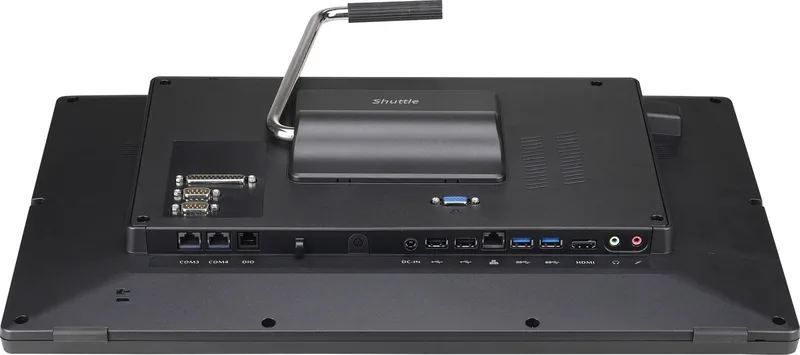
2x USB-A 3.0 (5Gb/s), 2x USB-A 2.0 (480Mb/s), 1x VGA, 1x HDMI 1.4, 2x 3.5mm Jack, 1x RJ-45 1Gb LAN (Intel I211-AT), 1x DC-In Barrel Jack (Power Input)
Front Side Ports
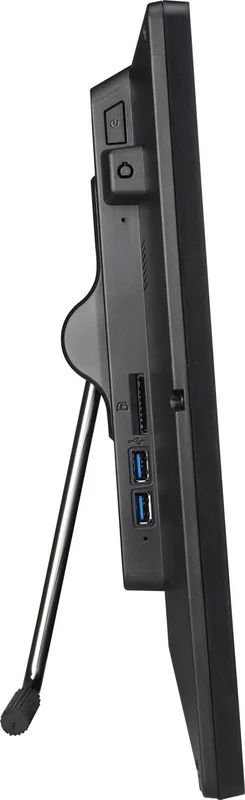
2x USB-A 3.0 (5Gb/s), 1x SD Card
Wireless
Wi-Fi 5 (WLAN 802.11a/b/g/n/ac, 1x1, Realtek RTL8821AE), Bluetooth 4.0
Optical Drive
N/A
Camera
2 Megapixel
Operating System
N/A
Power Adapter
External 90W, 1x Barrel Plug (19V)
Dimensions
19.17x12.64x1.73 inches (WxHxD)
Volume
421.06 cubic inches (calculated)
Features
Passive Cooling (Fanless), Suitable for Continuous Operation, VESA Mount (3.94x3.94 inches), IP54 Certified (Front), Speakers (2x 2W), Microphone
Color
Black
Warranty
3 years (Shipment, including 2 years Shipment with Pickup)
USB Naming
Link
Product Description
Shuttle POS P920 Black Overview
The Shuttle POS P920 black serves as a sturdy option for commercial venues needing dependable hardware. Powered by a Celeron 5205U processor, it delivers consistent performance for retail applications. This setup features 4GB RAM and a 128GB SSD Manual specification ensuring quick boot times. Users managing inventory or transactions will appreciate the stability provided by this configuration. It supports standard Windows operating systems with minimal overhead.
System Configuration and BIOS
Accessing the Advanced BIOS Setup screen is simple using the Delete key. Hot keys like F1 provide help while F4 saves changes. Navigation allows adjustments to Main Setup options including system time. Advanced menus support CPU Configuration settings for Intel HT Technology. Power Management Configuration enables wake-up by USB or LAN functions. You can also configure Security options like Secure Boot Control. These features allow administrators to lock down the system effectively.
Hardware and Install Details
The Motherboard Driver DVD includes software for Windows OS. Inserting the disc triggers AutoRun to install components automatically. Links to Shuttle website provide further support resources. Driver installation is required after installing the software system. Users can browse disk contents to access manuals. Configuration of SATA Confguration helps manage storage devices. Serial Port Confguration allows COM port settings for peripherals. High Definition Audio can be enabled through OnBoard Device menus.
Safety and Environment
Safety warnings suggest avoiding high levels of direct sunlight. Do not block air vents to impede airflow inside the unit. Do not place this device underneath heavy loads or unstable positions. Exposure to wet conditions must also be avoided carefully. Incorrectly replacing the battery may damage this computer unit. Disposal of used batteries needs manufacturer instructions. The device complies to FCC Rules regarding interference limits.
Usage Notes
Firmware updates may occur without notice for product improvement. Trademarks like Shuttle and Intel are used for identification purposes. Information is provided for general use by customers only. Security setup requires passwords to be stored in NVRAM. Exiting setup requires saving changes or discarding edits. Ensure you read safety precautions before setting up the machine. Always check for updates to maintain optimal performance levels.
BIOS Features
TPM Configuration allows enabling Security Device Support for added layers. CPU C State Support controls power saving states for the processor. Turbo Mode settings determine maximum frequency availability. EIST enables Enhanced SpeedStep technology for energy efficiency. Software Guard Extensions protect sensitive areas during execution. Fast Boot Function reduces the initialization time during startup. Boot device priority can be sorted to match workflow needs.
Search for 67,706 Manuals online


Type-in Brand or Model