
Shuttle BPCWL02-i3XA Manual
PDF manual · 20 Pages
English



Quick check
Incorrect answer, please try again.
Chat with your Shuttle BPCWL02-i3XA manual using AI
Get instant AI answers from your Shuttle BPCWL02-i3XA manual
Ask anything about the Shuttle BPCWL02-i3XA. Answers come from this manual, with the pages they are based on.
Ask a Question
Do you recommend BPCWL02-i3XA?
Yes NoFrequently Asked Questions
The system runs on an Intel Core i3-8145U processor designed for efficient performance in industrial tasks.
Is this answer helpful?
Yes, it supports SO-DIMM DDR4 memory up to a maximum of 64GB total system capacity.
Is this answer helpful?
You can mount it using VESA stands, DIN rail, wall ears, or other standard industrial fixtures.
Is this answer helpful?
It complies with CE Class A and FCC Part 15 regulations for commercial and industrial zones.
Is this answer helpful?
The unit operates safely between 0 degrees Celsius and 40 degrees Celsius ambient temperature.
Is this answer helpful?
Press the Delete or F2 key during the Power-On Self-Test to access the BIOS setup utility.
Is this answer helpful?
Advantages and Disadvantages
Advantages

- Compact dimensions fit many control panels and tight workspaces easily.
- Dual LAN ports enable reliable network redundancy for industrial use.
- Memory supports expansion up to 64GB DDR4 for future growth.
Disadvantages

- Specific 19V power adapter required to prevent damage.
- Operating temperature range restricts use in extreme heat or cold.
- Default 4GB RAM may need upgrade for heavy applications.
Product Specification
Form Factor
Mini-PC
CPU
Intel Core i3-8145U, 2C/4T, 2.10-3.90GHz, 4MB+0.5MB Cache, 15W TDP, 10-25W cTDP, Codename "Whiskey Lake-U" (Coffee Lake, Intel 14nm++)
RAM
4GB DDR4-2400 (1x 4GB Module, 2 Slots, max. 32GB)
SSD
120GB M.2 PCIe (2280)
HDD
N/A
Flash
N/A
Graphics
Intel UHD Graphics 620 (iGPU), 24EU/192SP, 0.30-1.00GHz, Architecture "Gen 9.5" (Whiskey Lake GT2)
Rear Ports
4x USB-A 3.0 (5Gb/s), 1x HDMI 1.4, 2x 3.5mm Jack, 1x RJ-45 1Gb LAN (Intel I219-LM), 1x RJ-45 1Gb LAN (Intel I211-AT), 1x Serial, 1x DC-In Barrel Jack (Power)
Front/Side Ports
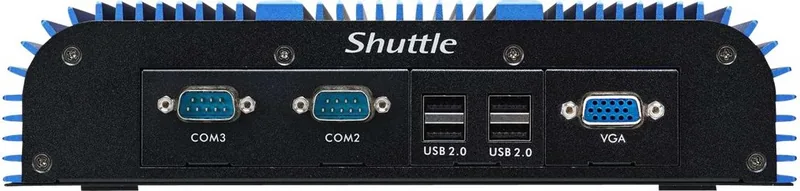
4x USB-A 2.0 (480Mb/s), 1x VGA, 2x Serial
Optical Drive
N/A
Camera
N/A
Operating System
N/A
Power Supply
External 90W, 1x Barrel Jack (19V/4.7A, 5.5mm)
Dimensions
9.65x2.24x6.65in (WxHxD)
Weight
6.28 lbs
Volume
2.4 L (estimated)
Features
passive cooling (fanless), suitable for continuous operation, guaranteed temperature range (32-104F), VESA mount (75x75)
Color
Black
Warranty
2 years
USB Notation
Link
Product Description
Discover the Power of the Shuttle BPCWL02-i3XA Industry IoT
Embedded systems require robust performance in compact packages for modern automation. The Shuttle BPCWL02-i3XA Industry IoT addresses this need with precision engineering. Featuring a Core i3-8145U processor, this box PC delivers efficient computing power tailored for industrial applications. With 4GB RAM and solid state storage, it ensures smooth multitasking in demanding environments. It serves as an ideal edge computing solution for sectors like retail and logistics.
Compact Design and Versatility
Measuring just 245 by 169 millimeters, this device fits into control panels. It offers extensive connectivity options. Dual LAN ports support robust network configurations essential for IoT deployments where reliability is key. USB 3.0 ports enable fast data transfer, while the inclusion of a COM port benefits legacy equipment. Users can mount it using VESA standards or secure it via DIN rail, offering flexibility in installation setups for factories where space is limited.
Installation and Customization
Hardware setup is straightforward. The chassis allows access to memory modules and M.2 slots without disassembly. Adding SO-DIMM DDR4 memory is easy, supporting up to 64GB total system capacity. This expandability ensures the system grows with project needs. Powering the unit requires a specific 19V adapter to maintain safety compliance. Incorrect adapters can lead to performance issues or hardware damage requiring service replacement.
Environmental and Safety Considerations
Operational safety is paramount for industrial use. The device complies with CE Class A and FCC regulations. Temperature limits range from 0 to 40 degrees Celsius. Proper ventilation is critical to prevent overheating. Avoiding exposure to moisture and magnetic fields extends the lifespan. Recycling guidelines ensure environmental responsibility when the unit is decommissioned. Battery replacement must follow manufacturer instructions to prevent damage.
Connectivity and Display Options
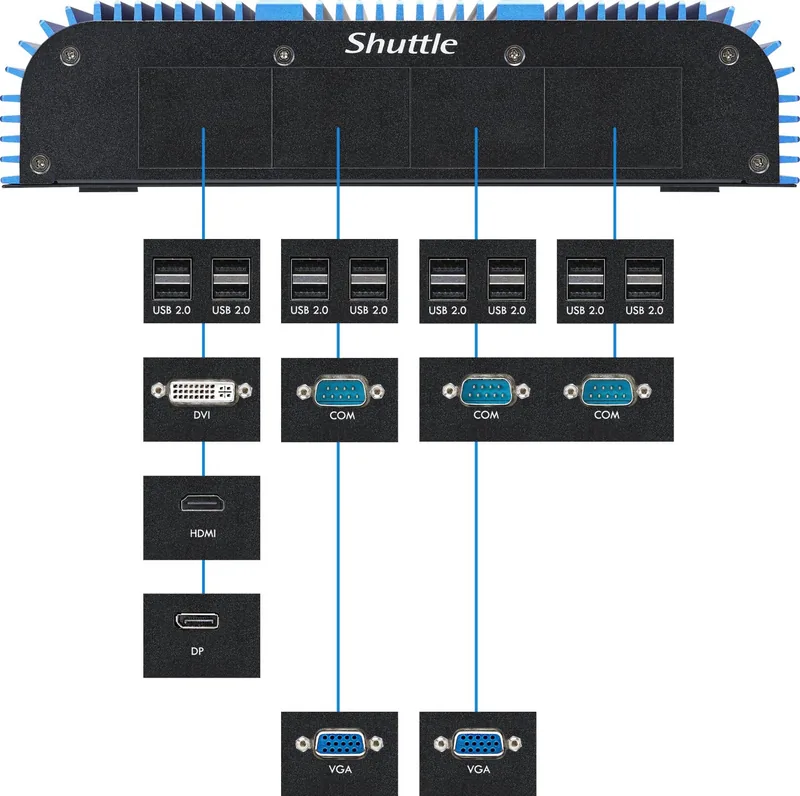
Visual output is handled through HDMI ports. Multiple display board options allow customization based on monitor requirements. The rear panel layout identifies critical components clearly. System BIOS settings can be adjusted during startup to customize boot devices. This level of configuration control empowers IT administrators to manage device behavior efficiently throughout the network infrastructure without complex software suites.
Final Thoughts
Integrating the Core i3-8145U into an Industry IoT solution provides reliability. The Manual guides users through optimized settings. The BIOS allows necessary configuration tweaks. This compact powerhouse remains a strong candidate for modern automation needs requiring consistent uptime and easy maintenance access for field engineers working in the sector.
Search for 67,706 Manuals online


Type-in Brand or Model