

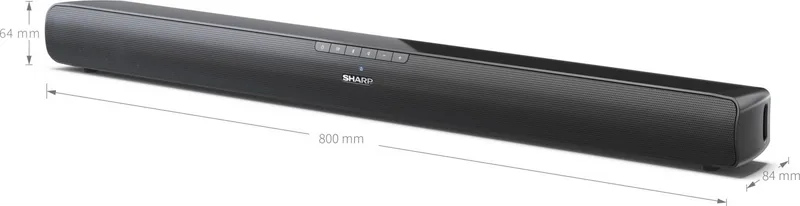

Sharp HT-SB100 Manual
PDF manual · 52 Pages
English



Quick check
Incorrect answer, please try again.
Chat with your Sharp HT-SB100 manual using AI
Get instant AI answers from your Sharp HT-SB100 manual
Ask anything about the Sharp HT-SB100. Answers come from this manual, with the pages they are based on.
HT-SB100 Maintenance Schedule
Unplug the power cable and wipe the outside with a soft, clean cloth. Do not use chemicals or detergents.
If the product will not be used for more than one month, remove the batteries to prevent leakage.
Ask a Question
Do you recommend HT-SB100?
Yes NoFrequently Asked Questions
Use an HDMI cable (version 1.4 or higher) to connect the soundbar HDMI (ARC) socket to your TV’s HDMI (ARC) socket. Ensure your TV has HDMI-CEC and ARC enabled in its settings, then select HDMI ARC on the soundbar.
Is this answer helpful?
Select Bluetooth mode on the soundbar (indicator flashes blue), enable Bluetooth search on your device, and choose "SHARP HT-SB100". If prompted, use "0000" as the PIN. The LED will stay solid blue and an audio prompt will confirm connection.
Is this answer helpful?
First check cable versions and connections, then set the source device’s digital output to PCM if available. Some TVs don’t pass through digital audio; if necessary connect directly to the source (e.g., Blu-ray player) or verify the TV’s audio output is set to FIXED/STANDARD instead of VARIABLE.
Is this answer helpful?
Yes. Wall mounting uses the supplied brackets and fixings; additional tools may be required. Installation should be carried out by qualified personnel and you must confirm the wall can support the unit and avoid hidden wiring or plumbing.
Is this answer helpful?
The soundbar supports USB flash drives up to 32GB containing MP3 files. Always back up your data before use, and power off the unit before removing the USB device to avoid data loss.
Is this answer helpful?
Enter Custom EQ via the remote’s EQ button or press BASS/TRE once to access custom mode. Use BASS+/- and TRE+/- to increase or decrease levels. The LED flash color and speed indicate the EQ level and changes are saved as default.
Is this answer helpful?
If the external input signal level is too low, the unit will automatically switch to standby after 15 minutes to save energy (an ERPII requirement). Increase the source device volume to prevent auto-standby.
Is this answer helpful?
Advantages and Disadvantages
Advantages

- Multiple inputs: HDMI ARC, optical, AUX, USB, and Bluetooth for versatile connectivity.
- Compact design with optional wall mounting — great for small spaces or secondary TVs.
- Easy Bluetooth pairing (SHARP HT-SB100) with A2DP and AVRCP support when available.
- Preset EQ modes plus custom bass/treble adjustments via remote for quick sound tuning.
- Included accessories: remote with batteries, power cable, wall brackets, fixings and feet.
Disadvantages

- No dedicated wireless subwoofer — limited low-end depth compared to larger systems.
- USB playback limited to MP3 and USB drives up to 32GB; risk of data loss if not backed up.
- Requires HDMI 1.4+ and TV ARC/CEC enabled for full HDMI ARC functionality.
- Bluetooth range and reliability can be affected by obstacles; not guaranteed with all devices.
- Auto-standby after 15 minutes with weak input may disrupt occasional low-level sources.
Product Specification
Type
Soundbar
Channels
2.0
Power
75W Peak
HDR
no
Video Connections
1x HDMI Out
Audio Connections
1x Digital Audio In (optical), 1x AUX In (3.5mm jack)
Other Connections
1x USB-A
Wireless
Bluetooth 5.1
Color
black
Dimensions
31.50x2.52x3.31in (WxHxD)
Weight
3.09lb
Consisting of
Soundbar
Product Description
Sharp HT-SB100 — Compact Soundbar with Smart Connectivity
The Sharp HT-SB100 is a compact, user-friendly soundbar designed to upgrade TV and music audio without the bulk of a full home theatre setup. It offers multiple input options including HDMI ARC, optical, AUX and USB, alongside Bluetooth wireless streaming for convenient playback from phones, tablets and other devices. With clear LED indicators, an included remote control, and support for HDMI-CEC, the HT-SB100 simplifies setup and everyday operation while improving dialogue clarity and overall sound compared to built-in TV speakers.
Key features and user experience
The soundbar supports HDMI ARC (requires HDMI 1.4+ and ARC/CEC enabled on the TV), making a single-cable connection possible for both audio return and remote volume control. Optical and AUX inputs provide compatibility with older TVs and external sources, while the USB port accepts MP3 playback from flash drives up to 32GB. Bluetooth pairing is straightforward — the unit appears as "SHARP HT-SB100" and supports A2DP for audio streaming and AVRCP for basic remote control if the source device supports it.
Onboard and remote controls let you switch sources, mute, adjust volume, and choose EQ presets (Movie, Music, Voice, Custom). The Custom mode allows fine-tuning of bass and treble using the remote; the LED indicator reflects EQ adjustments. Auto-standby after 15 minutes of no input conserves energy. Physical installation options include simple tabletop placement with silicone feet or secure wall mounting using supplied brackets and fixings.
Practical considerations
Safety and maintenance are covered with standard precautions: keep ventilation clear, avoid exposure to moisture and heat, and follow battery safety for the remote. The package includes remote control with batteries, power cable, wall-mount brackets and fixings, silicone feet and documentation. For audio sources using digital outputs, enabling PCM on the source device may be necessary if no sound is detected. Troubleshooting tips and regulatory statements (CE/UKCA) are provided as part of the product documentation.
Final thoughts
The Sharp HT-SB100 is a practical, budget-friendly upgrade for users seeking improved TV and music sound with straightforward connectivity and easy control. Its compact footprint, wall-mount option, and mix of digital and analog inputs make it a versatile pick for small living rooms, bedrooms, or secondary TV setups.
Notes
- HDMI ARC requires TV support for ARC and HDMI-CEC and an HDMI 1.4+ cable.
- USB playback supports MP3 files; back up data before use.
- For optimum Bluetooth performance keep the source within ~8 meters and avoid obstacles.
- Wall mounting should be performed by qualified personnel; check wall suitability and hidden wiring.
Search for 67,732 Manuals online


Type-in Brand or Model