
Shanling UP4 Manual
PDF manual · 32 Pages
English



Quick check
Incorrect answer, please try again.
Chat with your Shanling UP4 manual using AI
Get instant AI answers from your Shanling UP4 manual
Ask anything about the Shanling UP4. Answers come from this manual, with the pages they are based on.
Ask a Question
Do you recommend UP4?
Yes NoFrequently Asked Questions
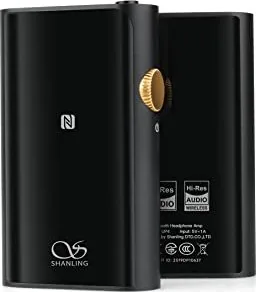
The Shanling UP4 is a portable Bluetooth headphone amplifier and USB DAC. It can receive music wirelessly from compatible devices or process audio from a computer through USB, then send sound to headphones through its 3.5 mm or 2.5 mm balanced output.
Is this answer helpful?
With the UP4 powered off, hold the multifunction button for about five seconds until the red and blue lights flash alternately. Enable Bluetooth on the phone, search for available devices, and choose "Shanling UP4." A blue flash every five seconds confirms a successful connection.
Is this answer helpful?
Yes. Put the UP4 in pairing mode, unlock an Android device with NFC enabled, and bring it close to the UP4 NFC sensor. This starts the quick pairing process. NFC availability depends on the Android device.
Is this answer helpful?
Yes. Pair it with the first device, power it off and disable Bluetooth on that device, then pair it with the second device. Power on the UP4 to reconnect to the second device, then manually connect the first device again.
Is this answer helpful?
Connect the UP4 to a computer with a USB cable and plug in headphones. Turn on the UP4, then select "Speaker Shanling UP4" as the default audio output in the computer sound settings. The computer should recognize and install the required driver automatically.
Is this answer helpful?
Check the system and UP4 volume settings first. Reseat the headphone plug if noise is present. If there is still no output, try a different headphone, cable, or audio source. Connecting the UP4 to USB power can reset it if it freezes.
Is this answer helpful?
Advantages and Disadvantages
Advantages

- Supports SBC, AAC, aptX, aptX Low Latency, aptX HD, LDAC, and HWA LHDC Bluetooth codecs.
- Offers both 3.5 mm single-ended and 2.5 mm balanced headphone outputs.
- Works as a USB DAC when connected to a computer through Type-C.
- NFC pairing, multipoint connection for two devices, and built-in call controls improve daily convenience.
- Physical volume wheel, selectable gain, and digital filters provide practical control options.
Disadvantages

- NFC quick pairing is limited to Android devices with NFC enabled.
- Pairing mode times out after five minutes if no device connects.
- The guide recommends avoiding use while charging.
- Higher-voltage chargers may damage the device; DC 5V 1A is recommended.
- LED colors communicate many settings, which may require checking the indicator guide.
Product Specification
Type
D/A converter, headphone amplifier
PCM D/A converter
16-bit/96 kHz
Output power
91 mW (32 ohms)
Signal-to-noise ratio (SNR)
120 dB
Total harmonic distortion (THD)
0.003% (32 ohms)
Channel separation
73 dB
Outputs
Balanced headphone (2.5 mm jack), headphone (3.5 mm jack)
Additional connections
USB-C
Wireless
Bluetooth 5.0, AAC, aptX, aptX HD, aptX LL, LHDC, LDAC, NFC
Power supply
Battery (550 mAh, 15 hr), USB
Features
Volume control, portable
Color
Black
Dimensions
1.42 x 2.36 x 0.53 in (W x H x D)
Weight
1.31 oz
Product Description
Shanling UP4 - Read, Download & Print Free
The Shanling UP4 is a compact Bluetooth headphone amplifier and USB DAC built for listeners who want stronger, cleaner sound from phones, computers, and portable sources. It combines wireless convenience with dedicated audio connections, making it a flexible companion for everyday listening, commuting, and desktop playback. With a clip included in the package, the UP4 is easy to carry with headphones or attach to clothing.
Wireless and wired listening in one device
Bluetooth pairing is straightforward: hold the multifunction button to enter pairing mode, then select Shanling UP4 from a phone or other Bluetooth source. Android users can also use NFC quick pairing by bringing an unlocked NFC-enabled device close to the sensor. The unit attempts to reconnect to the last device after startup and can remember connections for two devices, helping users move between a phone and tablet with less setup.
The UP4 supports a broad range of Bluetooth codecs, including SBC, AAC, aptX, aptX Low Latency, aptX HD, LDAC, and HWA LHDC. Its status light identifies the active codec with different colors, so listeners can quickly check the connection mode. For wired use, connect the UP4 to a computer through Type-C USB and select "Speaker Shanling UP4" as the default output. It then works as a USB DAC for computer audio.
Connections and controls
Two headphone outputs expand compatibility: a standard 3.5 mm jack and a 2.5 mm balanced jack. A physical volume wheel allows fast, precise adjustments without reaching for the source device. The multifunction button handles playback, track skipping, calls, and pairing. One press plays or pauses music, two quick presses move to the next track, and three quick presses return to the previous track.
For calls, the built-in microphone and button controls support answering, ending, rejecting, and transferring calls between the UP4 and a connected phone. A separate mode button displays or changes amplifier gain, while a long press switches digital filter settings. These options allow users to tailor output behavior for different headphones and listening preferences.
Everyday care and useful notes
The device provides charging, low-battery, codec, gain, and filter information through its LED indicator. Use a recommended DC 5V 1A charger, avoid operation while charging when possible, and recharge periodically during long storage. Keep volume low before connecting headphones, avoid extreme temperatures and moisture, and do not open or modify the unit. Firmware updates are available from the Shanling website.
Note: If the UP4 freezes, connect it to USB power to reset it. If sound is missing or noisy, reseat the headphone plug, check volume settings, or try another cable or pair of headphones.
Search for 67,732 Manuals online


Type-in Brand or Model