
Seasonic Prime Platinum Manual
PDF manual · 82 Pages
English



Quick check
Incorrect answer, please try again.
Chat with your Seasonic Prime Platinum manual using AI
Get instant AI answers from your Seasonic Prime Platinum manual
Ask anything about the Seasonic Prime Platinum. Answers come from this manual, with the pages they are based on.
Ask a Question
Do you recommend Prime Platinum?
Yes NoDo you recommend Prime Platinum?
Yes NoFrequently Asked Questions
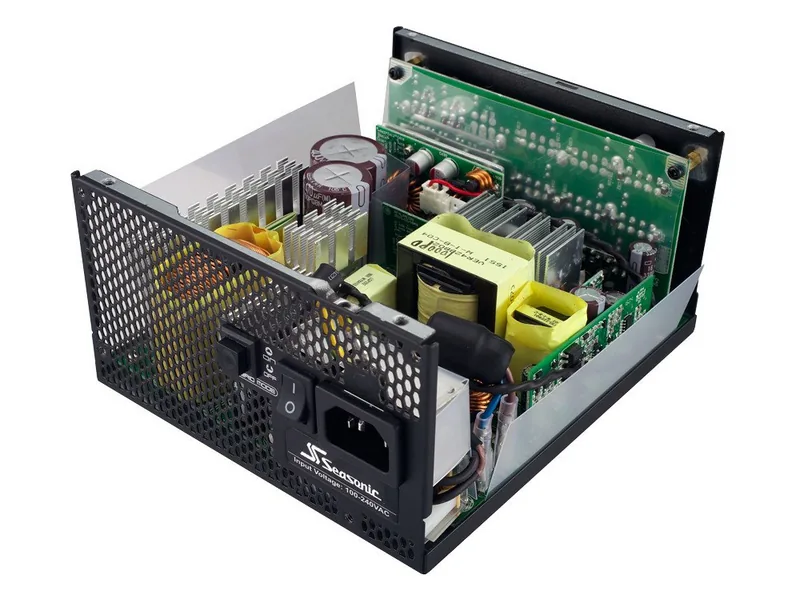
Never open the unit and keep it dry. Internal voltages are hazardous even after power is disconnected.
Is this answer helpful?
Check AC connections and toggle switches several times to reset internal circuits.
Is this answer helpful?
Contact Seasonic directly for special cables as standard usage is designed for PC systems.
Is this answer helpful?
The power supply will not turn on if there is a malfunction preventing activation signals.
Is this answer helpful?
Yes, use only the modular cables provided with the unit to maintain safety and warranty.
Is this answer helpful?
Terms vary by region. You must return the product postage prepaid to the point of purchase.
Is this answer helpful?
Enable Energy Savings and disable audio always-on for ErP compliance with standby modes.
Is this answer helpful?
Advantages and Disadvantages
Advantages

- Modular design simplifies cable management significantly improving airflow within chassis interiors efficiently.
- ErP 2013 compliance ensures lower standby power consumption meeting environmental regulations globally.
- Pull technology delivers only required power optimizing efficiency during variable workload scenarios dynamically.
- Comprehensive warranty protects against manufacturing defects starting from date of purchase transaction recorded.
- Separate PCIe cables reduce connector strain preventing overheating issues on high performance graphics cards.
Disadvantages

- Opening the unit voids warranty immediately due to high voltage hazards inside the casing permanently.
- Requires specific motherboard BIOS updates to enable full ErP 2013 energy saving functionality properly.
- Warranty terms vary between different geographic regions affecting consumer rights and return policies differently.
- Installation requires careful screw tightening to avoid damaging threads in the metal mounting panel structure.
- Does not support mining usage without contacting manufacturer for special cable configurations needed specifically.
Product Specification
Fan
5.31 inches, semi-passive mode
Cable Management
Fully Modular
80 PLUS Certifications
80 PLUS Platinum (115V, as per 80 PLUS Certification)
Dimensions (WxHxD)
5.91 x 3.39 x 6.69 inches
Manufacturer Warranty
12 Years
-12V
0.3A
Number of 12V Rails
1
PFC
Active
Form Factor
ATX PS/2
Specification
ATX 2.4
Special Features
ErP Lot 6, supports Haswell C6/C7 Low-Power States, switchable semi-passive mode
Color
Black
Product Description
Power Supply Essentials
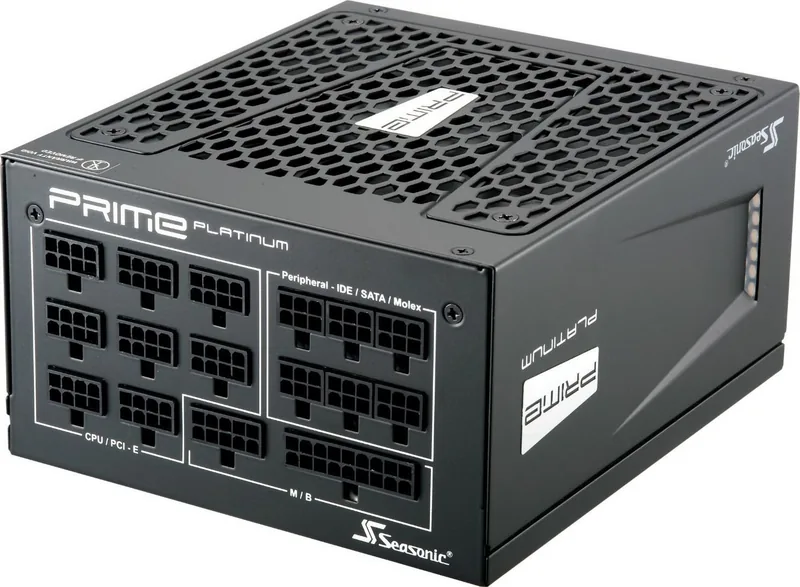
Constructing a custom personal computer involves multiple critical phases starting with safe handling procedures. The power supply serves as the foundational element delivering consistent electricity throughout the entire build process. This analysis focuses on the Seasonic Prime Platinum ATX 2.4 capabilities ensuring peak performance metrics are met reliably. Enthusiasts prioritize stability when running demanding applications or engaging in intensive gaming sessions continuously. High end graphics adapters typically utilize dual or triple PCIe connector slots requiring dedicated cabling solutions. Distributing load across separate lines reduces strain on individual conductors preventing potential thermal degradation over time. Safety protocols dictate that users never penetrate the sealed housing under any conditions whatsoever ever. Internal voltages remain hazardous to biological tissue even after electrical disconnection occurs temporarily. Removing protective covers instantly invalidates all remaining warranty privileges granted by the manufacturer initially. Airflow management plays a significant role in maintaining operational temperatures within acceptable ranges consistently. Obstructions placed near fan grills restrict necessary ventilation pathways leading to overheating failures eventually. Moisture exposure poses corrosion risks damaging sensitive circuitry embedded inside the aluminum frame permanently. Modular architecture provides organizational flexibility allowing owners to disconnect unused wires eliminating visual clutter completely. Connection interfaces employ keyed designs preventing accidental misalignment during the insertion process physically applied. Tightening mounting screws requires moderate torque to prevent thread stripping in the metal enclosure panels securely. Cooling fan orientation adapts based on chassis configuration directing airflow either upward or downward towards intakes logically situated. Rear panel switches facilitate state transitions between active and inactive modes clearly indicated by light feedback. Initial diagnostics should verify AC cord attachment at both source and terminal points definitively confirmed. Reset cycles involving button toggling clear residual charges trapped within capacitor banks rapidly now. Firmware updates synchronize legacy settings with contemporary energy conservation mandates enforced globally today. Standby consumption targets necessitate specific BIOS modifications enabling power savings functions correctly disabled previously. Audio always-on states consume unnecessary power and should be deactivated to meet environmental standards fully.
Installation and Maintenance
Old units must be removed carefully by unscrewing four mounting bolts securing them to the panel back. Disconnect all peripherals gently ensuring connectors release from sockets without pulling excessively hard on cables. New placement requires locating the appropriate space within the chassis cavity allocated for the supply block. Fasten using provided hardware bags containing necessary screws for structural integrity during transport movement. Ensure the unit does not shift position once installed to maintain vibration resistance qualities effectively maintained. Warranty disclaimers exclude damage resulting from lightning strikes floods fires or natural disaster events occurring naturally. Products used outdoors or outside intended scope forfeit protection plans immediately upon detection of misuse violations. Regional distributors manage claims processes ensuring swift resolution times for qualified subscribers registered locally. Australian law guarantees minimum replacement options regardless of other terms agreed upon separately prior. European offices operate centrally managing global inventory distribution logistics efficiently for all member nations involved. Taiwanese headquarters oversee manufacturing quality standards ensuring consistent output across all production batches released. Contact information includes email addresses for different continents supporting various language requirements encountered frequently. Maintenance tips suggest regular dust clearing to preserve thermal efficiency ratings kept high for longevity. Inspect cables periodically for signs of wear or cracking insulation compromising safety margins significantly reduced. The system complies with newest ErP 2013 requirements demanding updated BIOS versions for proper function configuration. Enable all Energy Savings features for standby and normal operations while disabling audio always-on completely. Consult motherboard manufacturers for further assistance regarding specific implementation details needed for success. If the unit fails to turn on check the mainboard for malfunctions preventing activation signals. Peripheral malfunction might stop power delivery to that specific component exclusively without shutting whole system down. Operations follow pull technology providing power only as demanded by mainboard and system components directly. This dynamic adjustment optimizes efficiency significantly compared to static power delivery methods used previously. Visit official homepage for additional technical support instructions if difficulties persist after troubleshooting checklist completion.
Search for 67,732 Manuals online


Type-in Brand or Model