

Schneider Electric NetBotz 355 Manual
PDF manual · 32 Pages
English



Quick check
Incorrect answer, please try again.
Chat with your Schneider Electric NetBotz 355 manual using AI
Get instant AI answers from your Schneider Electric NetBotz 355 manual
Ask anything about the Schneider Electric NetBotz 355. Answers come from this manual, with the pages they are based on.
Ask a Question
Do you recommend NetBotz 355?
Yes NoFrequently Asked Questions
Yes, it supports dry contact and 0-5V sensors with appropriate adapter cables.
Is this answer helpful?
Uses nominal 48 VDC external power supply separate from PoE.
Is this answer helpful?
Up to 1280 by 1024 resolution at a maximum of thirty fps.
Is this answer helpful?
Yes, internal sensors track humidity and dew point continuously.
Is this answer helpful?
Yes, a two-year factory warranty for defects is included.
Is this answer helpful?
Yes, the kit includes a T-bar mounting plate for rack use.
Is this answer helpful?
The Web Client or Advanced View Java application is required.
Is this answer helpful?
Advantages and Disadvantages
Advantages

- Integrated camera with 1280x1024 resolution
- Multiple sensor ports for external devices
- Flexible installation options wall rack or ceiling
- StruxureWare certification for enterprise systems
- Two-year warranty coverage for defects
Disadvantages

- No PoE injector included in this model
- Advanced View not supported on mobile devices
- Requires separate external power supply
- Default passwords need changing for security
- Frame rate dependent on available bandwidth
Product Specification
Type
Accessory
Standard
LAN (PoE)
Function
Camera, Humidity, Temperature, Airflow, Motion
Dimensions
6.69x8.27x3.74 in
Product Description
Introduction
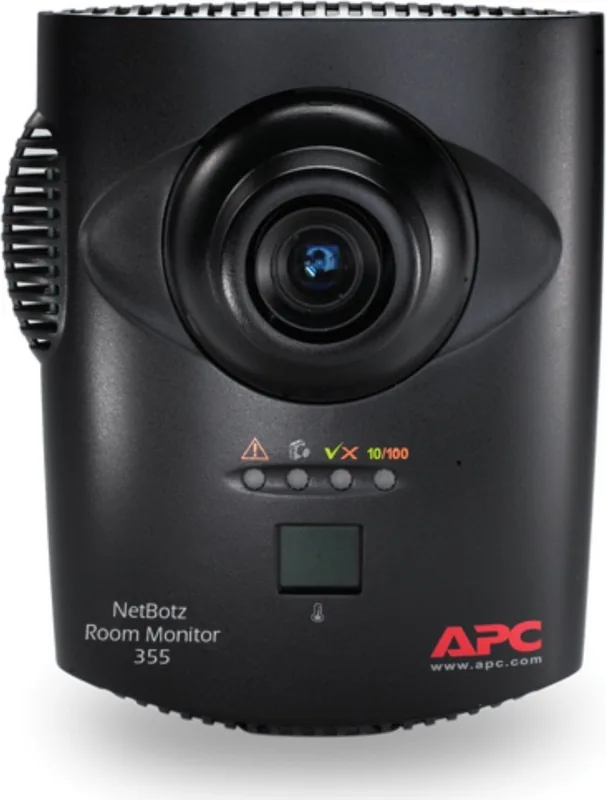
The Schneider Electric NetBotz 355 (without PoE Injector) Room Monitor serves as a robust central unit for comprehensive environmental monitoring solutions. Designed specifically for data centers and secure facilities, this appliance integrates high-resolution imaging with real-time environmental sensing. The device captures visual data up to 1280 by 1024 resolution at thirty frames per second, ensuring clear visibility of your protected areas. Beyond video, internal sensors track temperature, humidity, dew point, airflow, and motion directly within the unit. This multi-functionality reduces the need for separate bulky equipment in the monitored room. The adjustable CS-mount lens allows for customized focus and field of view settings to cover specific zones accurately.
Installation
Installation offers significant flexibility for facility managers. Users can place the device on walls, ceilings, or within electrical boxes and racks depending on structural requirements. The rear panel provides four dedicated sensor ports supporting various APC sensors and third-party devices like smoke detectors or fluid sensors. These ports accept dry contact and 0-5 volt signals, enhancing compatibility with legacy systems. Connectivity relies on a standard 10/100 Base-T network port. Since this specific model does not include a Power-over-Ethernet injector, users must utilize an external power supply for operation. This configuration allows for integration into existing network infrastructures where separate power management is preferred. Power requirements are listed at nominal 48 VDC with maximum consumption of 15 W.
Configuration
Configuration is streamlined through multiple methods to suit different technical expertise levels. Network settings can be obtained via DHCP or manually configured using a terminal emulator or the Serial Configuration Utility. The web client offers a basic overview of alerts and device details, while Advanced View provides deep control over alerts, email notifications, and device settings. Advanced View runs on supported network-attached computers and enables custom Java application features not available on mobile devices. Compatibility with StruxureWare systems adds value for enterprise environments looking to unify infrastructure management. The unit operates within standard environmental limits and complies with international safety standards including FCC and CE marks. Security is maintained through pre-configured administrator accounts, though changing default credentials is highly recommended to prevent unauthorized access. Maintenance involves simple cleaning with a dry cloth to ensure lens clarity. A two-year factory warranty covers defects in materials, ensuring reliability for business operations. Understanding the Schneider Electric NetBotz 355 (without PoE Injector) Room Monitor Manual guidelines during setup helps optimize performance and security posture effectively. This solution provides peace of mind regarding asset safety and environmental conditions. Operators can configure e-mail alerts when sensor thresholds are violated, ensuring immediate response to critical events within the monitored space.
Search for 67,706 Manuals online


Type-in Brand or Model