
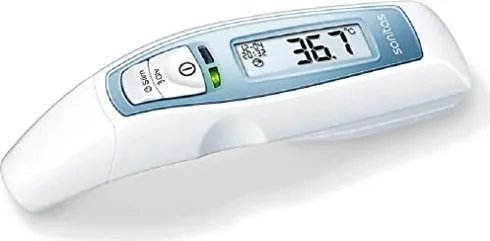
Sanitas SFT 65 Manual
PDF manual · 84 Pages
English



Quick check
Incorrect answer, please try again.
Chat with your Sanitas SFT 65 manual using AI
Get instant AI answers from your Sanitas SFT 65 manual
Ask anything about the Sanitas SFT 65. Answers come from this manual, with the pages they are based on.
SFT 65 Maintenance Schedule
Use a soft cloth or cotton bud moistened with disinfectant, alcohol, or warm water.
Verify the lens is intact before every application; contact service if damaged.
Replace both AAA batteries when the battery symbol appears or flashes.
Take out the batteries if the device will not be used for an extended period.
Ask a Question
Do you recommend SFT 65?
Yes NoFrequently Asked Questions
Press the designated mode button once or twice to toggle between ear and forehead settings. The display will change to indicate the active mode. Ensure the correct cap is attached for forehead scanning.
Is this answer helpful?
The battery warning symbol will appear indicating weak power. Measurements are still possible but should be replaced soon. If the symbol blinks, replace immediately to avoid shutdown.
Is this answer helpful?
Yes, hold it three centimeters from the object and select object mode. Press and hold the sensor button to measure surface temperature rather than body heat.
Is this answer helpful?
It is generally safe for infants over six months. For younger babies use alternative methods or consult a doctor as ear canals are very small and narrow.
Is this answer helpful?
Wipe the sensor tip with a soft cloth moistened with disinfectant. Clean the body with a slightly damp cloth. Do not immerse in water.
Is this answer helpful?
The device stores the last ten measurements automatically. You can browse them by pressing the memory button on the device to recall date and time of previous results.
Is this answer helpful?
Yes, it switches off after measuring or pressing buttons. It has an auto-off feature after one minute of inactivity to save battery power.
Is this answer helpful?
Advantages and Disadvantages
Advantages

- Triple measurement modes offer versatility for different applications
- Non-invasive infrared technology ensures user comfort during checks
- Clear LED color coding provides immediate fever alarm status
- Memory function stores last ten readings for tracking trends
- Clinical precision ensures accurate results within defined ranges
Disadvantages

- Not waterproof requires protection from liquid contact and moisture
- Specific positioning is required for accurate ear canal measurements
- Cannot measure oral or rectal temperatures directly without adapters
- Battery warning requires timely replacement to prevent failure
- Sensor lens must remain clean for optimal performance
Product Specification
Type
Infrared Thermometer
Power Source
Battery-powered (2x AAA Battery)
Usage
in the ear (auricular), on the forehead
Measurement Units
°C, °F (switchable)
Measuring Range
93.2°F to 109.4°F (Body Temperature), 32°F to 212°F (Surface Temperature)
Accuracy
±0.36°F
Memory Function
10 Memory Slots
Display
Yes
Features
Fever Indicator, Surface Measurement, Auto Shut-off, Disinfectable, Battery Level Indicator
Product Description
Enhance Your Family Wellness with the Sanitas SFT 65
Maintaining optimal health at home begins with accurate and reliable temperature monitoring tools. The Sanitas SFT 65 Manual serves as an essential companion for users seeking precision without discomfort. This advanced multifunctional device is engineered to provide fast results for infants and adults alike. It eliminates the need for separate instruments by combining ear and forehead scanning capabilities into one sleek unit. The engineering ensures that measurements remain consistent regardless of ambient conditions within specified limits. Proper storage conditions are vital for maintaining the integrity of the internal components over time. The device withstands temperatures between minus 25 and 55 degrees Celsius when not in use.
The versatility of this product allows for multiple measurement modes including surface temperature checks on objects. Clinical precision is maintained within a specific range ensuring valid data for health decisions. Users can choose between Celsius and Fahrenheit units based on their regional standards. Visual feedback is immediate with red or green LED lights signaling fever alarms or normal ranges. This visual cue helps caregivers make quick decisions during late night checks with minimal disturbance. Operating temperature ranges are defined to ensure the sensor does not drift during extreme weather conditions. If errors appear, checking the battery level often resolves the issue before further troubleshooting is needed. Object mode distance must be maintained at three centimeters for correct data.
Setup involves configuring the date and time upon first use as well as setting the temperature unit. The device includes a memory function capable of storing the last ten measurements for tracking trends. Cleaning is simple but critical since the lens must remain clear for infrared accuracy. Store the unit in a cool dry place away from direct sunlight to protect the electronics. Battery life is optimized but requires attention when the warning symbol activates to prevent sudden shutdowns. Do not use rechargeable batteries as they may not provide the correct voltage levels required for consistent operation. The warranty covers manufacturing defects but not physical damage caused by drops or water. Service support is available for further questions regarding device maintenance. Two years warranty applies from date of purchase.
Safety protocols are highlighted to prevent injury during use especially in pediatric cases. The sensor tip should be inserted carefully into the ear canal or gently stroked across the forehead. Avoid using on infected ears or after recent surgery without medical advice. Keep batteries away from small children to prevent choking hazards. Regular maintenance ensures the sensor remains functional for years. Always replace both batteries simultaneously using the same type for consistent power delivery. Adhering to these guidelines ensures the device remains a trusted partner in your daily health routine. The device is not waterproof so avoid any contact with water or cleaning fluids directly on the body of the unit.
Search for 67,706 Manuals online


Type-in Brand or Model
Sarah Schmidt
8 months ago
Several reviews mention accuracy issues especially with forehead measurements. How reliable is the ear measurement mode for detecting fevers compared to the forehead mode?
Manual.ly
8 months ago
Thank you for your question. Based on user experiences, the ear measurement mode is generally more consistent and reliable for fever detection than the forehead mode. Forehead readings can fluctuate due to ambient temperature or sweat. For best accuracy, please check that batteries are fresh and properly seated, as contact issues have caused initial errors for some users. If you notice differences greater than 1.0 degrees compared to a reliable method, please contact support. The color light indicator helps quickly identify fever without needing to read numbers precisely.