

Salter 9154 WH3R Manual
PDF manual · 1 Pages
English


Quick check
Incorrect answer, please try again.
Chat with your Salter 9154 WH3R manual using AI
Get instant AI answers from your Salter 9154 WH3R manual
Ask anything about the Salter 9154 WH3R. Answers come from this manual, with the pages they are based on.
Ask a Question
Do you recommend 9154 WH3R?
Yes NoVideo Manual
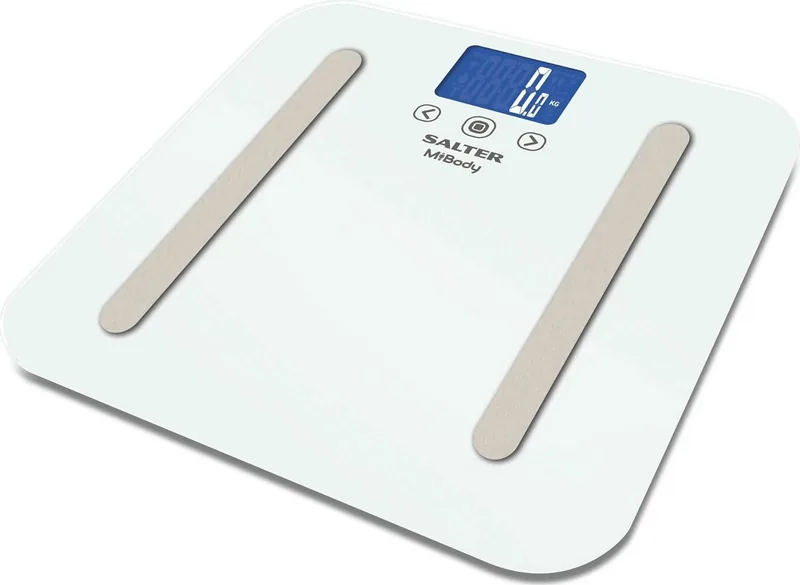
Body Trainer Scale with BMI Calculator
Frequently Asked Questions
Use the buttons to select your user number, then step on the centre of the platform with bare feet to turn the scale on. Wait for the zero reading and follow any on-screen prompts to confirm personal data.
Is this answer helpful?
The scale uses bioelectrical impedance analysis (BIA) to estimate body composition. It sends a small electrical signal through the body via your feet and uses the measured impedance along with your stored personal data to calculate estimates.
Is this answer helpful?
If the scale cannot connect, it saves measurements locally. Open the companion app and press the centre of the platform to wake the scale; stored data will sync automatically once a connection is available.
Is this answer helpful?
Place the scale on a hard, level surface, step on with clean, dry feet, and remain still. Take readings at consistent times (e.g., morning) and avoid measuring right after intense exercise or large fluid intake to reduce variability.
Is this answer helpful?
Press and hold the unit button on the rear of the scale until the communication animation appears. Ensure the app is open and Bluetooth is enabled on your device to complete pairing.
Is this answer helpful?
No. The scale stores readings internally when it cannot connect. Open the app and wake the scale later to transfer stored data; regular syncing prevents data backlog.
Is this answer helpful?
No. BIA provides estimates influenced by hydration, recent activity, and contact quality. Use trends over time rather than single readings to assess progress.
Is this answer helpful?
Advantages and Disadvantages
Advantages

- Multi-user memory stores separate profiles for several household members
- BIA analysis provides body composition estimates beyond simple weight
- Automatic sync to app when the scale is on and app is open
- Stores measurements locally if no connection and syncs later
- Simple button controls and rear unit button for pairing
Disadvantages

- BIA readings can vary with hydration, recent activity, and foot contact
- Requires a companion app and device for full tracking functionality
- Accuracy depends on a hard, level surface and correct user positioning
- Stored data sync requires app open or manual wake via platform press
- Battery replacement may be needed periodically
Product Specification
Operating Mode
Battery operated (3x AAA battery)
Material
Glass
Color
white
Weight Capacity
440.92 lb
Graduation
0.22 lb
Units of Measurement
kg, lb, st
Analysis Data
Body Mass Index, Body Fat, Body Water, Muscle Mass
Memory Function
User memory (for 4 people)
Display
yes
Special Features
Athlete mode, Automatic switch-on (Step-on)
Smart Home
App control (Bluetooth)
Standing Surface
12.60x12.60in (WxD)
Product Description
Salter 9154 WH3R digital body analyzer scale Manual
Discover the Salter 9154 WH3R
The Salter 9154 WH3R digital body analyzer scale is a feature-rich bathroom scale designed to give fast, reliable body measurements at home. This model uses BIA (bioelectrical impedance analysis) to estimate body composition alongside traditional weight readings. It's built for multiple users, stores readings locally, and syncs with companion apps when available, making it a practical tool for tracking progress over time.
How it works
Setup is straightforward: select your user number with the buttons, step onto the centre of the platform with bare feet to power the scale, and wait as it confirms personal settings and displays a zero reading. When zero is shown, step back on and remain still while the scale performs weight and BIA measurements. The rear unit button can be pressed and held to trigger the scale's communication animation and help pairing to an app or device.
Key features and user flow
- Multi-user memory: Assign and store multiple user profiles so each person’s results are tracked separately.
- BIA analysis: Measures body composition metrics in addition to weight, offering a more complete snapshot of fitness and health.
- Automatic and manual data sync: If the app is open and the scale is on, readings sync automatically. If no connection is available, measurements are saved locally and can be synced later by opening the app and stepping on the platform.
- Simple controls: Buttons allow quick selection of user number and manual pairing via a rear unit button.
Practical tips
Always use the scale on a hard, level surface and ensure your feet are clean and dry for the most accurate BIA readings. Remain still during measurement and allow the scale to display zero before stepping on for results. If syncing fails, keep the app open and press the platform to wake the scale; stored data will transfer when a connection is regained.
Notes
- BIA results are estimates and can be affected by hydration, recent exercise, and foot contact quality.
- Regularly update the companion app to maintain compatibility and ensure saved data syncs reliably.
- Replace batteries as needed and avoid placing the scale on soft flooring.
Search for 67,706 Manuals online


Type-in Brand or Model