
Salter 1193 WHDR Manual
PDF manual · 2 Pages
English



Quick check
Incorrect answer, please try again.
Chat with your Salter 1193 WHDR manual using AI
Get instant AI answers from your Salter 1193 WHDR manual
Ask anything about the Salter 1193 WHDR. Answers come from this manual, with the pages they are based on.
Ask a Question
Do you recommend 1193 WHDR?
Yes NoFrequently Asked Questions
Ensure Bluetooth is active on your device. Open the SALTER COOK app and tap the icon to connect. The scale will pair automatically with the nearest device.
Is this answer helpful?
The unit requires three AAA batteries. Ensure the positive and negative terminals are aligned correctly before insertion to power the device.
Is this answer helpful?
Yes. The scale allows unit toggling between milliliters and fluid ounces for water-based liquids like milk or stock. Ensure you tare the bowl first.
Is this answer helpful?
Do not immerse the scale in water. Clean only with a damp cloth. Wet electronics may cause failure or void the guarantee.
Is this answer helpful?
No. The fifteen-year guarantee covers defective workmanship or materials but excludes cosmetic deterioration, accidents or misuse of the product.
Is this answer helpful?
Press the unit button on the scale or tap the weight reading in the app to switch between g, oz, ml and fl.oz instantly.
Is this answer helpful?
Yes. When connected, the app links saved recipe weights to the scale display. You can set target weights and add ingredients easily.
Is this answer helpful?
Advantages and Disadvantages
Advantages

- Bluetooth connectivity integrates seamlessly with mobile recipes.
- Comprehensive fifteen-year domestic guarantee included.
- Versatile conversion supports grams, ounces and milliliters.
- Simple cleaning requires only a damp cloth.
- Auto switch-off and tare function save battery.
Disadvantages

- Only supports connection to one device at a time.
- Battery dependent power source requires replacements.
- Screen display reading can be affected by interference.
- Full smart features require installing a specific app.
- Manual setup instructions needed for first use.
Product Specification
Power Source
Battery power (3x AAA battery)
Material
Glass
Color
White
Weight Capacity
22.05 lbs
Increment
0.04 oz
Measurement Units
g, oz, ml
Features
Tare function, Timer
Smart Home
App Control (Bluetooth)
Product Description
Transform Your Kitchen Cooking Precision
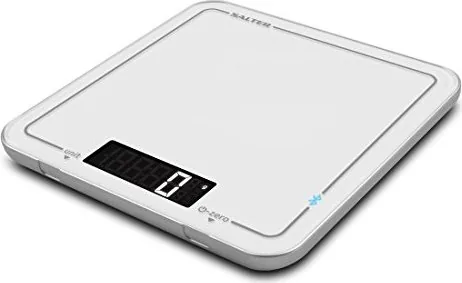
Elevate your culinary journey with the Salter 1193 WHDR digital kitchen scale. This innovative device connects seamlessly with the SALTER COOK app to provide a fully interactive weighing experience. Users can capture recipes from favorite websites or input homemade dishes directly into a personal digital cookbook accessible on any tablet or phone. Whether you are stocking groceries or cooking at home, staying connected is effortless and ensures every ingredient is measured accurately.
The core functionality relies on the Salter 1193 WHDR digital kitchen scale Manual guidance for setup, ensuring batteries are inserted correctly without errors. Simply press zero to switch on the unit and begin weighing ingredients. The Bluetooth connection allows real-time updates in the app, displaying weights directly on your screen. This feature helps in setting target weights automatically from saved recipes. You can name timers, mute alerts, and toggle between grams, ounces, milliliters, and fluid ounces easily to suit specific cooking needs. Regular maintenance helps keep the device running smoothly for years.
Key Features Highlighted Daily
Cleaning is straightforward using a damp cloth without immersion. The auto switch-off feature conserves battery life after periods of inactivity. Users must ensure the scale is paired with only one device at a time for optimal performance and stability. The system handles overload errors gracefully and indicates low battery levels via clear display codes on the front panel.
Comprehensive Warranty Protection
HoMedics Group Ltd stands behind this product with a fifteen-year guarantee for domestic use coverage. This warranty extends to functional failures due to defective materials or workmanship claims made by consumers. Cosmetic damage or misuse voids the guarantee entirely for users. Proper disposal is required under WEEE and Battery Directives to support environmental sustainability and safety.
Interference from radio devices can occasionally affect operation sensitivity. Reinstalling batteries often resolves temporary connectivity issues quickly. Contacting local agents or the provided helpline ensures support outside the UK remains accessible and helpful for customers. This scale enhances the cooking process by linking digital recipes to physical measurements efficiently and reliably.
Conclusion for Home Chefs
Integrating the Salter 1193 WHDR digital kitchen scale into your workflow streamlines meal preparation significantly for everyone. The combination of accurate measurement and smart technology creates a superior user experience for enthusiasts everywhere. Following the initial setup steps ensures longevity and consistent performance in modern kitchens globally without issues.
Search for 67,706 Manuals online


Type-in Brand or Model