
Runtastic Bluetooth Smart Combo Manual
PDF manual · 16 Pages
English



Quick check
Incorrect answer, please try again.
Ask a Question
Do you recommend Bluetooth Smart Combo?
Yes No
Markus Weber
5 months ago
Where can I find instructions on how to install the battery since it needs to be clipped in?
id_mollitia
6 months ago
How do I install the battery in the chest strap?

Manual.ly
6 months ago
The battery for this chest strap is a CR2032 coin cell that must be inserted into the sensor module and secured by clamping the cover shut. Please ensure the positive side faces up and that the contacts are clean before closing the compartment. If you are experiencing connection issues, please check that the battery is seated correctly.

Sarah Jenkins
4 months ago
Does this heart rate monitor connect reliably to iOS devices during long runs?
porro33
6 months ago
Does the chest strap connect reliably to smartphones and fitness apps, or are there common pairing issues?
Manual.ly
6 months ago
Most users report that the chest strap connects quickly and works seamlessly with the Runtastic app and other fitness devices. The battery life is also praised for endurance training. However, a few users have experienced connection drops after 1-2 minutes despite troubleshooting steps like reinstalling the app or trying different phones. We recommend ensuring the battery is properly inserted and checking for firmware updates if you encounter persistent connectivity problems.
Stephen Davies
6 months ago
Is the battery installation process clear in the manual, or do users struggle with how to insert it?
Alice Wilson
4 months ago
Does the heart rate chest strap connect reliably to the Runtastic app and fitness equipment, and how is the battery installed?
Manual.ly
4 months ago
Most users report quick, straightforward pairing with the Runtastic app, iPhone, and compatible fitness equipment, with plausible heart-rate readings. However, one review reported the connection dropping after 1-2 minutes on multiple phones. Ensure the battery is properly clipped into place in the sensor before use, as this installation detail may not be obvious. If disconnections continue, check the battery fit and app permissions, then try pairing again.
VoluptasOmnis72
4 months ago
Is the chest strap easy to connect to the Runtastic app and iPhone, and are the heart-rate readings reliable?
Manual.ly
4 months ago
Most users report quick, straightforward pairing with the Runtastic app, iPhone, and compatible gym equipment. The displayed heart-rate values were generally considered plausible, with one comparison to a Garmin device showing only minimal differences. Please note that individual connection performance can vary; one reviewer experienced repeated signal dropouts after 1-2 minutes.
Janet Parisian
4 months ago
Does the chest strap reliably stay connected to a smartphone and the Runtastic app during workouts?
Manual.ly
4 months ago
Most users report quick, straightforward pairing with the Runtastic app, iPhone, and compatible gym equipment, with plausible heart-rate readings. However, one review reported that the phone connection dropped after 1-2 minutes even after troubleshooting. Ensure the battery is correctly clipped in, Bluetooth is enabled, and the strap contacts are moistened before use. If dropouts continue, test with another device and contact support.
Maisie Miller
5 months ago
Does the chest strap connect reliably to the Runtastic app and iPhone, and can it also be used with gym equipment?
Manual.ly
5 months ago
Most users report quick, straightforward pairing with the Runtastic app, iPhone, and compatible fitness equipment. Heart-rate readings are generally described as plausible and close to comparison devices. A small number of users experienced connection dropouts after a few minutes. If this happens, check that the battery is correctly clipped in, moisten the electrodes, and reconnect the strap in the app or Bluetooth settings.
ConsequaturExercitationem90
4 months ago
Is the heart rate strap easy to connect to the Runtastic app and iPhone, and does the connection stay stable?
Manual.ly
4 months ago
Most users report quick, straightforward pairing with the Runtastic app, iPhone, and compatible gym equipment, with plausible and accurate heart-rate readings. A small number of users experienced disconnections after one or two minutes. Ensure the battery is correctly clipped into place, the strap contacts are slightly moistened, and Bluetooth permissions are enabled before use.
Ryan Ward
4 months ago
Does the chest strap connect reliably to the Runtastic app and iPhone, or can the connection drop during a workout?
Manual.ly
4 months ago
Most reviewers report quick, reliable pairing with the Runtastic app, iPhone, and compatible gym equipment, with plausible heart-rate readings. One reviewer experienced disconnects after 1-2 minutes despite troubleshooting. Ensure the battery is correctly clipped in, the strap is moistened and fitted snugly, and Bluetooth permissions are enabled. If dropouts continue, try a fresh battery and test with another device.
Lena Vogt
4 months ago
Does the Runtastic chest strap connect reliably to the app and iPhone during workouts?
Manual.ly
4 months ago
Most users report quick, reliable pairing with the Runtastic app, iPhone, and compatible fitness equipment, with plausible heart-rate readings. Make sure the battery is correctly clipped into place and the strap contacts are properly moistened before use. If the connection drops, restart Bluetooth and the app, then re-pair the sensor.
Frequently Asked Questions
It is designed to measure heart rate during exercise and transmit that information wirelessly to compatible apps or devices. The data can be used for live effort monitoring, training zones, workout records, and post-exercise review.
Is this answer helpful?
Place the adjustable band around the chest just below the chest muscles, with the sensor centered and the electrode areas against the skin. The strap should be snug enough to stay in place without restricting breathing. Moistening the electrodes before use can improve contact.
Is this answer helpful?
Activate Bluetooth on the phone, open a compatible fitness app, and use the app's sensor or heart-rate monitor connection option. Wear the strap during pairing so it wakes up. If it is not found, move closer, restart the app, and check for another active connection.
Is this answer helpful?
No. Support depends on the app or device and the wireless protocol it accepts. Check the specifications of your phone, watch, bike computer, or fitness platform before relying on the strap for a particular training setup.
Is this answer helpful?
Common causes include dry or dirty electrode areas, a loose strap, a low battery, or an interrupted wireless connection. Moisten and clean the contact surfaces, adjust the fit, confirm pairing, and replace the battery if needed.
Is this answer helpful?
Detach the sensor module when appropriate, then clean or rinse the textile strap according to its care instructions. Removing sweat residue after demanding sessions helps maintain comfort and may support reliable electrode contact on future workouts.
Is this answer helpful?
Advantages and Disadvantages
Advantages

- Chest-based measurement can provide responsive heart-rate feedback during changing workout intensity.
- Bluetooth Smart connectivity supports use with compatible mobile apps and training devices.
- Adjustable, lightweight strap is designed for hands-free use in running, cycling, and gym sessions.
- Heart-rate zone data can help users pace intervals, endurance training, and recovery workouts.
Disadvantages

- Compatibility depends on the wireless standards and app support of the receiving device.
- A secure fit and moistened electrodes are needed for the most consistent readings.
- Chest straps may feel less convenient than wrist sensors for some casual users.
- Battery status, cleaning, and pairing checks add routine maintenance requirements.
Product Specification
Type
Chest strap
Interfaces
Bluetooth
Weight
3.14 oz
Product Description
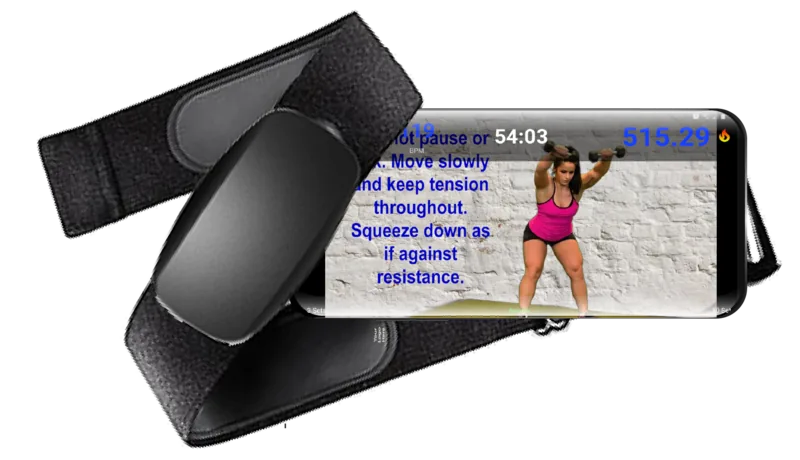
Runtastic Bluetooth Smart Combo Chest Strap
The Runtastic Bluetooth Smart Combo Chest Strap is a fitness accessory designed for athletes who want heart-rate information that is more responsive than estimates from a wrist-based sensor. Worn around the chest, it detects cardiac activity during training and sends compatible data wirelessly to supported fitness apps and devices. It is a practical option for runners, cyclists, gym users, and anyone building workouts around heart-rate zones.
Accurate Training Data for Everyday Workouts
A chest strap sits close to the heart, making it well suited to tracking changes during intervals, hill sessions, endurance runs, and recovery work. The Runtastic Bluetooth Smart Combo Chest Strap helps users see how hard they are working in real time, so they can adjust pace or effort before a workout becomes too easy or overly demanding. The live reading can also make it easier to follow structured sessions based on target heart-rate ranges.
For people searching for the Runtastic Bluetooth Smart Combo Chest Strap Manual, the most useful setup principle is simple: moisten the electrode areas, position the strap securely below the chest, and pair the sensor with a compatible app or receiver before starting an activity. A snug, comfortable fit is important because loose placement can affect signal consistency, especially during high-motion exercise.
Bluetooth Smart and Broad Training Flexibility
Bluetooth Smart connectivity allows the strap to communicate with compatible smartphones and selected training platforms. The Combo design is intended to offer flexible connection options, which can be helpful for users who train with more than one device type. Rather than relying on a single workout environment, athletes can use the sensor as part of a wider tracking routine, provided their chosen app or receiver supports the relevant wireless standard.
The strap is lightweight and designed to remain unobtrusive under typical training clothing. Its adjustable band helps accommodate different body shapes, while the compact sensor module avoids the bulk of a watch or handheld monitor. This makes it especially useful when a clear wrist display is not the priority and dependable heart-rate feedback is.
Care, Pairing, and Long-Term Use
Before each session, check that the sensor is attached correctly and that the contact surfaces are clean. After exercise, detach the module when appropriate and rinse the soft strap according to its care guidance. Regular cleaning helps remove sweat residue and can support comfortable, reliable use over time.
Pairing issues are often solved by confirming that Bluetooth is active, closing other apps that may already be connected to the sensor, and moving close to the receiving device. Battery condition also matters, so replacing a depleted battery should be considered if readings fail to appear.
Notes
- Confirm compatibility with your phone, app, watch, or bike computer before purchase.
- Use the chest strap as a training aid, not as a medical diagnostic device.
- Follow the Runtastic Bluetooth Smart Combo Chest Strap Manual guidance for battery replacement, cleaning, and pairing details.
Search for 67,706 Manuals online


Type-in Brand or Model
Graham Owen
5 months ago
Does the chest strap connect reliably to smartphones and apps, and is it easy to set up?
Manual.ly
5 months ago
The Runtastic chest strap generally connects quickly and reliably to compatible apps like Runtastic on both Android and iOS devices. Most users report seamless pairing upon app startup. However, a few users have experienced connection drops after 1-2 minutes, which may require restarting the app or checking Bluetooth settings. For best results, ensure the sensor battery is properly inserted and the electrodes are moistened before use.