
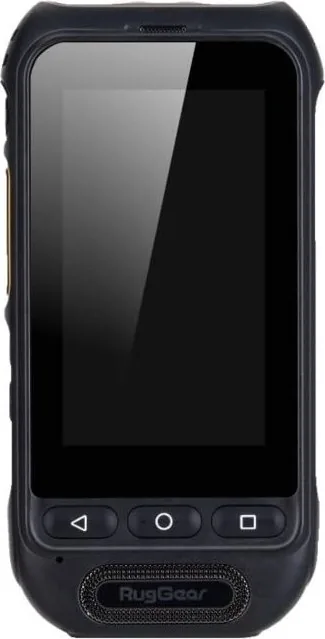
RugGear RG360 Manual
PDF manual · 72 Pages
English



Quick check
Incorrect answer, please try again.
Chat with your RugGear RG360 manual using AI
Get instant AI answers from your RugGear RG360 manual
Ask anything about the RugGear RG360. Answers come from this manual, with the pages they are based on.
Ask a Question
Do you recommend RG360?
Yes NoDo you recommend RG360?
Yes NoFrequently Asked Questions
Long press the SOS key for three seconds. This triggers an automatic call to an emergency number stored in your device, provided you have the optional LWP app installed.
Is this answer helpful?
The default password for the Lone Worker Protection application is 112. You should change this immediately after first use for security.
Is this answer helpful?
No. You must only use valid RugGear licensed chargers and cables. Unlicensed products may cause the battery to explode or permanently damage the device.
Is this answer helpful?
While the device is water-resistant and dustproof, it is designed for wet environments and rain. It is not rated for deep underwater immersion unless specified by additional accessories.
Is this answer helpful?
Remove the battery cover by unscrewing the assembly screw. Insert the Micro SIM and Micro SD cards into their respective slots, then reinsert the battery and secure the cover.
Is this answer helpful?
Advantages and Disadvantages
Advantages

- Dedicated SOS key for immediate emergency assistance
- Customizable PTT button for instant team communication
- Robust design capable of withstanding extreme temperatures
- Clear audio quality with noise-reduction microphones
- Waterproof and dustproof sealing for harsh environments
Disadvantages

- Requires specific RugGear licensed chargers to avoid damage
- Battery replacement requires tools and careful handling
- Limited to Micro SIM cards rather than Nano SIM
- PTT customization requires initial app setup configuration
- Must maintain distance from medical devices like pacemakers
Product Specification
Operating System
Android 10.0 (Factory / Android Go Edition)
Display
3.0", 854x480 Pixels, IPS, Capacitive Touchscreen, Flat, 327ppi
Rear Camera
2.0MP, LED Flash
Front Camera
No
Interfaces
USB-C 2.0 (480Mb/s, OTG), 3.5mm Jack, Wi-Fi 4 (WLAN 802.11a/b/g/n), Bluetooth 4.2, NFC
Sensors
Accelerometer, Proximity Sensor, Light Sensor, Compass
SoC
Mediatek MT6739, 64bit
CPU
4x 1.50GHz Cortex-A53
GPU
PowerVR GE8100
RAM
1GB
Storage
8GB, microSD Slot (Dedicated, Up to 128GB)
Navigation
A-GPS, GLONASS
Modem
GSM, UMTS, LTE
Frequency Bands
2G (850/900/1800/1900), 3G (B1/B2/B4/B5/B8), 4G (B1/B2/B3/B4/B5/B7/B8/B20/B28/B38/B40/B41)
Battery
3000mAh, Removable
Form Factor
Bar
Housing Material
Plastic (Back), Plastic (Frame)
SIM Form Factor
Nano-SIM, eSIM
Features
Dual-SIM, IP68 Certified, MIL-STD-810H Certified, Emergency Call, Notification LED (Front)
Color
Black
Dimensions
4.65x2.28x1.02 in
Weight
6.95 oz
Screen-to-Body Ratio
36.2%
Product Description
RugGear RG360 Black: The Ultimate Rugged Companion
The RugGear RG360 Black stands as a testament to durability and advanced functionality in the world of mobile communications. Designed for professionals who operate in demanding environments, this device is built to withstand harsh conditions while delivering reliable performance. Whether you are working on a construction site, navigating through extreme weather, or managing emergency response operations, the RG360 ensures you stay connected when it matters most.
At the heart of the RG360 lies a robust design that prioritizes safety and longevity. The device features a comprehensive array of keys and buttons tailored for efficiency. A dedicated SOS key allows users to trigger an emergency alert with a simple long press, automatically dialing pre-set numbers when paired with the Lone Worker Protection app. This feature provides peace of mind for workers operating alone. The customizable PTT button further enhances communication, allowing instant push-to-talk access for team coordination without navigating complex menus.
Connectivity is seamless with a Type-C USB interface supporting fast data transfer and charging. The audio capabilities are equally impressive, featuring a 3.5mm jack for wired headsets and microphones, alongside noise-reduction sub-micros for clear hands-free calls. The rear camera captures high-quality images even in low light, making it ideal for documentation tasks. Safety is paramount, with strict guidelines regarding temperature ranges and charging protocols to prevent overheating or battery issues. The device supports operation in temperatures from -10°C to 50°C, ensuring reliability in both freezing and scorching climates.
Security and privacy are maintained through rigorous testing against Specific Absorption Rate (SAR) limits, ensuring safe usage near the body. The inclusion of a waist clip offers convenient portability, keeping the device accessible at all times. With its rugged build, waterproofing, and dustproofing capabilities, the RugGear RG360 Black is not just a phone; it is a vital tool for modern industry professionals who demand excellence and resilience.
Search for 67,732 Manuals online


Type-in Brand or Model