
Ruark Audio R410 Manual
PDF manual · 83 Pages
English



Quick check
Incorrect answer, please try again.
Chat with your Ruark Audio R410 manual using AI
Get instant AI answers from your Ruark Audio R410 manual
Ask anything about the Ruark Audio R410. Answers come from this manual, with the pages they are based on.
Ask a Question
Do you recommend R410?
Yes NoFrequently Asked Questions
Follow the setup wizard that launches on first power up. Select your language and connect to a network using Ethernet or Wi-Fi. Rotate the control knob to navigate and press to select options.
Is this answer helpful?
Yes, this system supports Apple AirPlay 2, Google Chromecast built-in, and Spotify Connect for seamless audio streaming from compatible devices over your network.
Is this answer helpful?
The standard guarantee is two years from purchase date. Registering your product online extends the warranty coverage to three years for additional peace of mind.
Is this answer helpful?
Charge the remote for ten minutes first. Connect the provided USB cable to the unit. In the menu, select system, remote, and pair remote. Hold the remote near the unit and press skip forward and back keys until the LED flashes.
Is this answer helpful?
The unit features an AC inlet, sub output, phono input, line input, optical input, HDMI eARC, USB C, Ethernet port, chassis ground, and DAB-FM antenna socket for comprehensive connectivity.
Is this answer helpful?
Yes, it includes a dedicated MM phono input allowing you to connect a turntable directly for high fidelity analog playback without needing an external preamplifier.
Is this answer helpful?
Yes, updates happen Over-The-Air to provide new features and security patches. Do not power off during installation to avoid system damage.
Is this answer helpful?
Advantages and Disadvantages
Advantages

- High power output with 120W Class-D amplifier for excellent sound quality
- Extensive streaming support including AirPlay 2, Chromecast, and Spotify Connect
- Includes versatile audio inputs like Phono, Line, Optical, and HDMI eARC
- Built-in DAB and FM tuner with RDS functionality for radio listening
- Elegant design with 100mm woofers and 20mm silk dome tweeters
Disadvantages

- Remote control requires charging before first use for proper operation
- Large dimensions and 9.5kg weight make placement less flexible
- Standby power consumption is 2W when not connected externally
- No user-serviceable parts inside requiring professional servicing only
- Warranty extension to three years requires online registration immediately
Product Specification
Consists of
CD Player, Tuner, Integrated Speakers, All-in-One Device
Power
120W RMS
Frequency Range
35Hz-22kHz
Tuner
FM, DAB, DAB+, Internet Radio
Audio Formats
AAC, FLAC, MP3, WAV, WMA
Streaming Clients
Amazon Music, Apple AirPlay, Deezer, Google Cast, Qobuz, Spotify, Tidal
Audio Connections
Digital Audio In (optical), Stereo Line In (RCA), Phono In (RCA), Sub Out (RCA)
Additional Connections
USB-A 2.0, HDMI, RJ-45
Wireless
Bluetooth 5.1 LE, AAC, aptX, aptX HD, Wi-Fi 6 (802.11a/b/g/n/ac/ax)
Features
Charging (USB-C), App Control
Device Dimensions
22.05x5.91x11.42in (WxHxD)
Weight
20.94 lbs
Product Description
Experience Premium Audio with the Ruark Audio R410
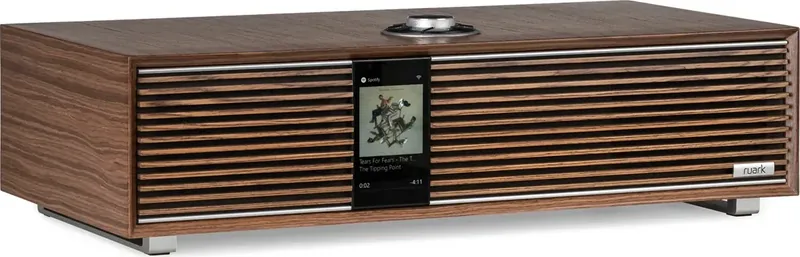
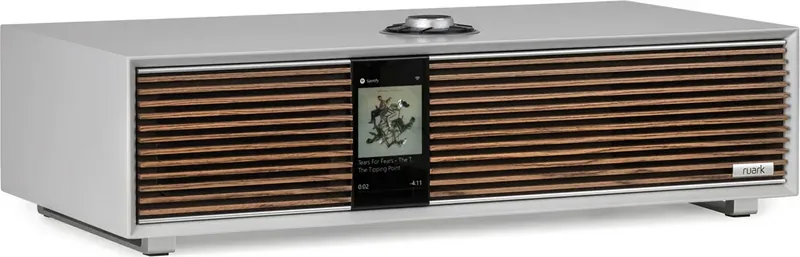
Welcome to a world of exceptional sound where precise engineering meets music perfectly today. The Ruark Audio R410 Integrated Music System stands out as a true centerpiece for any audiophile home. Designed to be seen and engineered to be heard, this unit offers a premium listening experience. It features a robust 120W Class-D Hi-Fidelity power amplifier driving every speaker efficiently. The system includes two 100mm fibre composite bass mid woofers providing punchy low ends and 20mm silk dome tweeters ensuring crisp highs. This combination ensures rich bass and crystal clear highs for every music genre. Connectivity is vast and versatile. You have Apple AirPlay 2 support and Google Chromecast built-in allows streaming from any device. Spotify Connect works alongside TIDAL Connect capabilities too. Internet radio and DAB-FM tuners are supported with RDS functionality. Following the guidance in the Ruark Audio R410 Manual helps users maximize this potential.
Setting up the device is straightforward for everyone. A setup wizard guides you when powering on. You can connect via Ethernet cable directly or Wi-Fi network. The control knob allows volume adjustment and menu browsing. Pressing it selects options. There is a dedicated standby button and source selector. An LED indicates system status and Bluetooth readiness. Safety is paramount for device longevity. Do not expose the unit to rain. Ensure space around the device. The dimensions are 133mm height by 560mm width. Weighing 9.5kg, it sits firmly on surfaces. Do not place near heat sources like radiators.
Care instructions suggest cleaning with a soft cloth. Avoid wax sprays. Natural wood finishes vary over time. Power consumption is low at 5W idle. The guarantee covers defects for two years generally. Registering online extends this to three years. Registering online extends warranty coverage significantly for owners. This ensures long-term protection against faults. If errors occur, refer to support area. Streaming services vary, check updates. The remote control pairs via menu. Hold unit near remote during pairing. Setup wizard configures network access immediately. Remote pairing confirms connection on display. Software updates happen Over-The-Air. Never power off during installation. Enjoy music with stereo plus 3D audio.
This system represents quality in audio engineering. It integrates wireless tech with tuner features. Phono and line inputs add versatility. HDMI eARC connects to TVs. USB C ports allow charging. Support website lists detailed specifications. Consult support website. Disposal must follow regulations. Avoid overloading outlets. Long term exposure to loud music damages hearing. Avoid extreme volume levels. Leave space for airflow. Do not install in confined spaces. Read safety guidelines. Manual content remains available for reference. Contact Ruark dealer if power cord does not fit.
Search for 67,732 Manuals online


Type-in Brand or Model