
Rollei 2.4 GHz Remote Shutter Release Manual
PDF manual · 72 Pages
English



Quick check
Incorrect answer, please try again.
Chat with your Rollei 2.4 GHz Remote Shutter Release manual using AI
Get instant AI answers from your Rollei 2.4 GHz Remote Shutter Release manual
Ask anything about the Rollei 2.4 GHz Remote Shutter Release. Answers come from this manual, with the pages they are based on.
2.4 GHz Remote Shutter Release Maintenance Schedule
Replace transmitter or receiver batteries immediately if the low battery symbol appears on the display.
Ensure TIMER ACTIVE, SET and RELEASE indicators are not flashing to reduce power consumption before extended non-use.
Ask a Question
Do you recommend 2.4 GHz Remote Shutter Release?
Yes NoFrequently Asked Questions
It is used to trigger a Sony camera remotely, helping reduce shake and making it easier to shoot portraits, long exposures, self-timers, and timed sequences from a distance.
Is this answer helpful?
The remote can operate at distances of up to 50 meters in open areas. Actual performance may vary depending on obstacles, interference, and the shooting environment.
Is this answer helpful?
Yes. It supports programmable timer shooting with delay, exposure, interval, and shot-count settings. This makes it suitable for time-lapse or repeated interval-based photography.
Is this answer helpful?
Yes. Besides timer mode, it also supports manual shutter release. You can half-press to focus and fully press to take a photo, or hold the shutter for longer exposures.
Is this answer helpful?
The transmitter uses two AAA alkaline batteries, and the receiver uses one CR2 3V alkaline battery. Battery status should be checked before use, especially for long sessions.
Is this answer helpful?
A low-battery indication appears on the display when power is running low. If that happens, replace the batteries before continuing to shoot to avoid interruptions.
Is this answer helpful?
Advantages and Disadvantages
Advantages

- Stable 2.4 GHz wireless control for dependable triggering.
- Up to 50 m range in open areas gives freedom for remote shooting.
- Timer, delay, interval, and shot-count settings support advanced workflows.
- Manual release mode is useful for quick captures and long exposures.
Disadvantages

- Requires correct camera setup and compatible connection before use.
- Battery management is important; low power can affect performance.
- Not waterproof, so moisture and humidity can cause problems.
- Timer accuracy may not match a standard watch or clock precisely.
Product Specification
Max. wireless range
164 ft
Suitable for
Sony
Product Description
Rollei Wireless Remote Shutter Release for Sony
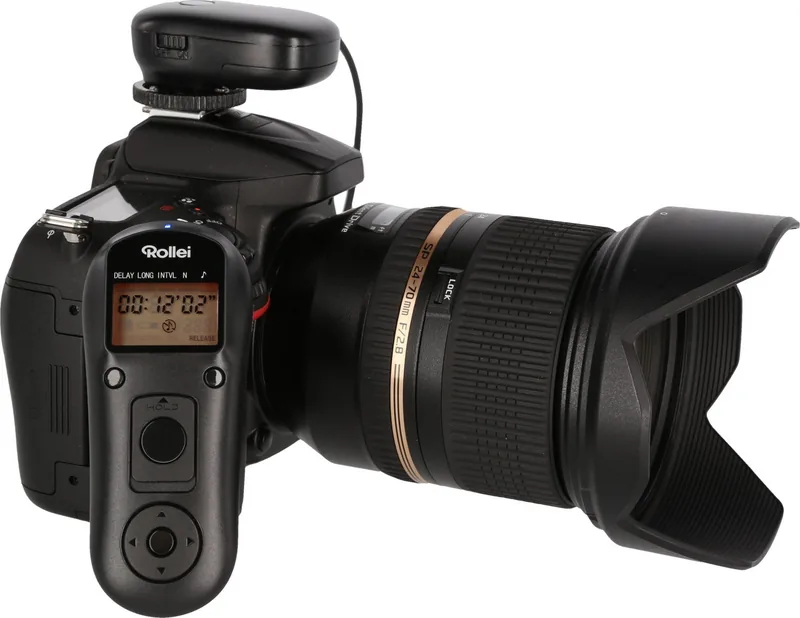
The Rollei wireless remote shutter release for Sony Manual points to a compact and practical accessory built for photographers who want more control without touching the camera. Using a 2.4 GHz wireless connection, this remote system is designed to deliver a stable trigger signal at distances of up to 50 meters in open space. That makes it a helpful tool for portraits, long exposures, self-portraits, and situations where even a small camera shake can affect the result.
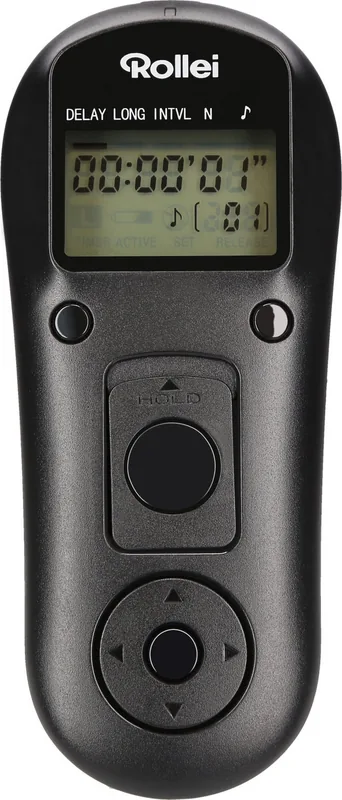
At its core, the system includes a transmitter and a receiver, both designed with a clear LCD interface and straightforward controls. The transmitter offers a shutter button, settings button, directional navigation, timer start/stop, and a lock/backlight function. The receiver mounts to the camera’s hot shoe and connects through a 2.5 mm port, giving the setup a practical wireless feel while still maintaining a reliable physical connection to the camera.
One of the strongest features is the programmable timer mode. Users can define delay, exposure time, interval time, and number of shots, which is ideal for time-lapse work or repeated shooting sessions. The remote also supports manual release, so it can function as a traditional shutter trigger when speed and simplicity matter more than automation. Helpful status lights and sound cues make it easier to follow focus and release actions during use.
For Sony users, the appeal is in the flexibility. The remote is not limited to one style of shooting; it adapts to manual exposures, bulb mode, continuous autofocus, and single-shot workflows. The unit also supports a hold position for longer exposures, which is especially useful for night photography or creative motion blur. A lock function helps prevent accidental button presses during transport or active shooting.
The design is practical, but it also expects careful handling. The batteries must be installed correctly, the receiver should be switched off when not in use, and the display should be checked for low-power alerts. The manual also stresses moisture protection, proper storage, and safe battery replacement to avoid malfunction. In short, this is a versatile remote aimed at photographers who want more precision and less camera contact.
Notes
- Best used with compatible Sony camera remote-release inputs.
- For timer shooting, the interval should exceed the exposure time.
- If the low-battery icon appears, replace batteries before long shoots.
- Keep the remote dry and avoid sudden temperature changes.
Search for 67,706 Manuals online


Type-in Brand or Model