
Road Angel Halo Pro Manual
PDF manual · 30 Pages
English



Quick check
Incorrect answer, please try again.
Chat with your Road Angel Halo Pro manual using AI
Get instant AI answers from your Road Angel Halo Pro manual
Ask anything about the Road Angel Halo Pro. Answers come from this manual, with the pages they are based on.
Ask a Question
Do you recommend Halo Pro?
Yes NoFrequently Asked Questions
Download the Road Angel App from the App Store or Google Play. Press the plus icon in the app to start pairing, then connect to the camera's Wi-Fi network using the default password 1234567890 to access live feeds and settings.
Is this answer helpful?
The device supports TF cards up to 128GB Class 10. It performs best with high endurance cards to handle loop recording, and must be formatted by the device for the first time to ensure compatibility.
Is this answer helpful?
Yes, the halo pro has a parking mode feature. It will record when a change in the G-sensor detects movement. This feature needs a permanent power source, often requiring a hardwiring kit if you want it to work when the ignition is off.
Is this answer helpful?
Yes, the companion app includes video editing features. You can crop clips, add text, change filters, and manage sound before saving them to your phone or sharing them. This is convenient for creating clips for social media.
Is this answer helpful?
If you have Scanning always available enabled, it might interfere. Go to Wi-Fi settings in the app and disable it. Ensure your phone is near the camera as distance can also cause disconnection issues.
Is this answer helpful?
Yes, you can download footage to your phone and then transfer to a PC. The files are in MP4 format. This is useful for reviewing HD recordings without relying solely on mobile playback quality.
Is this answer helpful?
Advantages and Disadvantages
Advantages

- High resolution front recording at 1440P
- Dual camera system for front and rear coverage
- Integrated GPS for route tracking and data
- Mobile app allows easy video editing and sharing
- Parking guard mode with G-sensor detection
Disadvantages

- Parking mode requires separate hardwiring kit purchase
- Android mobile data is disabled when connected
- Requires manual formatting of SD card on first use
- Wi-Fi signal strength can impact app connection speed
Product Specification
Sensor
CMOS
Memory Card
microSD/microSDHC/microSDXC
Video
MPEG-4, 2560x1440@25p (16:9)
Photo Resolution
JPEG
Viewing Angle
140°
Display
No
Ports
USB
Wireless
Wi-Fi (WLAN), GPS
Features
Motion Sensor, Loop Recording, Rear Camera
Product Description
Road Angel Halo Pro Overview
Features and Installation
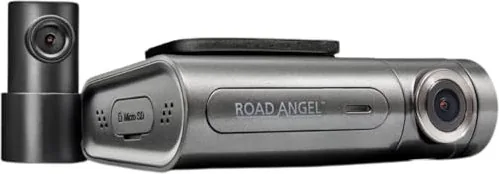
The Road Angel Halo Pro represents a significant leap in dash cam technology, offering drivers peace of mind with its dual-camera system. This device is designed to capture high-quality footage from both the front and rear of your vehicle, ensuring comprehensive coverage on every journey. Installing the unit is straightforward, typically involving a mount on the windscreen and connecting power cables correctly. Drivers should refer to the official Road Angel Halo Pro Manual for detailed configuration steps to avoid potential damage from incorrect power insertion. The package often includes front and rear cameras along with necessary mounting pads and cables for easy setup.
App Connectivity and GPS
Once set up, the Halo Pro connects via Wi-Fi to a dedicated mobile application, transforming your smartphone into a remote control center. You can access live feeds, review footage, and manage settings directly from the app. The front camera records in stunning 1440P resolution with a wide viewing angle, while the rear camera captures 720P video, perfect for monitoring traffic behind you. GPS telematics are integrated, providing data on speed, elevation, and route tracking within the application interface. This data helps drivers understand their routes better and analyze driving patterns over time accurately.
Parking and Battery Management
Parking mode is another standout feature, allowing the camera to record while the vehicle is stationary. However, this requires a hardwiring kit for permanent power to function correctly. When activated, the device monitors for impacts using its G-sensor, protecting your valuable footage during potential incidents. The companion app further enhances functionality by allowing video editing before sharing, such as adding filters or cropping clips. This makes sharing evidence or memories much easier for users who want to document specific moments from their trip.
Technical Specifications
Battery management and storage are critical aspects covered in the user guide. The device supports micro SD cards up to 128Gb, ensuring ample space for loop recording which overwrites old footage automatically. Always ensure the SD card is formatted by the device before initial use to prevent corruption issues. Storage temperatures range from minus 20 to 70 degrees Celsius, making it suitable for various climates. Cleaning the lens regularly maintains image quality since foreign objects can reduce performance significantly and cause blurry pictures during night driving.
Final Thoughts
Connectivity remains a focal point, with Wi-Fi enabling seamless data transfer between the camera and your phone. Users should be aware that connecting to the Halo Pro Wi-Fi disables mobile data on Android devices temporarily while connected to the system. The app interface displays real-time driving scores and mileage, helping monitor driving behavior without distraction. Safety warnings emphasize checking the view obstruction to ensure compliance with traffic regulations and visibility rules. Overall, the Halo Pro is a robust tool for modern drivers seeking advanced protection and recording capabilities for their daily commutes and long travels alike. It serves as a reliable safety net on the road.
Search for 67,706 Manuals online


Type-in Brand or Model