
Ring Stick Up Cam Plug-In Manual
PDF manual · 7 Pages
English



Quick check
Incorrect answer, please try again.
Chat with your Ring Stick Up Cam Plug-In manual using AI
Get instant AI answers from your Ring Stick Up Cam Plug-In manual
Ask anything about the Ring Stick Up Cam Plug-In. Answers come from this manual, with the pages they are based on.
Ask a Question
Do you recommend Stick Up Cam Plug-In?
Yes No
Marcus Schmidt
6 months ago
Does the device maintain high performance over time, and is there a warranty for longevity issues?

Manual.ly
6 months ago
Our units are built for durability and undergo strict quality control. We include a 24-month warranty covering manufacturing defects. If performance drops within the warranty period, we offer repairs or replacements. Regular maintenance also helps ensure long-term stability for satisfied users.
Stanley Barrows
6 months ago
Is the performance reliable over time?
Manual.ly
6 months ago
Yes, our products are designed for long-term reliability. We stand behind our quality and offer support if any issues arise.

Sara Klein
4 months ago
How do I maintain consistent performance after the initial purchase?
Alexandra Hall
4 months ago
Is the product reliable over the long term, or does its performance decline after some use?
Manual.ly
4 months ago
The review indicates that performance has been satisfactory so far. Long-term reliability can depend on usage and maintenance, but the product is intended to provide consistent performance over time.
Frequently Asked Questions
Connect the included power cable to the camera and plug it into an outlet. Download the Ring app, choose device setup, select security cameras, and follow the on-screen instructions. Keep your Wi-Fi password available for the connection process.
Is this answer helpful?
Yes. It can be placed indoors or outdoors. For outdoor installation, remove the indoor plug cover, connect the supplied outdoor power cable, and secure the plug as needed with the included screws.
Is this answer helpful?
The camera can stand on a flat surface such as a shelf or table, or it can be mounted on a wall. Select a location with the desired viewing angle, reliable Wi-Fi access, and a nearby electrical outlet.
Is this answer helpful?
Open the Ring app and select Live View after setup. Use the live video feed to verify coverage, then adjust the camera angle or placement until the view meets your needs.
Is this answer helpful?
A flashing blue light after setup may mean the camera is updating its software. Leave the camera plugged in while the light is flashing so the update can finish properly.
Is this answer helpful?
Yes. Optional security screw positions can help secure the camera stand and battery compartment. A Phillips screwdriver is required to install them and is not supplied with the camera.
Is this answer helpful?
Advantages and Disadvantages
Advantages

- Plug-in power supports continuous operation without regular battery charging.
- Works on a table, shelf, or wall for flexible placement.
- Ring app provides guided setup and real-time Live View.
- Outdoor installation is supported with the included outdoor power cable.
- Optional security screws add protection for the stand and battery compartment.
Disadvantages

- A nearby electrical outlet is required for installation.
- A Phillips screwdriver is needed for mounting and security screws but is not included.
- Ceiling installation requires a separately available ceiling mount.
- Outdoor setup requires changing to the dedicated outdoor power cable.
- Camera placement depends on available Wi-Fi coverage and power access.
Product Specification
Resolution
1920 x 1080 pixels
Viewing angle
110 degrees (horizontal), 57 degrees (vertical), 130 degrees (diagonal)
Wireless
Wi-Fi 4 (WLAN 802.11b/g/n)
Microphone
integrated
Speaker
integrated
Illumination
IR illumination (32.81 ft)
Protection rating
IP64
Housing
white, suitable for outdoor use
System control and operation
Mobile app (Android, iOS)
Zone and analysis functions
Motion detection
Special features
integrated siren
Manufacturer warranty
1 year
Product Description
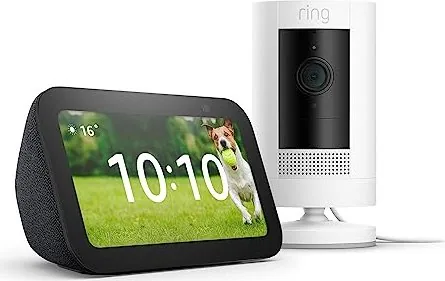
Ring Stick Up Cam Plug-In White: Flexible Plug-In Security
The Ring Stick Up Cam Plug-In White is a versatile security camera designed for convenient monitoring indoors or outdoors. Its clean white finish blends easily with many home settings, while its plug-in power design helps provide continuous operation without the routine charging associated with battery-only cameras. With a nearby power outlet and a Wi-Fi connection, the camera can be set up through the Ring app and positioned where coverage matters most.
Easy app-guided setup
Getting started is straightforward. Connect the included power cable to the rear of the camera, plug it into an outlet, and follow the guided steps in the Ring app. During setup, you will need your Wi-Fi password. Once connected, the app lets you access Live View, making it easy to check the camera feed in real time and confirm that the selected angle covers the intended area.
The Ring Stick Up Cam Plug-In White Manual approach emphasizes checking the front blue LED during setup. A flashing light after connection can indicate that the camera is updating its software. Keeping the unit plugged in until the update is complete helps ensure a smooth installation.
Place it where you need it
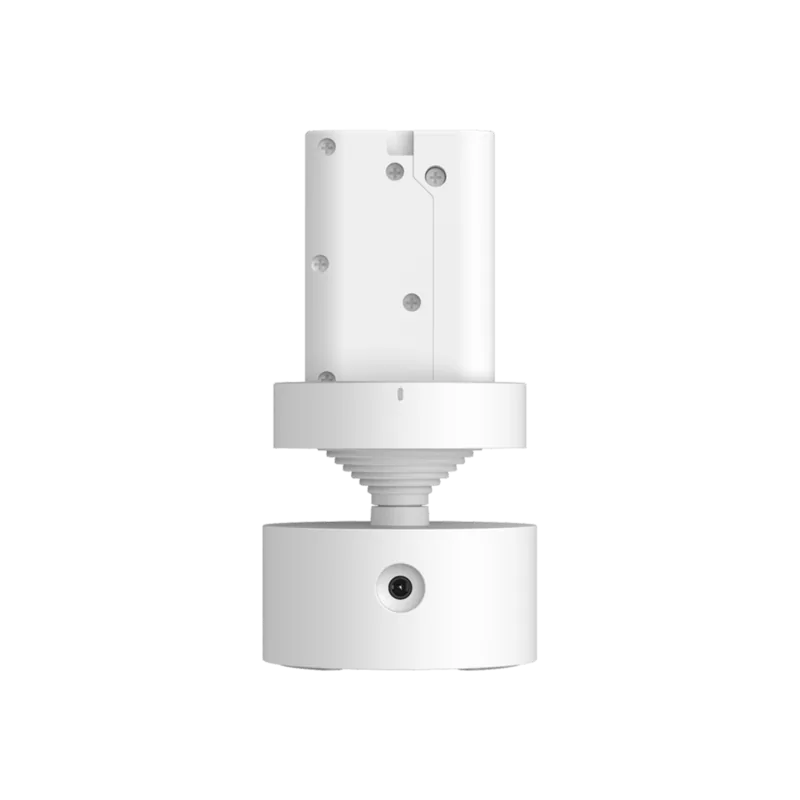
This camera can sit on a flat surface such as a table or shelf, or it can be mounted on a wall. The adjustable stand supports angle changes, including a downward-facing view when needed. After positioning the camera, review the live feed in the Ring app to fine-tune its direction before finalizing the installation.
For outdoor placement, use the supplied outdoor power cable and secure the power connection as instructed. The plug can also be fastened to a wall or floor with the included screws, helping keep the installation tidy. Choose a location that provides the desired view while remaining close enough to a suitable outlet.
Mounting options and added security
Wall installation uses the included mounting hardware. The bracket is attached with its "UP" arrow facing upward, then the camera stand slides onto the bracket. Optional security screws can secure the camera to its stand and help secure the battery compartment. A Phillips screwdriver is required for these screws and is not included.
A separate ceiling mount is available for installations that require overhead positioning. Whether placed on a shelf, mounted to a wall, or used with an optional ceiling accessory, the Ring Stick Up Cam Plug-In White offers a practical way to adapt camera placement to your space.
Notes
- Confirm Wi-Fi details before beginning setup.
- Check Live View after every placement adjustment.
- Do not unplug the camera while its blue light is flashing during a software update.
- Use the correct included power cable for indoor or outdoor installation.
Search for 67,732 Manuals online


Type-in Brand or Model
Peter Schmidt
8 months ago
I am worried about long-term durability. Will the performance stay consistent like it is now?
Manual.ly
8 months ago
Yes, our product is engineered for sustained performance. We stand behind our quality with a comprehensive warranty. Many users report consistent satisfaction over extended periods. Regular maintenance as outlined in the manual ensures longevity.