
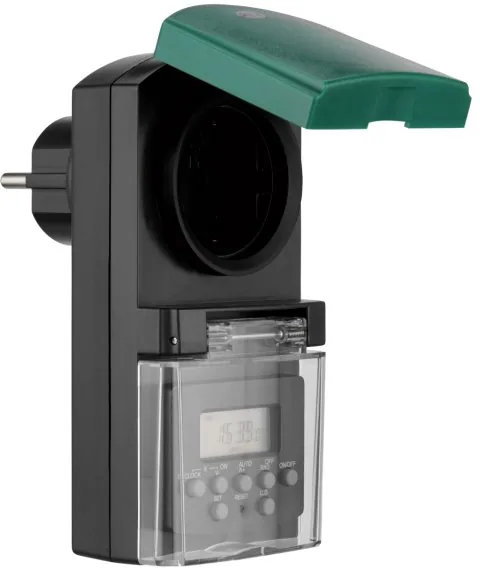
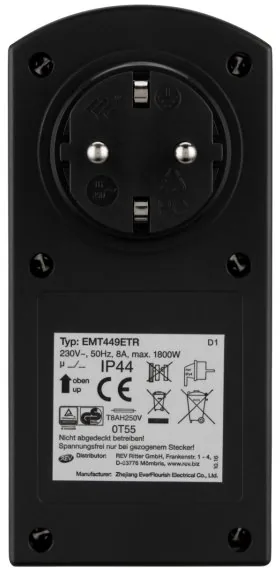
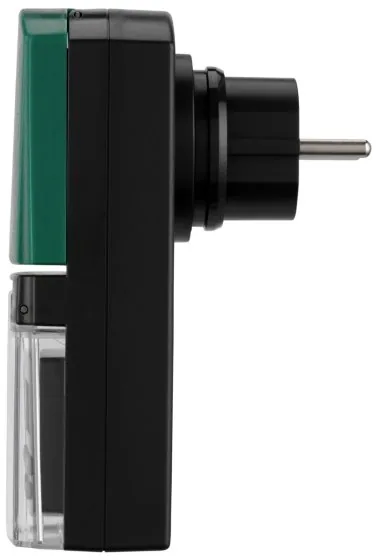
REV Ritter Digital Outdoor Timer Manual
0.0 · 0 Ratings
PDF manual · 10 Pages
English



Loading...

▪ 15 available combinations of days
or blocks of days.
▪ CD function (COUNT DOWN) of
max. 99 hours, 59 minutes, 59 se-
conds.
COMMISSIONING
1. Insert the time switch into a 230
volt socket. The memory‘s rechargea-
ble battery requires about 14 hours
for charging. If not in use for a greater
length of time, the time switch should
be charged for at least two hours
once a month in order to retain the
battery‘s charging capacity.
2. After charging, remove timer from
the socket and press RESET using a
thin, electrically non-conductive ob-
ject.
3. The time switch is now ready for
entering usage settings.
SETTING TIME AND WEEKDAY
▪ Converting from 24 hour to 12 hour
mode. Press CLOCK key and hold.
▪ Press SET key until day flashes,
select day with V– oder Λ+ .
▪ Press SET key, hour flashes, select
hour with V– oder Λ+ .
▪ Press SET key, minutes flash, select
minute with V– oder Λ+ .
▪ Press SET key, minutes flash, select
minute with
▪ Hold V– or Λ+ for fast forward/
reverse.
SETTING/CHECKING
PROGRAMS
▪ The time switch can be set for daily
or weekly programs
▪ You can set up to 20 programs.
▪ In order to check the various pro
grams, press either the V– or Λ+
key. If you press the Λ+ key, the
LCD display shows all programs as
follows:
TIME –
Program 1 ON –
Program 1 OFF
...
Program 20 ON –
Program 20 OFF
d (Count–Down Program)
TIME
▪ If you press the V– key, the same
process runs but in reverse order.
The symbol d (see COUNT-
DOWNTimer) lights up in the case
of the COUNT-DOWN program.
Fig. è shows a sample program
where no times have been entered
yet.
▪ You can take a fast look at all
programs by pressing and holding
the V– or Λ+. The programs are
displayed in series in fast mode. If
you want to look at the program
times individually, press the V– or
Λ+ key briefly.
EXAMPLE FOR SETTING
PROGRAM 1
MO 8:15 ON / MO 15:45 OFF
▪ In this example, the time switch
switches on on Monday at 8:15
and switches off at 15:45. To set
the time 8:15 to ON, press the
V– or Λ+ key until program 1 ON
is shown on the display and then
press the SET key.
▪ The day display flashes now. Using
the V– or Λ+ key you can now
select the required day for your
program no. 1. The day display
runs from:
CORRECT USE
For automatic on/off switching of
lamps and electrical equipment.
The time switch is protected against
spray water (IP44) and suitable for
outdoor use.
Conforms to corresponding European
directives.
TECHNICAL DATA
▪ Voltage: 230V∼, 50Hz
▪ Maximum load: 8A, 1800W
▪ Protection type: spraywater
protected, IP44
▪ Operating temp.: 0°C bis +55°C
▪ Battery: NiMH 1,2V
>100 hours
Settings:
▪ 20 programming possibilities per
day or week by block formation
(e.g. MO-FR etc.) up to 140
switching possibilities
▪ Smallest switching interval: 1 minute
▪ With random operation (switches
your lamps/radio on/off at random
intervals and simulates presence –
burglary prevention)
▪ Power reserve for electricity failure
▪ Manual on/off switch
▪ Child-safe
▪ Countdown function with hour, minu
te and second settings
SAFETY INSTRUCTIONS
▪ Only a proper mains socket
(230 V∼, 50Hz, with protective
earth) from the public supply net
work may be used.
▪ Do not operate any equipment
which could cause danger to life
and limb if operated without super
vision.
EXPLANATION
OF OPERATING PANEL
RESET: Deletes all data in memo-
ry, including the current
time and all programs
Λ+: Up; to change program
and increase time settings.
V –: Down; to change program
and reduce time settings.
SET: Programming mode for set-
tings.
RND: Setting or deleting RND
function (random function).
CD: COUNT DOWN. Setting
or deleting the CD (count-
down) function.
ON/OFF: Selection of operating
mode (ON, AUTO, OFF).
Overriding programs or
recalling overridden pro-
grams when setting pro-
grams.
CLOCK: Return to clock mode.
GENERAL FEATURES
▪ 20 ON/OFF programs in stages of
one minute each.
▪ Selection of MANUAL ON/AUTO/
MANUAL OFF.
▪ Selection of time display in 12 or 24
hour mode.
▪ LCD-display with second display.
▪ Available summertime function.
▪ Random function with random
switch of 10 – 26 minutes.
GB
For a specific day
MO = Monday, TU = Tuesday,
WED = Wednesday, TH = Thursday,
FR = Friday, SA = Saturday,
SU = Sunday
or for combinations
Mo–We–Fr
Tu–Th–Sa
Sa–Su
Mo–Tu–We
Th–Fr–Sa
Mo–Tu–We–Th–FR
Mo–Tu–We–Th–Fr–Sa
Mo–Tu–We–Th–Fr–Sa–Su
and then back to the start.
▪ In our example, the required day is
Monday. When you have selected
Monday, press the SET key again.
▪ The hour display flashes again.
Use the V– oder Λ+ key to select
the 8 and set this again using the
SET key. Use the same method
for entering the minutes. Terminate
programming with the SET key.
(see fig. è) shows the program menu
without your input (see fig. ç) with
your input.
▪ In order to switch the program off
again at 15:45 (see fig. é) use the
same time input method as above.
Please note that you cannot enter
any seconds for the time input.
TO DELETE A PROGRAM
▪ Use V– or Λ+ key to find program
to be deleted.
▪ Press ON/OFF key, dashes appear
on the display (see fig. è) the pro-
gram is deleted. On and off times
have to be deleted individually.
COUNT-DOWN TIMER -
COUNT-DOWN FUNCTION
▪ This function allows selective on/off
switching with a period of 1second
to 99 hours, 59 minutes and 59
seconds. Proceed as follows:
Example:
An appliance is to be kept switched
on for 1 hour, 10 minutes and 30
seconds.
▪ Turn the count-down program on
(d) using the V– or Λ+ or Λ+ key
(if the clock is being displayed,
simply press the V– or Λ+ key
once and the symbol d appears on
the display).
▪ Press the SET key. The ON or OFF
symbol flashes.
▪ Set to ON using the V– or Λ+ key.
▪ Press the SET key. The hour display
lights up.
▪ Set the hour display to 1 using the
V– or Λ+ key.
▪ Press the SET key. The minute display
lights up.
▪ Set the minute display to 10 using the
V– or Λ+ key.
▪ Press the SET key. The second display
lights up.
▪ Set the second display to 30 using
the V– or Λ+ key.
▪ Press the SET key again. Program
input is terminated.
▪ The count-down function is now set
(see fig. ê).
▪ Press the CD key in order to activate
the count-down function. If the CD
program is displayed you will see
how the time runs backwards to 0 on
the display.
The time switch turns off when the time
runs out.
IMPORTANT:
The time switch must be set to Auto
and plugged into a live mains socket.
RANDOM OPERATION
▪ This time switch has a built-in ran-
dom operation generator which
switches connected appliances on
and off at irregular intervals.
The time switch remains switched on
approx. 10 – 26 minutes. It then
switches off for 26 – 42 minutes and
then back on again. This function is
particularly valuable as additional
burglary protection as it simulates
presence.
▪ Press the RND key. The R symbol
lights up to show that you have
activated this program (fig. ë). In
this case, all other programs remain
inactive until you press the RND key
again in order to switch the random
operation generator off.
Important:
The time switch must be set to AUTO
and plugged into a live mains socket.
MANUAL OPERATION
This time switch offers the possibility
of switching connected appliances on
and off manually.
To do so, press the ON/OFF key.
The display switches from OFF to
AUTO and then to ON. If the display
is not set to AUTO, the programs, CD
and RND are not active.
AUTOMATIC RETURN
TO CLOCK DISPLAY
▪ If the time switch displays a program
or you have set a program and not
pressed a key for longer than a
minute, the time switch reverts auto-
matically to clock display.
▪ If, however, the count-down function
is running, the time switch does not
revert to clock display until the end
of the count-down.
SUMMERTIME / WINTERTIME
Press the two keys CLOCK and V–
simultaneously in order to switch the
current time over to the summertime
operating mode. The current time is
set forward by one hour and the S
symbol lights up (fig. å) to indicate
that the summertime operating mode
is now active.
In order to return the time operating
mode back to its normal setting, press
the two keys CLOCK and V– simulta-
neously again.
UNUSUAL OR NO DISPLAY
It is possible that the time switch does
not show any or only an incomplete
display. In this case, press the RESET
key, electrically non-conductive
object and enter the program and
time again.
WEEE-REFERENCE OF DISPOSAL
In accordance with Europe-
an defaults used electrical
and electronics devices
may no more be given to
the unsorted waste. The
symbol of the waste bin
on wheels refers to the necessity of
separate collection.
Please help with environmental
protection and see to it that this device
is given to the for this purpose designa-
ted systems of waste sorting if you do
not use it any longer.
DIRECTIVE 2012/19/EU of the
EUROPEAN PARLIAMENT AND
OF the COUNCIL of 4 July 2012
on waste electrical and electronic
equipment (WEEE).
Batteries and accumu-
lators are not to be
disposed of in the
normal house waste
bin. Every user is legally obliged, to
hand over all batteries and accumu-
lators, irrespective of whether or not
they contain harmful substances to
a communal collection point in the
local town area or to a trade dealer
so that they can be disposed of in
an orderly environmentally friendly
manner.
Batteries and accumulators should
only be handed over when they are
completely discharged!
RESET-nuppu.
3. Taimer on nüüd seadistusteks töövalmis.
PÄEVAAJA JA
NÄDALAPÄEVA SEADISTAMINE
▪ Ümberseadistamine 24-tunni-režiimilt 12-tunni-
režiimile. Vajutage nuppu CLOCK ja hoidke
all.
▪ Vajutage nuppu SET, kuni päev hakkab vilku-
ma, valige nupuga V– või Λ+ päev.
▪ Vajutage nuppu SET, kuni tunnid hakkavad
vilkuma, valige nupuga V– või Λ+ tunnid.
▪ Vajutage nuppu SET, kuni minutid hakkavad
vilkuma, valige nupuga V– või Λ+ minutid.
▪ Vajutage nuppu SET, ilmub seadistatud kel-
laaeg.
▪ Hoides all nuppu V– või Λ+ toimub kiirotsing.
PROGRAMMIDE
SEADISTAMINE/KONTROLLIMINE
▪ Taimerit saab seadistada päeva või nädala
programmidele.
▪ Teil on võimalik seadistada kuni 20 pro-
grammi.
▪ Erinevate programmide kontrollimiseks vajuta-
ge nuppu V– või Λ+. Kui vajutate nuppu Λ+,
kuvatakse LCD-ekraanile kõik programmid
järgmiselt:
Kellaaeg –
Programm 1 ON (SEES) –
Programm 1 OFF (VÄLJAS)
...
Programm 20 ON (SEES) –
Programm 20 OFF (VÄLJAS)
d (pöördloenduse programm)
Kellaaeg
▪ Kui vajutate nuppu V- toimub sama loen-
dus, kuid vastupidises järjekorras. COUNT
DOWN-programmi ajal põleb sümbol d (vt
COUNT DOWNTimer). Joonisel on pro-
grammi näidis, kui aega pole veel sisestatud.
▪ Saate vaadata kiiresti kõiki programme,
vajutades kauem nuppu V– või Λ+. Program-
mid kuvatakse kiiresti nende järjekorras. Kui
soovite vaadata programmi aegu ükshaaval,
vajutage korraks nuppu V– või Λ+.
PROGRAMMI 1
SEADISTAMISE NÄIDE
MO 8:15 EIN / MO 15:45 AUS
▪ E 8:15 SEES / E 15:45 VÄLJAS
▪ Selles näites lülitub taimer esmaspäeval kell
8:15 sisse ja kell 15:45 välja. Et seadistada
aega 8:15 olekusse SEES, vajutage nuppu
V– või Λ+, kuni näidikule ilmub Programm 1
ON ning seejärel vajutage nuppu SET .
▪ Nüüd vilgub päevanäit. Nupuga V– või
Λ+ saate valida oma programm nr 1 jaoks
soovitud päeva. Päevanäit töötab:
ühe kindla päeva jaoks
MO = esmaspäev, TU = teisipäev,
WED = kolmapäev, TH = neljapäev,
FR = reede, SA = laupäev,
SU = pühapäev
või kombinatsiooni jaoks
Mo–We–Fr
Tu–Th–Sa
Sa–Su
Mo–Tu–We
Th–Fr–Sa
Mo–Tu–We–Th–FR
Mo–Tu–We–Th–Fr–Sa
Mo–Tu–We–Th–Fr–Sa–Su
ja siis jälle algusest peale.
▪ Meie näites on soovitud päev esmaspäev.
Pärast seda, kui olete esmaspäeva välja
valinud, vajutage uuesti nuppu SET.
▪ Nüüd vilgub tunninäit. Valige nupuga V– või
Λ+ 8 ja kinnitage see jälle nupuga SET.
Minutite sisestamisel toimige sama põhimõtte
järgi. Lõpetage programmeerimine nupuga
SET. Joonisel on näha programmimenüü
SIHIP§RANE KASUTAMINE
Valgustite ja elektriseadmete automaatseks lüli-
tamiseks. Taimer on kaitstud veepritsmete eest
(IP44) ja sobib kasutamiseks välitingimustes
Valgustite ja elektriseadmete automaats-
eks lülitamiseks kuivades ruumides, ainult
sisetingimustes.
TEHNILISED ANDMED
▪ Pinge: 230V∼, 50Hz
▪ Maksimaalne koormus: 8A, 1800W
▪ Kaitseklass:
veepritsmete eest kaitstud, IP44
▪ Töötemp: 0°C kuni +55°C
▪ Aku: NiMH 1,2 V >100 tundi
Seadistused:
▪ 20 programmeerimisvõimalust päevas või
nädalas plokkide moodustamise abil (nt E –
R jne) võimalik kuni 140 lülitust
▪ väikseim lülitusvahemik: 1 minut
▪ juhusegeneraator (lülitab valgustuse/raadio
juhuslikult sisse või välja ja jätab mulje Teie
kodusolekust – kaitseks varaste eest)
▪ varuvõimsus voolukatkestuse puhuks
▪ manuaalne sisse- ja väljalülitamine
▪ lapsekaitse
▪ pöördloenduse funktsioon, seadistatav
tundides, minutites ja sekundites
OHUTUSJUHISED
▪ Pingeallikana tohib kasutada ainult avaliku
elektrivõrgu nõuetekohast võrgupistikupesa
(230V∼, 50Hz, kaitsemaandusega).
▪ Ärge kasutage seadmeid, mille järelevalveta
töötamine võib elu ohustada või materiaals
eid kahjusid tekitada.
JUHTPANEELI SELGITUS
RESET: Kustutab mälust kõik andmed, ka het-
kel kehtiva aja ning kõik programmid.
Λ+: Üles; programmide ümberlülitami-
seks ja seadistatava aja suurendami-
seks
V –: Alla; programmide ümberlülitami-
seks ja seadistatava aja vähendami-
seks
SET: Seadistuste programmeerimisrežiim.
RND: RND-funktsiooni (korrapäratu funktsi-
ooni) seadistamine või kustutamine.
CD: COUNT DOWN / pöördloendus.
CD (pöördloenduse) funktsioon.
ON/OFF: Töörežiimi valimine (ON, AUTO,
OFF). Programmide tühistamine või
programmide seadistamisel tühista-
tud programmide taaskäivitamine.
CLOCK: Tagasipöördumine kellarežiimi.
ÜLDISED TUNNUSED
▪ 20 ON/OFF-programmi minutiliste sammu-
dena.
▪ MANUAL ON/AUTO/MANUAL OFF vali-
mine.
▪ Aja kuvamise valimine 12 või 24 tunniga.
▪ Sekundinäiduga LCD-ekraan.
▪ Suveajafunktsioon.
▪ Korrapäratu funktsioon 10–26-minutise ke-
stusega.
▪ 15 kasutatavat päevade või päevaplokkide
kombinatsiooni.
▪ CD-funktsioon (COUNT DOWN / pöördloen-
dus) max 99 tundi, 59 minutit, 59 sekundit.
KASUTUSELEVÕTT
1. Ühendage taimer 230V∼ pistikupessa. Nüüd
tuleb salvesti akut umbes 14 tundi laadida.
Taimeri pikemaajalisel seismisel tuleks see
aku mahu säilitamiseks kord kuus vähemalt 2
tunniks vooluvõrku ühendada.
2. Pärast laadimist kustutage kogu olemasolev
info, võtke relee vooluvõrgust välja ja vaju-
tage peenikese, elektrit mittejuhtiva esemega
EE
ilma Teie sisestuseta, joonisel Teie sise-
stusega.
▪ Et programmi kell 15:45 jälle välja lülitada,
joonis , toimige sama põhimõtte järgi nagu
ülal. Arvestage, et programmiaega sisestades
ei ole võimalik sekundeid sisestada.
PROGRAMMIDE KUSTUTAMINE
▪ Otsige nupuga V– või Λ+ programm, mida
on vaja kustutada.
▪ Vajutage nuppu ON/OFF, ilmuvad kriipsud
(joonis ), programm on kustutatud. Sisse- ja
väljalülitusajad tuleb ükshaaval kustutada.
COUNT-DOWN TIMER -
PÖÖRDLOENDUSE FUNKTSIOON
▪ See funktsioon võimaldab sisse- ja väljalülita-
mist ajavahemikus 1 sekundist kuni 99 tunni,
59 minuti ja 59 sekundini. Toimige järgmiselt:
Näide:
1 tund 10 minutit ja 30 sekundit ühik sisse
lülitatud.
▪ Seade peab sisselülitatuks jääma 1 tunniks,
10 minutiks ja 30 sekundiks.
▪ Seadistage pöördloenduse programm (d)
nupuga V– või Λ+.
(Kui kuvatakse kellaaeg, vajutage lihtsalt nuppu
V– veelkord ja seejärel ilmub sümbol d).
▪ Vajutage nuppu SET . Sümbol ON või OFF
hakkab vilkuma.
▪ Seadke nüüd nupp V– või Λ+ asendisse
ON.
▪ Vajutage nuppu SET. Tunninäidik põleb.
▪ Seadke nüüd tunninäit nupuga V– või Λ+
1 peale.
▪ Vajutage nuppu SET. Minutinäidik põleb.
▪ Seadke nüüd minutinäit nupuga V– või Λ+
10 peale.
▪ Vajutage nuppu SET. Sekundinäidik põleb.
▪ Seadke nüüd sekundinäit nupuga V– või
Λ+ 30 peale.
▪ Vajutage veelkord nuppu SET. Programmi
sisestamine on lõppenud.
▪ Pöördloenduse funktsioon on nüüd seadista-
tud (vt joonist ).
▪ Vajutage nüüd nuppu CD, et aktiveerida
pöördloenduse funktsiooni. Kui kuvatakse
programm CD, näete näidikul, kuidas aega
tagurpidi kuni 0-ni loendatakse.
Kui aeg on läbi, lülitub taimer välja.
TÄHELEPANU:
Taimer peab olema seatud olekusse Auto ja
pingetjuhtivasse pistikupessa ühendatud.
JUHUSEGENERAATOR
▪ Sellesse taimerisse on integreeritud juhuse-
generaator, mis ühendatud seadmeid eba-
regulaarsete ajavahemike järel sisse või
välja lülitab. Taimer jääb umbes 10 – 26
minutiks sisselülitatuks. Ta lülitub seejärel 26
– 42 minutiks välja ning seejärel jälle sisse.
See funktsioon on eriti väärtuslik täiendava
kaitsemeetmena varguse eest: Teeseldakse
kodusolekut.
▪ Vajutage nuppu RND . Süttib sümbol R, et
näidata, et olete selle programmi aktiveeri-
nud (joonis ). Sellisel juhul on kõik teised
programmid niikaua automaatselt inaktiivsed,
kuni uuesti nuppu RND vajutate ja sellega
juhusegeneraatori välja lülitate.
Tähelepanu:
Taimer peab olema seatud olekusse Auto ja
pingetjuhtivasse pistikupessa ühendatud.
MANUAALNE LÜLITAMINE
See taimer võimaldab ühendatud tarbijaid
manuaalselt sisse ja välja lülitada.
Vajutage selleks nuppu ON/OFF.
Näit hüppab nüüd OFF-ilt AUTO-le ja seejärel
ON-ile. Kui näidul ei ole AUTO, siis pole pro-
grammid CD ja RND aktiivsed.
AUTOMAATNE TAGASIPÖÖRDUM
INEKELLAREŽIIMI
▪ Kui taimer kuvab mõnda programmi või kui
seadistate programmi ja üle 1 minuti ühtki
nuppu ei vajuta, pöördub taimer automaatselt
kellarežiimi tagasi.
▪ Kui pöördloenduse funktsioon töötab, toimub
tagasipöördumine kellarežiimi alles pärast
pöördloenduse lõppemist.
SUVE-/TALVEAEG
Vajutage korraga nuppe CLOCK ja V–, et
seada hetkel kehtiv aeg režiimi: suveaeg. Het-
kel kehtiv aeg läheb tunni võrra edasi ja süttib
sümbol S (joonis ), et märku anda, et suveaja
režiim on aktiivne.
Ajarežiimi seadmiseks tagasi normaalasendisse
vajutage uuesti korraga nuppe CLOCK ja V–.
▪ Kui pöördloenduse funktsioon töötab, toimub
tagasipöördumine kellarežiimi alles pärast
pöördloenduse lõppemist.
EBATAVALINE NÄIT /
NÄIT PUUDUB
On võimalik, et taimeri ekraanil puudub näit
või ilmub puudulik näit. Sellisel juhul vajutage
nuppu RESET ja sisestage programmid ja
kellaaeg uuesti.
ELEKTRILISTE JA ELEKTROONILISTE
JÄÄTMETE KÄITLEMISE NÕUDED
Elektri- ja elektroonikaseadme-
te jäätmeid ei ole enam lubatud
euroopa õigusaktide kohaselt viia
sorteerimata prügi hulka. Ratastel
prügikonteineri sümbol juhib teie
tähelepanu asjaolule, et seade on
vaja lahuskoguda.
Aidake ka teie loodust kaitsta ja kandke selle
eest hoolt, et see seade antaks pärast selle
kasutamisaja lõppu selleks ettenähtud jäätmete
lahuskogumispunkti.
EUROOPA PARLAMENDI JA NÕUKOGU 04.
juuli 2012. a DIREKTIIV 2012/19/EU elektri- ja
elektroonikaseadmete
jäätmete kohta.
Patareid ja akud ei tohi sattuda
majapida-misprügi hulka. Iga
kasutaja on kohustatud seadusli
kult selleks, et kõik patareid ja
akud, hoolimata sellest kas nad sisaldavad
toksilisi aineid või mitte, viiakse kasutaja munit-
sipaalüksuse või linnaosa kogumispunkti või
antakse keskkonnasõbralikku jäätmekäitlusse.
Patareisid ja akusid tohib ära anda vaid siis,
kui nad on tühjaks saanud.
ANL_EMT449ETR.indd 2 05.01.2018 10:20:08
Quick check
I'm not a robot
Incorrect answer, please try again.
Chat with your REV Ritter Digital Outdoor Timer manual using AI
Get instant AI answers from your REV Ritter Digital Outdoor Timer manual
Ask anything about the REV Ritter Digital Outdoor Timer. Answers come from this manual, with the pages they are based on.
Ask a Question
0/1000
Do you recommend Digital Outdoor Timer?
Yes NoProduct Specification
Type
digital socket timer
Control
Buttons (protective flap), LCD
Specifications
230V, 1800W, 8A, operating range 32 to 131 F
Functions
140 storable switching programs, presence simulator, manual permanent switching, weekly programs (with block formation), minimum switching interval 1min, 12/24h mode selectable
Special features
integrated battery for memory (1.2V NiMH), child protection, IP44, socket with protective flap
Color
anthracite, green
Manufacturer's warranty
two years
Product Description
Search for 67,706 Manuals online


Type-in Brand or Model