
Renkforce HD-WRCL135 Manual
PDF manual · 8 Pages
English



Quick check
Incorrect answer, please try again.
Chat with your Renkforce HD-WRCL135 manual using AI
Get instant AI answers from your Renkforce HD-WRCL135 manual
Ask anything about the Renkforce HD-WRCL135. Answers come from this manual, with the pages they are based on.
Ask a Question
Do you recommend HD-WRCL135?
Yes NoFrequently Asked Questions
The clock uses a built-in DCF receiver that synchronizes with the DCF radio signal from Mainflingen. After inserting batteries the clock attempts reception (3–12 minutes). Once successful the DCF icon is shown and the hands move to the correct time.
Is this answer helpful?
Reposition the clock away from metal objects, electronic devices, reinforced concrete or metallized glass. Press the RESET button to restart or hold REC for ~3 seconds to initiate a manual reception attempt. If reception remains impossible, set time manually via TIME SET and REC buttons.
Is this answer helpful?
It requires 2 x AA (1.5 V) batteries for standard operation (3 V total). Rechargeable AA cells (1.2 V each) may be used but reduce runtime because of their lower voltage and typically lower capacity.
Is this answer helpful?
Press TIME SET for ~3 seconds until the year blinks, use REC to change values, and press TIME SET briefly to confirm each setting (year, month, date, hour, minute). You can also select weekday language with REC. The clock reverts after 30 seconds of inactivity.
Is this answer helpful?
Hang the clock on a screw or nail using the suspension eye on the back. For optimal DCF reception choose a location away from electronic devices, cables, metal parts, reinforced concrete and metallized insulating glass; avoid basements.
Is this answer helpful?
The clock is maintenance-free except for battery replacement. Clean with a soft, dry cloth and do not open, modify, or use aggressive cleaning agents. Dispose of the product and batteries according to local regulations.
Is this answer helpful?
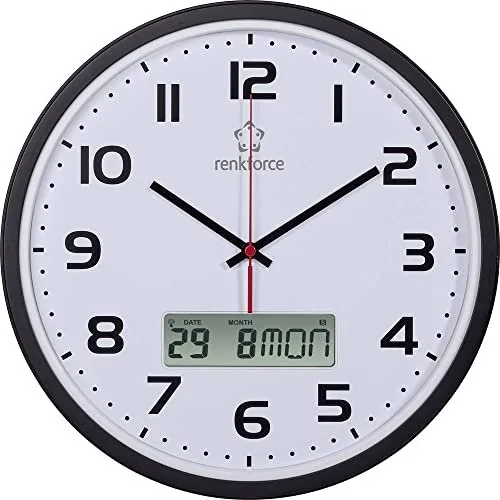
When the DCF signal is successfully received the DCF symbol is shown permanently. During summertime the DST/summertime symbol appears. The LC display shows date, month and weekday alongside the analog hands.
Is this answer helpful?
Advantages and Disadvantages
Advantages

- Accurate automatic time synchronization via DCF signal for near-perfect timekeeping.
- Combined analog hands and LC display provide both visual and digital calendar information.
- Manual reception and full manual time setting offer flexibility in poor reception areas.
- Simple wall-mounting with lightweight form factor and clear display.
- Low maintenance; only battery changes required and easy reset function if unresponsive.
Disadvantages

- DCF reception can be blocked by metal, reinforced concrete, special wallpapers or nearby electronics.
- Initial synchronization may take 3–12 minutes and requires the clock remain stationary.
- Using rechargeable AA cells reduces operating time due to lower voltage and capacity.
- No advanced features like backlight, alarm, or Wi‑Fi; basic time/calendar functionality only.
- Warranty void if device is modified or safety instructions are ignored.
Product Specification
Display
analog/digital
Case Diameter
12.60 in
Color
black, white
Functions
Date Display, Day of the Week, Month
Special Features
Radio
Product Description
Renkforce HD-WRCL135 — Reliable Radio-Controlled Wall Clock
The Renkforce HD-WRCL135 is a radio-controlled wall clock designed for clear time and calendar display with an integrated DCF receiver for automatic synchronization. Compact and slim, it combines an LC display for calendar data with analog hands driven to precise time positions after successful DCF reception. Its unobtrusive design (320 x 45.5 mm) and lightweight build make it suitable for home, office, classroom, or workshop walls where accurate timekeeping and easy readability are important.
Key features and operation
This clock automatically synchronizes to the DCF time signal broadcast from Mainflingen (near Frankfurt), offering near-perfect accuracy and automatic switching for summertime/wintertime. After inserting two AA batteries, the hands move to the reception position and the unit attempts to lock onto the DCF signal — a process that can take 3–12 minutes. When reception is successful, the DCF icon appears on the LC display and the analog hands adjust to the correct time. Daily automatic synchronization runs multiple times; one successful reception per day keeps deviations to under a second.
Manual DCF reception and full manual setting are also supported. Holding the REC button initiates or cancels a manual reception attempt, while the TIME SET and REC buttons allow step-by-step manual input of year, month, date, hour, minute and the weekday language (multiple languages supported). A RESET button restores the internal processor if the display becomes unresponsive.
Practical notes on installation and maintenance
Mounting is simple: a suspension eye on the back hangs on a screw or nail. For best DCF reception avoid placement near electronic devices, metal objects, reinforced concrete or metallized insulating glass. Battery replacement is straightforward via the rear compartment — two AA cells provide 3 V operation; rechargeable cells are possible but may reduce run time. The unit is essentially maintenance-free apart from battery changes; clean with a soft, dry cloth and never open or modify the device.
Why choose the Renkforce HD-WRCL135
Its blend of automatic radio synchronization, clear analogue-plus-LC display, and easy user controls make it a low-hassle solution for anyone needing accurate wall-mounted timekeeping. The robust feature set (manual override, language options, DST indicator, and reset function) ensures reliable operation even in less-than-ideal reception environments.
Notes
- Use two AA batteries and observe correct polarity. Rechargeable AA cells may shorten runtime due to lower voltage.
- If DCF reception fails, reposition the clock and use RESET or a manual REC attempt.
- Dispose of clock and batteries according to local electronic and battery recycling regulations.
Search for 67,706 Manuals online


Type-in Brand or Model
accusantium72
8 months ago
Does the radio signal reception work reliably so the time stays accurate, and what should I do if it does not sync?
Manual.ly
8 months ago
Most buyers report that the clock syncs quickly and then keeps accurate time reliably. Typical setup is: insert batteries, press Reset, and the time is set automatically. If reception is weak (for example, the time stops updating), try a fresh battery set and reposition the clock closer to a window or in a more open area. You can also trigger a re-synchronization via Reset. If it still does not receive the signal consistently, contact support or the seller for troubleshooting or a replacement (in some cases the clock was returned for service).