Manual.ly Logo

Renkforce 1277996 Manual

4.8 · 18 Ratings

PDF manual · 8 Pages

English

M: OA-GPT-54-NAN
page

/ 8

Loading...
086201f6ce05dc41efc11e231e2c9526cca0 page 3
c) Operation
• This product is not a toy. Devices operated using mains voltages should not be used
by children. Particular care must therefore be exercised if children are around.
Use the product where it is out of the reach of children.
• The product is intended for use in dry, indoor locations only. No part of the product
should become damp or wet; never handle it if your hands are wet!
Wall plug transformers pose the potential risk of a fatal electric shock!
• Avoid the following adverse conditions at the installation location and during trans-
port:
- Dampness or excessive humidity
- Extreme cold or heat, direct sunlight
- Dust or flammable gases, fumes or solvents
- Strong vibrations, impacts or blows
- Strong magnetic fields such as those found in the vicinity of machinery or loud-
speakers
• Choose a stable, even, flat and sufficiently large surface to place the converter and
the connected hard drive/SSD or optical drive on.
• Never move a hard drive when in operation or whilst the magnet discs rotate after
switching off. Otherwise, data may be lost! In addition, the hard drive could be dam-
aged if the write/read head touches the magnetic disc.
• Never use the product immediately after it has been taken from a cold room to a
warm one. The condensation that forms can destroy the product under certain cir-
cumstances. The wall plug transformer also poses a risk for a potentially fatal elec-
tric shock!
Allow the product to reach room temperature before connecting it to the power sup-
ply and putting it into use. This may take several hours.
• When setting up the product, make sure that the cables are neither kinked nor
pinched.
• Handle the product with care; it can be damaged by impacts, blows, or accidental
falls, even from a low height.
Controls and connections
1 USB3.0 connector
1
2 3
4
5
6 7 8 9
10
2 Round low-voltage socket for the connec-
tion of the wall plug transformer supplied
3 Output socket to power the IDE drives
4 Connection for the IDE drives
5 “PWR” LED
6 “USB3.0” LED
7 “IDE” LED
8 “SATA” LED
9 Connection for 6.35 cm/2.5” IDE drives
10 Connection for the SATA drives
General information on connecting drives
• Turn off the power supply before connecting or disconnecting a drive (hard drive/SSD or optical
drive). To do this, move the rocker switch on the cable of the wall plug transformer into the posi-
tion “OFF”.
• It is possible to operate an SATA drive and an IDE drive at the same time.
The following two combinations are possible:
a) SATA drive + 6.35 cm/2.5” IDE drive
b) SATA drive + 8.89 cm/3.5” IDE drive
Depending on the power consumption of the connected combination, it might be nec-
essary to use a more powerful wall plug transformer than the one supplied.
This might become necessary when using older drives or when connecting an optical
drive (e.g. IDE drive and SATA Blu-ray burner).
In this case, a wall plug transformer with a stabilised voltage output of +12 V/DC and
a current output of at least 3.5 A is required. The round plug (outside diameter 5.5 mm,
inside diameter 2.1 mm) must have the positive/+ pole at the inside contact and nega-
tive/- at the outside contact.
G
Operating instructions
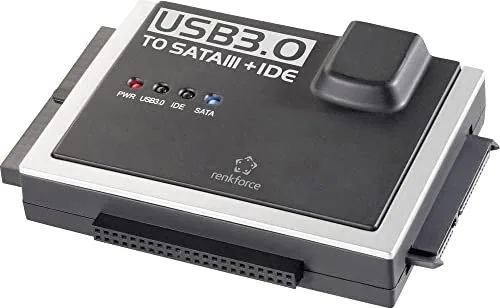
USB3.0 to IDE/SATA converter
Item no. 1277996
Intended use
The product can be used to operate a hard drive/SSD or an optical drive (either IDE or SATA) via
a USB interface.
The external wall plug transformer provided is used to supply the power for the converter and the
connected hard drive/SSD or optical drive.
Always observe the safety instructions included in these operating instructions. Please read the
operating instructions carefully and keep them.
Any use other than that described above could lead to damage to this product and involves the
risk of short circuits, fire, electric shock, etc. No part of the product may be modified or converted!
This product complies with the applicable national and European requirements. All names of com-
panies and products are the trademarks of the respective owners. All rights reserved.
Package contents
• Converter
• Wall plug transformer
• USB3.0 cable
• Power cable for IDE drives
• Operating instructions
Explanation of symbols, inscriptions
The lightning symbol inside a triangle is a warning to inform you of potential risks for
your health and life, such as electrical shock.
This symbol indicates specific risks associated with handling, function or use.
The “arrow” symbol indicates special tips and operating information.
Safety instructions
Damages due to failure to follow these operating instructions will void the warranty!
We do not assume any liability for any resulting damage!
We shall not accept liability for damage to property or personal injury caused by in-
correct handling or non-compliance with the safety instructions! The warranty will be
void in such cases!
a) General
• The unauthorised conversion and/or modification of the product is not permitted for
safety and approval reasons (CE). Do not disassemble the product.
• Any maintenance or repair work may only be performed by an expert.
• Do not leave packaging material carelessly lying around, since it could become a
dangerous plaything for children.
b) Wall plug transformer
• The design of the wall plug transformer complies with Protection Class II. Use only a
standard mains socket as the power source for the wall plug transformer.
• The mains socket into which the wall plug transformer is plugged must be easily
accessible.
• Do not pull the wall plug transformer from the mains socket by pulling on the cable.
Hold it on the sides of the casing and pull it out of the mains socket.
• Never touch a wall plug transformer that shows signs of damage, as this could cause
a fatal electric shock!
First, switch off the mains voltage to the socket to which the wall plug transformer
is connected (switch off at the corresponding circuit breaker or remove the safety
fuse or switch off at the corresponding RCD protective switch, so that all poles of the
mains socket are disconnected).
You can then unplug the wall plug transformer from the mains socket. Dispose of
the faulty wall plug transformer in an environmentally friendly way, do not use it any
more. Replace it with a wall plug transformer of the same design.

Chat with your Renkforce 1277996 manual using AI

Get instant AI answers from your Renkforce 1277996 manual

Ask anything about the Renkforce 1277996. Answers come from this manual, with the pages they are based on.

Ask a Question

0/1000

Do you recommend 1277996?

Yes No
0
User Pic

Lea Schmidt

8 months ago

Will this USB 3.0 IDE/SATA converter work for different drives (IDE and SATA) and on Linux, and do I need to install drivers or extra software? Also, does it require an external power supply?

0
User Pic

Manual.ly

7 months ago

Yes. Reviews commonly report that IDE and SATA 2.5/3.5-inch drives are detected automatically over USB (often no extra software needed). Users also report working under Linux distributions such as Ubuntu/Debian without tedious driver installation. However, it does require its own power supply to run reliably, so it is less convenient for travel. Also note that the included cables and power switch help with quick, simple use. If a connection issue occurs, support/exchange is typically handled quickly.

M: OA-GPT-5-NAN
M: OA-GPT-5-NAN

Frequently Asked Questions

A

It is used to connect IDE or SATA hard drives, SSDs, and optical drives to a computer through USB. It is useful for data access, backup tasks, drive testing, and working with older storage media.

Is this answer helpful?

A

Yes. The converter supports SATA, 40-pin IDE, and 44-pin IDE connections. It can also handle certain SATA + IDE combinations at the same time, depending on power requirements.

Is this answer helpful?

A

Yes. The included 12 V power supply is used to power the converter and the connected drive. Some older or more demanding drives may need a stronger 12 V supply with at least 3.5 A output.

Is this answer helpful?

A

Yes. IDE drives must be set to master for proper recognition. If the drive is not configured correctly, the system may not detect it as expected.

Is this answer helpful?

A

Yes. The device is backward compatible with USB 2.0 and USB 1.1. However, transfer speeds will be limited by the slower USB standard.

Is this answer helpful?

A

A new or empty drive must be partitioned and formatted before use. This can be done in the operating system’s disk management tools, and you should be careful not to select the wrong drive to avoid data loss.

Is this answer helpful?

M: OA-GPT-54-NAN

Advantages and Disadvantages

Advantages

  • Supports SATA and IDE drives, including 2.5-inch and 3.5-inch IDE formats.
  • USB 3.0 connection offers faster transfer potential and backward compatibility.
  • Included power supply and cables make basic setup easier.
  • LED status lights help monitor power and drive activity at a glance.
VS

Disadvantages

  • IDE drives must be set to master, which adds an extra setup step.
  • Some drive combinations may need a stronger 12 V / 3.5 A power supply.
  • Designed for dry indoor use only, so it is not suitable for harsh environments.
  • Hard drives must not be moved while operating or immediately after shutdown.
M: OA-GPT-54-NAN

Product Specification

Conversion

USB -> SATA, USB -> IDE 2.5", USB -> IDE 3.5"

Host

1x USB-B 3.0 (female)

Target

1x SATA 6Gb/s + SATA Power (female), 1x IDE 2.5"/44-Pin (female), 1x IDE 3.5"/40-Pin (female)

Additional Power Supply

Power Supply (12V)

Form Factor

Cable/Dongle

M: OA-GPT-54-NAN

Product Description

Renkforce 1277996 Manual: Practical USB 3.0 Drive Converter

The Renkforce 1277996 is a handy bridge between older storage technology and modern computers. Designed as a USB 3.0 to IDE/SATA converter, it lets you connect hard drives, SSDs, and even optical drives through a standard USB port. That makes it especially useful for accessing archived data, testing drives, or giving a second life to components that would otherwise sit unused in a drawer.

What makes this adapter stand out is its flexibility. It supports both SATA and IDE drives, including 2.5-inch and 3.5-inch IDE models, and it can even run a SATA drive together with an IDE drive in certain combinations. The included external power supply helps provide the extra energy required for connected drives, while LED indicators make it easy to see when power, USB, IDE, or SATA activity is active. For everyday recovery tasks, upgrades, and backups, it offers a straightforward, no-nonsense setup.

The product is built for convenience, but it also asks for careful handling. Drives should be connected only when power is off, and older or power-hungry devices may require a stronger 12 V supply than the one included. It is also important to set IDE drives as master, format new drives before use, and avoid moving spinning hard disks. These details may sound cautious, but they reflect the realities of working with delicate storage media.

In real-world use, the converter is most valuable for people who still deal with legacy hardware or need quick access to old drives. USB 3.0 support gives it better bandwidth than older USB standards, while backward compatibility means it can still work on USB 2.0 or 1.1 ports when needed. That makes it a practical tool for technicians, home users, and anyone who wants a simple way to read or transfer data from mixed drive types.

Notes

  • Use a stable, dry indoor setup only.
  • Always stop power before plugging in or removing a drive.
  • Back up important data regularly.
  • For some drive combinations, a stronger 12 V / 3.5 A power supply may be necessary.

Quick takeaway

The Renkforce 1277996 is a compact and versatile adapter for legacy and modern drives alike. It is especially useful when you need reliable access to SATA or IDE storage without opening a computer case.

M: OA-GPT-54-NAN

© Copyright 2026 Manual.ly