Manual.ly Logo

Reloop Ready Manual

0.0 · 0 Ratings

PDF manual · 28 Pages

English

M: QW-35-FL
page

/ 28

Loading...
c5603e8cf50f686f1ff42ea8385634309455 page 2
2
CAUTION!
For your own safety, please read this operation manual carefully before initial operation! All persons involved in the installation, setting-up,
operation, maintenance and service of this device must be appropriately qualied and observe this operation manual in detail. This product
complies with the requirements of the applicable European and national regulations. Conformity has been proven. The respective statements
and documents are deposited at the manufacturer.
Please remove the Reloop Ready from its packaging. Check before initial operation to make sure that the device has not been visibly damaged
during transport. If you detect any damage to the power cable or the casing, do not operate the device. Contact your specialised dealer.
SAFETY INSTRUCTIONS
CAUTION!
Please exercise particular caution when handling AC 100 - 240 V, 50/60Hz power voltage. This voltage rating may lead to a critical electrical
shock! Any damage caused by the non-observance of this operation manual excludes any warranty claims. The manufacturer is not liable for
any damage to property or for personal injury caused by improper handling or non-observance of the safety instructions.
WARNING!
To prevent re or avoid an electric shock do not expose the device to water or uids! Never open the housing!
- This device left the factory in perfect condition. To maintain this condition and to ensure a risk-free operation the user must observe the safety
instructions and warnings contained in this operation manual.
- For reasons of safety and certication (CE) the unauthorised conversion and/or modication of the device is prohibited. Please note that in the
event of damage caused by the manual modication to this device any warranty claims are excluded.
- The inside of the device does not contain any parts which require maintenance, with the exception of wear parts that can be exchanged from
the outside. Qualied staff must carry out maintenance, otherwise the warranty does not apply!
- The fuse must exclusively be exchanged against fuses of the same class, with the same trigger features and nominal current rating.
- Ensure that the power will only be supplied after the device has been fully set up.
- Only use cables that comply with regulations. Observe that all jacks and bushes are tightened and correctly hooked up. Refer to your dealer, if
you have any questions.
- Ensure that when setting up the product, the mains cable is not squashed or damaged by sharp edges.
- Prevent the mains cable from coming into contact with other cables! Exercise great care when handling mains cables and connections. Never
touch these parts with wet hands!
- Connect the power cable exclusively to appropriate shock-proof outlets. The only supply point to be used is a supply outlet in accordance with
specications of the public supply network.
- Disconnect the device from the supply outlet when not in use and before cleaning! Be sure to hold the mains plug by the body. Never pull the
mains cord!
- Position the device on a horizontal and stable low-ame base.
- Avoid any concussions or violent impact when installing or operating the device.
- When selecting the location of installation, make sure that the device is not exposed to excessive heat, humidity and dust. Be sure that no cables
lie around openly. You will endanger your own safety and that of others!
- Do not rest any containers lled with liquid that could easily spill onto the device or in its immediate vicinity. If, however, uids should access the
inside of the device, immediately disconnect the mains plug. Have the device checked by a qualied service technician before re-use. Damage
caused by uids inside the device is excluded from warranty.
- Do not operate the device under extremely hot (in excess of 35° C) or extremely cold (below 5° C) conditions. Keep the device away from
direct exposure to the sun and heat sources such as radiators, ovens, etc. (even during transport in a closed vehicle). Always ensure sufcient
ventilation.
- The device must not be operated after being taken from a cold environment into a warm environment. The condensation caused hereby may
destroy your device. Do not switch on or operate the device until it has reached ambient temperature!
- Controls and switches should never be treated with spray-on cleaning agents and lubricants. This device should only be cleaned with a damp
cloth. Never use solvents or cleaning uids with a petroleum base for cleaning.
- When relocating, the device should be transported in its original packaging.
- When starting operation, the crossfaders and volume controls of your amplier must be set to minimum level. Bring the loudspeaker switches
into the “OFF” position. Wait between 8 to 10 seconds before increasing the volume to avoid damage to loudspeakers.
- Devices supplied by voltage should not be left in the hands of children. Please exercise particular care when in the presence of children.
- At commercial facilities the regulations for the prevention of accidents as stipulated by the organization of professional associations must be
observed.
- At schools, training facilities, hobby and self-help workshops the operation of the device must be monitored with responsibility by trained staff.
- Keep this operation manual in a safe place for later reference in the event of questions or problems.
APPLICATION IN ACCORDANCE WITH REGULATIONS
- This device is a 2-channel DJ controller, which can regulate and mix audio signals. The device needs to be connected to a tablet or computer
and an audio amplier or active speakers.
- If the device is used for any other purposes than those described in the operation manual, damage can be caused to the product, leading to
the exclusion of warranty rights. Moreover, any other application that does not comply with the specied purpose harbours risks such as short
circuit, re, electric shock, etc.
- The serial number determined by the manufacturer must never be removed to uphold the warranty rights.
MAINTENANCE
- Check the technical safety of the device regularly for damage to the mains line or the casing, as well as for wear of wear parts such as rotary
and sliding switches.
- If it is to be assumed that the safe operation is no longer feasible, then the device must be disconnected and secured against accidental use.
Always disconnect the mains plug from the outlet!
- It must be assumed that a safe operation is no longer feasible, if the device bears visible defects, if the device no longer functions, following
longer storage under unfavourable conditions or after major transport stress.
ENGLISH

Chat with your Reloop Ready manual using AI

Get instant AI answers from your Reloop Ready manual

Ask anything about the Reloop Ready. Answers come from this manual, with the pages they are based on.

Ready Maintenance Schedule

Regularly
Inspect device for damage and wear

Check the mains line, casing, and wear parts like rotary and sliding switches for damage or wear to ensure technical safety.

Before cleaning
Clean housing with damp cloth

Disconnect from power. Clean only with a damp cloth. Never use solvents, petroleum-based fluids, or spray-on cleaners on controls.

M: qwen/qwen3.8-flash

Ask a Question

0/1000

Do you recommend Ready?

Yes No

Frequently Asked Questions

A

The Reloop Ready works seamlessly with Serato DJ Lite, Serato DJ Pro, and the djay app on iOS devices. It also supports various other DJ software depending on the operating system used.

Is this answer helpful?

A

Yes, you can connect an iPad using the USB-A iOS port. You must set the USB source switch to iOS and ensure the device is powered via the USB-B port with a 5V/2A adapter.

Is this answer helpful?

A

Yes, Windows users need to install the ASIO driver provided by Reloop to ensure low-latency audio performance. This driver is available for download on the official website.

Is this answer helpful?

A

No, the device is not waterproof. Exposure to water or liquids can cause severe damage and void the warranty. Keep it away from drinks and humid environments.

Is this answer helpful?

A

To activate Slip Mode, press the SHIFT button and the Vinyl Mode button simultaneously. This allows tracks to continue playing at their original tempo even when manipulated.

Is this answer helpful?

A

By turning the Loop Encoder, you can select loop lengths ranging from 1/32 bars up to 32 bars, providing flexibility for different track structures.

Is this answer helpful?

M: QW-35-FL

Advantages and Disadvantages

Advantages

  • Supports multiple software platforms including Serato and djay
  • Touch-sensitive jog wheels offer professional scratching feel
  • Dedicated performance pads enable quick cue and loop actions
  • Compact size makes it highly portable for mobile DJs
  • High-quality 24-bit/48kHz audio output ensures clear sound
VS

Disadvantages

  • Requires external power supply for iOS devices via USB-B
  • Some advanced Pro features need paid software upgrades
  • Windows users must install specific ASIO drivers manually
  • No internal battery, requiring constant power connection
  • Limited to 2 channels which may restrict complex setups
M: QW-35-FL

Product Specification

Type

DJ Software Controller

Outputs

Stereo Line Out (RCA), Headphones (3.5mm Jack)

Additional Connections

1x USB-A, 1x USB-B

Jog Wheel

2x, touch-sensitive

Features

Auto Loop, Auto Sync, Hot Cues, Tap Tempo

Dimensions

12.80 x 1.89 x 8.66 in

Weight

2.51 lbs

M: QW-35-FL

Product Description

Reloop Ready: Your Gateway to Professional DJing

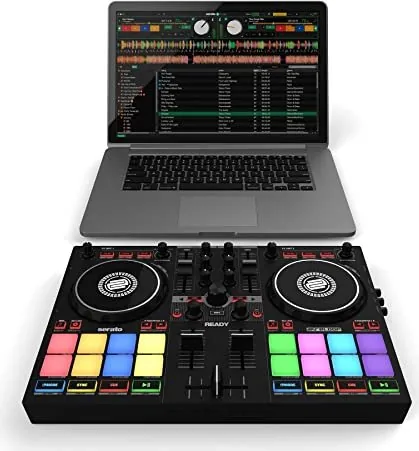
Discover the Reloop Ready, a compact and powerful 2-channel DJ controller designed for both beginners and seasoned professionals. This device transforms your computer or iOS tablet into a fully functional mixing station, offering an intuitive interface that puts creative control directly in your hands. Whether you are hosting a house party or performing at a local venue, the Reloop Ready delivers the precision and reliability needed to craft seamless mixes.

The unit features two high-quality jog wheels with touch-sensitive surfaces, allowing for expressive pitch bending and scratching. The dedicated performance pads provide instant access to hot cues, loops, and samples, enabling dynamic live performances. With built-in support for Serato DJ Lite and Pro, as well as the djay app on iOS, this controller bridges the gap between software and hardware effortlessly. The robust build quality ensures durability during transport, while the sleek design fits perfectly into any setup without taking up excessive space.

Connectivity is straightforward, with dedicated USB ports for PC and iOS devices, ensuring compatibility across all major platforms. The integrated audio interface offers crystal-clear sound reproduction with low latency, making it ideal for monitoring tracks through headphones or sending signals to main speakers. Safety is paramount, with clear instructions on handling power and preventing damage from moisture or improper use. By keeping the manual handy, users can maximize the lifespan of their equipment and maintain warranty coverage.

Experience the freedom of wireless connectivity options and the stability of wired connections. The Reloop Ready empowers you to explore new sonic landscapes without the complexity of traditional setups. Its user-friendly layout means you can focus on the music rather than navigating menus. From adjusting gain levels to manipulating filters and effects, every element is designed for speed and accuracy. Elevate your DJ skills today with a tool that grows with your talent.

Key Highlights

  • Compatible with Serato DJ Lite, Pro, and djay apps.
  • Touch-sensitive jog wheels for precise scratching.
  • Dedicated performance pads for hot cues and loops.
  • Built-in audio interface for high-fidelity sound.
  • Compact and durable design for portability.
M: QW-35-FL

© Copyright 2026 Manual.ly