

Reloop Mixon 8 Pro Manual
PDF manual · 44 Pages
English



Quick check
Incorrect answer, please try again.
Chat with your Reloop Mixon 8 Pro manual using AI
Get instant AI answers from your Reloop Mixon 8 Pro manual
Ask anything about the Reloop Mixon 8 Pro. Answers come from this manual, with the pages they are based on.
Mixon 8 Pro Maintenance Schedule
Check the mains cable, casing, and wear parts like rotary and sliding switches regularly to ensure technical safety.
Always disconnect the device from the supply outlet before cleaning. Use only a damp cloth; never use solvents or petroleum-based fluids.
Ask a Question
Do you recommend Mixon 8 Pro?
Yes NoFrequently Asked Questions
The Reloop Mixon 8 Pro works with Serato DJ Pro on PC and Mac. It is also compatible with djay Pro AI on iOS devices. You will need to download the specific driver or app for your operating system to ensure proper recognition and control functionality. Check the latest requirements on the official support pages.
Is this answer helpful?
Yes, it features dedicated inputs for microphones. Channel 3 and 4 can be assigned to microphone inputs. This allows you to make announcements or perform live mixes without external equipment. Ensure the gain is adjusted correctly before use to avoid audio distortion during your performance.
Is this answer helpful?
Please refer to Serato or djay specifications for minimum PC requirements. Generally, you need a recent operating system and sufficient RAM. You must also install the appropriate ASIO driver for optimal audio performance on Windows systems. Compatibility varies based on your specific hardware configuration.
Is this answer helpful?
No. Do not expose the device to water or fluids. Moisture can damage internal components and void the warranty. Keep liquids away from the control surface and avoid operation in high humidity environments to prevent electrical shock or malfunction. Always dry the unit before extended storage.
Is this answer helpful?
Use the USB-C port on the rear panel connected to your iOS device. Set the USB source switch to iOS mode. Plug your Lightning or USB-C cable into the controller and your tablet. Open the djay app to establish the connection automatically without additional configurations typically.
Is this answer helpful?
The rear panel includes USB inputs for computers, power connection, master outputs via XLR and RCA, booth outputs, and ground screw terminals. There are also line inputs for turntables or other audio sources. Consult the manual for pinout details and connection diagrams for best results.
Is this answer helpful?
Advantages and Disadvantages
Advantages

- Compatible with Serato DJ Pro and djay Pro AI software for broad usage.
- Includes a built-in docking station for seamless iOS device integration.
- Offers 4 mixer channels with independent EQ and filter controls.
- Durable build quality suitable for regular transport and use.
- Versatile connectivity with XLR and RCA outputs for professional sound.
Disadvantages

- Requires specific software drivers for full functionality on Windows.
- No built-in battery, must rely on external power supply unit.
- Complex menu functions can be challenging for absolute beginners.
- Physical size may require significant space on a DJ table setup.
- Some advanced features need software subscription for full access.
Product Specification
Type
DJ-Software-Controller
Inputs
2x Stereo Line In (RCA), 2x Phono/Stereo Line In (RCA), Mic In (XLR/6.35mm Combo), Mic In (6.35mm Jack)
Outputs
Stereo Line Out (XLR), Stereo Line Out (RCA), Stereo Line Out (6.35mm Jack), Headphones (3.5mm Jack), Headphones (6.35mm Jack)
Additional Connections
USB-C, 2x USB-B
Jog Wheel
2x 5.8", LCD Display
Features
Audio Interface, Auto Loop, Auto Sync, BPM Counter, Hot Cues, Integrated Effects, Waveform Display
Dimensions
25.87x15.39x2.68"
Weight
12.57 lbs
Product Description
Reloop Mixon 8 Pro Review
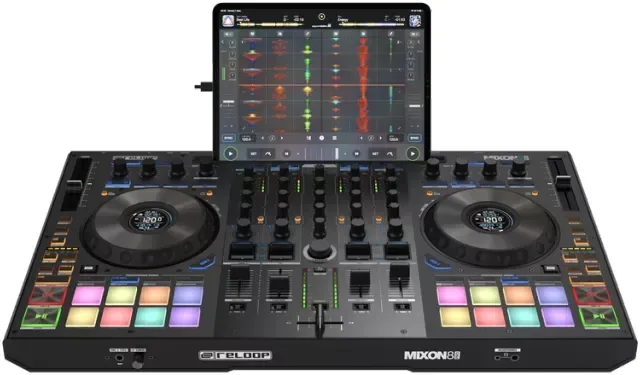
The Reloop Mixon 8 Pro stands out as a versatile 4-channel DJ controller designed for professional performance. This device integrates seamlessly with software platforms like Serato DJ Pro and djay Pro AI, offering a robust interface. Whether you are a resident DJ or emerging artist, hardware specs ensure a smooth workflow. Build quality reflects expectations of a premium mixing device with durable materials used throughout the chassis.
Connectivity and Setup
Setting up the controller is straightforward. It features inputs including XLR master outputs, RCA connections, and dedicated microphone inputs. The unit supports both iOS devices via a docking station and standard computer connections through USB-B ports. Users must ensure they check the Reloop Mixon 8 Pro Manual before initial operation to understand safety protocols regarding voltage and liquid exposure. Proper grounding and cable management are essential. The device complies with regulations for safety.
Performance Features
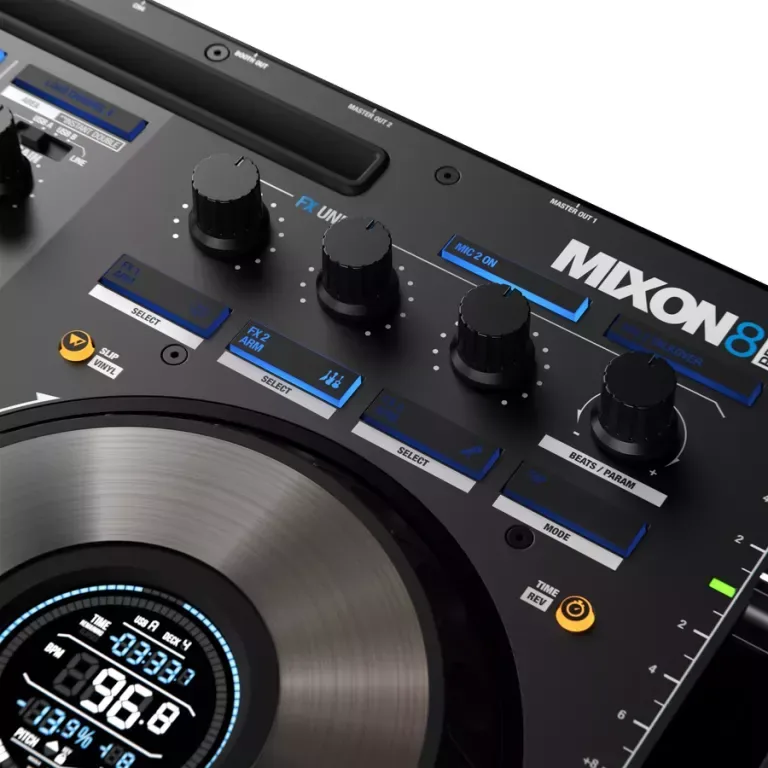
The mixer section includes independent volume controls for the master, booth, and cue outputs. Eight performance pads offer versatile functions such as hot cues. The jog wheels feature pitch bend capabilities and display information like BPM. Advanced effects can be controlled via dedicated encoders. The filter knob provides creative sound sculpting options. Crossfader curves can be adjusted to suit personal mixing styles.
Software Integration
Compatibility is a key strength. Installation guides detail steps for macOS and Windows environments. For mobile users, the iOS setup involves connecting the dock station and powering up correctly. Software settings may require enabling specific access permissions. Ensure all drivers are up to date for the best latency performance. The included USB cable connects the unit directly to your computer.
Safety and Maintenance
Maintaining this gear requires adherence to safety guidelines. Users should avoid exposing the device to extreme temperatures. Regular checks on the power cable prevent hazards. Always disconnect the unit from the power source before cleaning. Ensure cables are not squashed. The manual helps resolve operational questions efficiently.
Note: Always keep the operating instructions accessible for future reference regarding troubleshooting.
Conclusion
The Reloop Mixon 8 Pro delivers a high-quality experience. Its compatibility makes it a reliable choice. By following procedures, users can maximize the lifespan and performance of this controller. It remains a staple for DJs seeking precision and reliability.
Search for 67,732 Manuals online


Type-in Brand or Model