
Reloop Flux Manual
PDF manual · 28 Pages
English



Quick check
Incorrect answer, please try again.
Chat with your Reloop Flux manual using AI
Get instant AI answers from your Reloop Flux manual
Ask anything about the Reloop Flux. Answers come from this manual, with the pages they are based on.
Flux Maintenance Schedule
Check the USB cable and casing for damage. Inspect wear parts such as buttons and switches for wear out.
Always disconnect the USB plug by holding the body of the plug before cleaning the device to prevent electric shock.
Clean the device only with a damp cloth. Never use solvents, petroleum-based cleaning fluids, or spray-on agents on controls.
Ask a Question
Do you recommend Flux?
Yes NoFrequently Asked Questions
Download from Serato site. Software activates with device. Install ASIO driver if prompted on Windows. Manual ASIO driver available on website.
Is this answer helpful?
Yes with Thru mode, but external power needed. Connect USB-C power supply to use outputs without PC.
Is this answer helpful?
2 A or higher. External DC recommended for active hub usage. USB bus power minimum 400 mA.
Is this answer helpful?
Use Reloop Firmware Update App. Requires Java Runtime Environment. Follow on-screen steps. Update takes 3 to 5 minutes.
Is this answer helpful?
Connect RCA inputs to turntables. Attach earth wire to terminal. Set Phono/Line switch UP for turntables.
Is this answer helpful?
Yes via USB-C PD if external power plugged into Flux. Ensure at least 15 watts available from supply.
Is this answer helpful?
160 by 120 by 34 mm. Weight is 0.85 kg. Compact design fits easily in standard racks.
Is this answer helpful?
Advantages and Disadvantages
Advantages

- Integrated Serato DJ Pro and DVS license included
- Three deck support for expanded setups
- Active USB hubs for multiple accessories
Disadvantages

- Requires external power for Thru without computer
- No internal maintenance allowed by user
- Must wait for ambient temp after cold transport
Product Specification
Interface
USB-C 2.0
Input Channels
6
Output Channels
6
Mic Preamps
No
Analog Inputs
3x Phono/Stereo Line In (RCA)
Analog Outputs
3x Stereo Line Out (RCA)
Digital Inputs
No
Digital Outputs
No
AD/DA Converter
24-bit/96kHz
Features
Bus powered
Dimensions
6.30 x 1.34 x 4.72 in (W x H x D)
Weight
1.87 lbs
Product Description
Reloop Flux Review
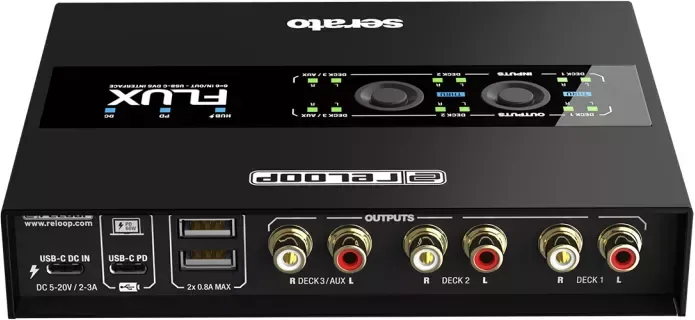
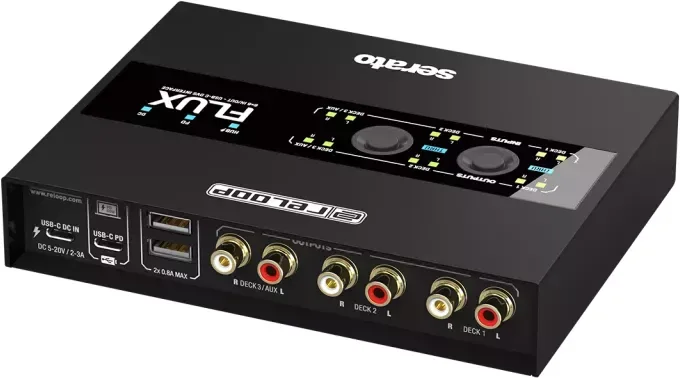
The Reloop Flux stands out as a professional USB-C DVS interface designed for modern DJ setups. It allows DJs to digitize their vinyl control with precision. This unit connects turntables directly to Serato DJ software. Every movement of the control disc is replicated virtually. You get digital control without sacrificing the feel of analog media.
Advanced Control Features
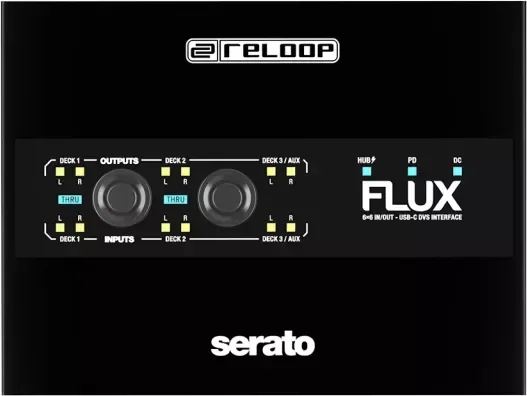
Managing audio signals is straightforward with three deck inputs. Each input supports both Phono and Line sources. You flip switches to match equipment. Interface includes input and output status LEDs. They indicate signal levels and clipping risks in real time. Two active USB hubs let you connect MIDI controllers easily. Power Delivery is handled via a USB-C port. You can plug in an external DC power supply.
Integration and Software
Serato DJ Pro and Serato DVS licenses are built-in. No extra keys are required. Software activates automatically. Windows users need the ASIO driver. Fitting into a tour rig is simple. It measures 160 by 120 millimeters. At 0.85 kg it remains portable. Safety instructions are vital. Keep it dry. Do not open housing. The Reloop Flux Manual provides guidelines. Avoid liquids. Clean with damp cloth. Transport in packaging. Ventilation is key. Do not cover vents. If cold, warm up indoors. Thru buttons allow bypass without computer. Useful for vinyl-only sets. Power management adjusts. USB bus power works but external source recommended. Check website for firmware updates.
Audio Quality and Safety
The audio quality supports high resolution. It handles 24 bit files at various sample rates up to 96 kHz. Signal to noise ratio exceeds 83 dB on line inputs. This ensures clean sound for professional venues. Gain control varies between Phono and Line modes. You gain up to 36 dB for turntables. Line inputs require much less. Maximum output reaches over 11 dBV. This drives mixers effectively.
Safety is paramount during operation. Electrical shock risk exists with incorrect voltage handling. Follow all setup instructions carefully. Do not operate in extreme heat above 35 C. Humidity also poses risks. Dust can degrade internal components over time. If fluids enter, disconnect immediately. Contact service for inspection. Unauthorized modification invalidates warranty claims. Maintenance is limited to external parts. Qualified staff must handle internal repairs. Keep the guide saved for future reference.
Connectivity options support workflows. You power computer via USB-C PD. This uses 15 watt minimum. Hub delivers max power. Two ports allow 0.8 amps each. Supports accessories. Lights show power mode. Passive when USB-A. Active with sufficient power. Help troubleshooting.
Search for 67,732 Manuals online


Type-in Brand or Model