
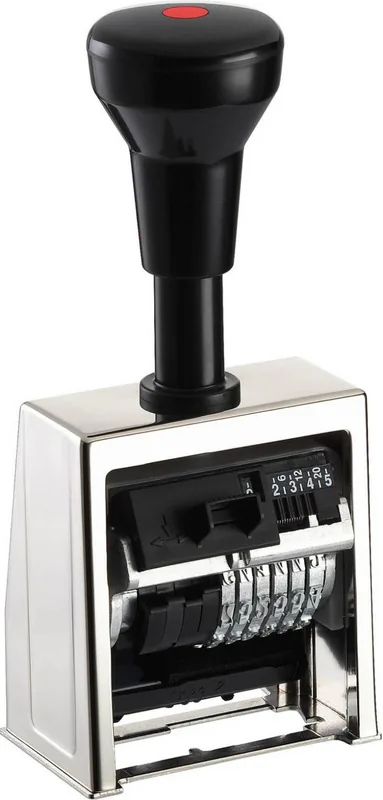
Reiner B6 Manual
PDF manual · 12 Pages
English



Quick check
Incorrect answer, please try again.
Chat with your Reiner B6 manual using AI
Get instant AI answers from your Reiner B6 manual
Ask anything about the Reiner B6. Answers come from this manual, with the pages they are based on.
Ask a Question
Do you recommend B6?
Yes No
InModi62
6 months ago
How does this stamp compare to other brands in terms of quality and durability?
Frequently Asked Questions
You must use only oil-based stamp ink. Water-based or gel inks can damage the internal mechanism and ruin the ink pad. Ensure the ink pad is fresh and properly seated before use.
Is this answer helpful?
Yes, the device allows you to hide preceding zeros. By setting the wheels to the empty space between 0 and 1, a number like 000049 will print simply as 49.
Is this answer helpful?
To park the stamp, press the button on the front plate and push the handle down until it clicks into the raised locked position. This prevents the wheels from touching the ink pad when idle.
Is this answer helpful?
Yes, replacing the ink pad is straightforward. You simply lower the handle, squeeze the grips on the back of the pad, remove the old one, and slide the new pad into the slot until it locks.
Is this answer helpful?
The interval switch controls how the number changes. You can set it to stamp the same number repeatedly, increase by one each time, or skip numbers depending on your needs.
Is this answer helpful?
Advantages and Disadvantages
Advantages

- Durable black and silver construction suitable for heavy daily use
- Six-digit capacity allows for extensive numbering sequences
- Adjustable intervals enable flexible repetition patterns
- Feature to hide leading zeros for cleaner output
- Simple mechanical operation requires no power source
Disadvantages

- Requires manual force which may be tiring for very large batches
- Limited to six digits per impression
- Ink pad replacement requires careful handling to avoid spills
- Not suitable for digital record keeping without scanning
- Print size is fixed at 5.5mm and cannot be adjusted
Product Specification
Type
Numbering/page stamp, rectangular, self-inking
Wheel count
6
Sequence
0x, 1-6x, 12x, 20x repeating
Font size
5.5mm
Impression size
0.91x0.24 in (WxH), 1 line
Ink color
black
Ink pad
integrated, single-color, replaceable (size/type 2)
Material
metal
Color
silver, black
Package contents
1 numbering stamp
Features
Zeroes retractable, precise impression placement via alignment guide, document-safe ink
Product Description
The Reiner Numeroteur B6: Precision and Reliability in Every Stamp
The Reiner Numeroteur B6 Paginierstempel is a robust manual numbering tool designed for professionals who demand accuracy and durability. Finished in a sleek black and silver color scheme, this six-digit stamper features a compact 5.5mm print size that ensures clear, legible impressions on any document. Whether you are managing inventory, filing records, or preparing invoices, this device streamlines your workflow by eliminating the need for manual number entry.
Designed with user convenience in mind, the B6 offers versatile functionality. Users can easily adjust the numbering sequence to increment after every stamp, skip numbers, or repeat specific digits as needed. The mechanism allows for hiding leading zeros, transforming a sequence like 000049 into a clean 49, which enhances the professional look of your paperwork. The sturdy construction includes a secure locking system that protects the ink pad when the device is not in use, preventing smudges and extending the life of the consumable parts.
Operating the Reiner Numeroteur B6 is intuitive. A simple press of the handle engages the stamping mechanism, while a dedicated switch controls the interval settings. The device accepts standard oil-based ink pads, which are easy to replace using the integrated release levers. This thoughtful design minimizes downtime and keeps your operations running smoothly without complex maintenance procedures.
Key Features Overview
The B6 model stands out for its mechanical simplicity and reliability. It does not rely on batteries or electricity, making it a sustainable choice for offices that prefer analog tools. The ergonomic handle reduces hand fatigue during high-volume tasks, and the precise alignment of the wheels ensures consistent print quality over thousands of uses.
Important Notes for Users
- Always use oil-based ink pads to prevent damage to the internal mechanism.
- Park the stamp in the raised position when not in use to preserve the ink pad surface.
- Adjust the zero-hiding feature carefully to match your specific numbering requirements.
- Clean the exterior regularly with a dry cloth to maintain the black and silver finish.
Search for 67,706 Manuals online


Type-in Brand or Model
Tiffany Richards
5 months ago
Is the stamp cushion easy to install, or is it complicated for beginners?
Manual.ly
5 months ago
While the stamp itself is robust and high-quality, installing the ink pad can be challenging. The current instructions are not very detailed, so users without experience may find the process difficult. We recommend watching online tutorials or contacting support for step-by-step guidance.