
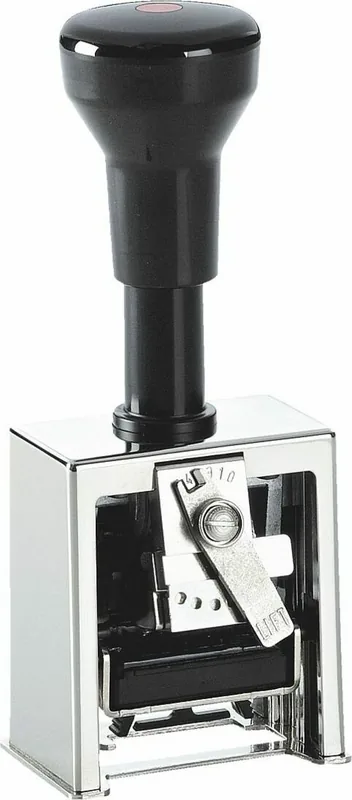
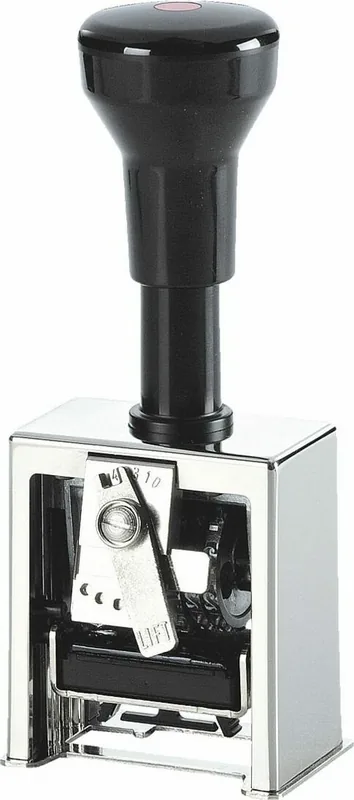
Reiner B2 Manual
PDF manual · 12 Pages
English



Quick check
Incorrect answer, please try again.
Chat with your Reiner B2 manual using AI
Get instant AI answers from your Reiner B2 manual
Ask anything about the Reiner B2. Answers come from this manual, with the pages they are based on.
Ask a Question
Do you recommend B2?
Yes NoFrequently Asked Questions
You must use only oil-based stamping ink. Water-based or alcohol-based inks can damage the internal components and ruin the stamping quality.
Is this answer helpful?
Locate the action selector lever and lift it up. Move it to the desired setting such as incrementing after every stamp or every second stamp, then release it to lock in place.
Is this answer helpful?
Yes, using the included stylus, you can push down the wheels corresponding to the leading zeros to sink them below print height, showing only the significant digits.
Is this answer helpful?
Parking the stamp lifts the numbering wheels away from the ink pad. This prevents the ink from drying unevenly or creating permanent indentations on the pad surface.
Is this answer helpful?
Press the handle down fully, hold the front plate button, lift the handle to unlock, remove the old pad, insert the new one into the cradle, and press the handle back down.
Is this answer helpful?
The zero setting stamps the exact same number every time without incrementing. This is useful for marking items that all share a common identifier or batch number.
Is this answer helpful?
Yes, the robust mechanical design is built for continuous use in offices, warehouses, and administrative settings requiring frequent manual numbering.
Is this answer helpful?
Advantages and Disadvantages
Advantages

- Adjustable numbering intervals allow for flexible usage patterns including static, single-step, or double-step increments
- Leading zero suppression feature enables cleaner output by hiding unnecessary zeros in six-digit sequences
- Durable black and silver build quality ensures long-term reliability for heavy daily office tasks
- Easy ink pad replacement system minimizes downtime and keeps the workflow uninterrupted
- Simple parking mechanism protects the ink pad from deformation and extends product life
Disadvantages

- Requires specific oil-based ink pads which may need to be purchased separately if depleted
- Manual operation means physical effort is required for each impression compared to electric alternatives
- Adjustment of wheels requires a separate stylus tool which could be misplaced if not stored properly
- Limited to six digits which might not suffice for very large inventory tracking systems
- Ink pads can stain clothing or skin if handled roughly during the changing process
Product Specification
Type
Numbering/Pagination stamp, rectangular, self-inking
Wheel count
6
Mechanism
0x, 1-4x repeating
Font size
4.5mm
Print size
1 line
Ink color
black
Stamp pad
integrated, single-color, replaceable (size/type 1)
Material
metal
Color
silver, black
Package contents
1 pagination stamp
Features
Zeroes recessed, precise print placement via alignment guide, document-safe ink
Product Description
Master Precision with the Reiner Numeroteur B2
The Reiner Numeroteur B2 Paginierstempel in a sleek black and silver finish represents the pinnacle of manual numbering technology. Designed for professionals who demand reliability, this 6-digit self-inking stamp ensures your documents are marked with clarity and consistency. Whether you are managing inventory logs, filing legal records, or organizing archival materials, this tool simplifies the task of sequential numbering without the need for electricity or complex machinery.
The device features an intuitive design that allows users to customize their numbering experience effortlessly. The adjustable mechanism lets you set intervals, ensuring the number increments after every single use, every second use, or remains static as needed. This flexibility makes it suitable for a wide range of applications where specific counting patterns are required. The sturdy construction guarantees durability, while the ergonomic handle provides comfort during extended periods of use.
Maintaining the stamp is straightforward and user-friendly. The ink pad can be easily replaced by following simple steps involving the release lever and front plate button. It is crucial to use only oil-based stamping ink to ensure smooth operation and prevent damage to the internal mechanisms. The ability to park the stamp protects the ink pad from drying out or developing permanent impressions when not in active use, extending the lifespan of the product significantly.
One of the standout features is the capability to suppress leading zeros. This function allows you to display numbers like 49 instead of 000049, offering a cleaner look for your printed pages. The adjustment process involves a small stylus provided with the unit, making fine-tuning precise and easy. By mastering these controls, users can achieve professional results every time they make a mark.
Essential Maintenance Notes
To keep your Reiner Numeroteur B2 performing at its best, always store it in the parked position when not in use. This prevents unnecessary wear on the ink pad and ensures the next impression is fresh. Regularly check the ink level and replace the pad before it runs dry to avoid smudging. Always handle the ink pads with care to prevent staining your hands or clothing.
Pros and Cons
Pros
- Adjustable numbering intervals allow for flexible usage patterns including static, single-step, or double-step increments.
- Leading zero suppression feature enables cleaner output by hiding unnecessary zeros in six-digit sequences.
- Durable black and silver build quality ensures long-term reliability for heavy daily office tasks.
- Easy ink pad replacement system minimizes downtime and keeps the workflow uninterrupted.
- Simple parking mechanism protects the ink pad from deformation and extends product life.
Cons
- Requires specific oil-based ink pads which may need to be purchased separately if depleted.
- Manual operation means physical effort is required for each impression compared to electric alternatives.
- Adjustment of wheels requires a separate stylus tool which could be misplaced if not stored properly.
- Limited to six digits which might not suffice for very large inventory tracking systems.
- Ink pads can stain clothing or skin if handled roughly during the changing process.
Frequently Asked Questions
What type of ink should I use? You must use only oil-based stamping ink. Water-based or alcohol-based inks can damage the internal components and ruin the stamping quality.
How do I change the numbering interval? Locate the action selector lever and lift it up. Move it to the desired setting such as incrementing after every stamp or every second stamp, then release it to lock in place.
Can I hide the leading zeros in my numbers? Yes, using the included stylus, you can push down the wheels corresponding to the leading zeros to sink them below print height, showing only the significant digits.
Why should I park the stamp? Parking the stamp lifts the numbering wheels away from the ink pad. This prevents the ink from drying unevenly or creating permanent indentations on the pad surface.
How do I replace the ink pad? Press the handle down fully, hold the front plate button, lift the handle to unlock, remove the old pad, insert the new one into the cradle, and press the handle back down.
What does the zero setting mean? The zero setting stamps the exact same number every time without incrementing. This is useful for marking items that all share a common identifier or batch number.
Is the Reiner B2 suitable for high volume work? Yes, the robust mechanical design is built for continuous use in offices, warehouses, and administrative settings requiring frequent manual numbering.
Search for 67,706 Manuals online


Type-in Brand or Model