
Rebeltec Whiterun Manual
PDF manual · 4 Pages
English



Quick check
Incorrect answer, please try again.
Chat with your Rebeltec Whiterun manual using AI
Get instant AI answers from your Rebeltec Whiterun manual
Ask anything about the Rebeltec Whiterun. Answers come from this manual, with the pages they are based on.
Ask a Question
Do you recommend Whiterun?
Yes NoFrequently Asked Questions
Yes, it supports Windows 7, Vista, XP, ME, 2000, 8, and 10 without special drivers.
Is this answer helpful?
Both the keyboard and the mouse each require two AAA batteries for operation.
Is this answer helpful?
Turn on the computer and press any mouse button to resume normal operation from power save.
Is this answer helpful?
No, the nano-receiver is plug-and-play and requires no manual configuration drivers.
Is this answer helpful?
It operates in the 2404 MHz-2480 MHz range, roughly 2.4 GHz for reliable wireless transmission.
Is this answer helpful?
Package includes mouse, keyboard, nano receiver, and installation instructions.
Is this answer helpful?
The mouse enters power-saving mode after ten minutes of inactivity to conserve battery life.
Is this answer helpful?
Advantages and Disadvantages
Advantages

- Wireless connectivity reduces desk clutter effectively
- Compatible with multiple Windows operating systems
- Nano receiver allows plug-and-play functionality
- Intelligent power-saving mode extends battery life
- Compact design fits well in various environments
Disadvantages

- Requires AAA batteries not included or rechargeable
- Mouse needs button press to wake after power save
- Receiver unplugging disables mouse function temporarily
- Fixed US keyboard layout limits regional flexibility
- Battery installation requires careful polarity alignment
Product Specification
Package Contents
Mouse, Keyboard
Layout
US
Connectivity
Wireless (2.40 GHz)
Resolution (Mouse)
Red LED / IR 1600 dpi, adjustable to 1200/800 dpi
Features
Numeric Keypad
Product Description
Discover Freedom with the Rebeltec Whiterun Wireless Desktop
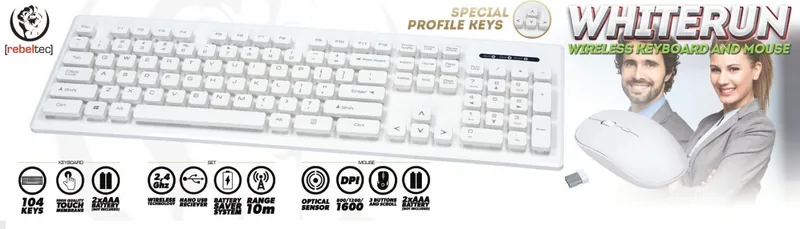
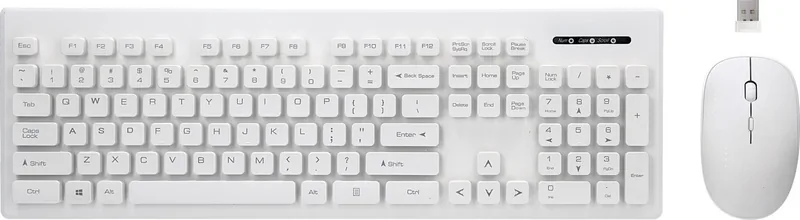
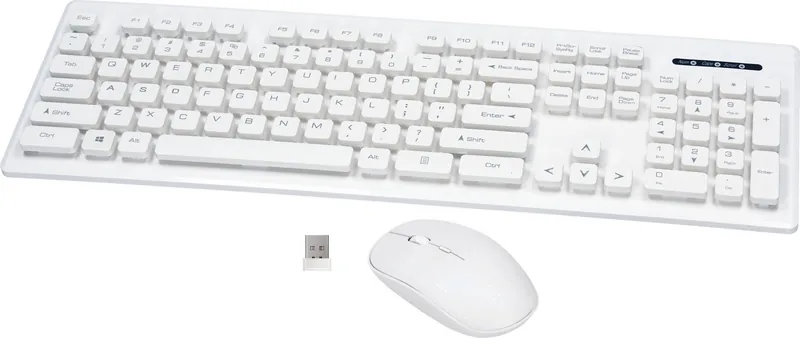
In the modern workspace, clutter-free organization is paramount for productivity. The Rebeltec Whiterun Wireless Desktop, white, USB, US Keyboard-Mouse Set offers a sleek solution designed to enhance your daily computing experience. This combination device brings convenience and style to your desk setup without the limitations of tangled cords. The set includes a matching keyboard and mouse, both crafted to fit seamlessly into any environment while maintaining a clean aesthetic for professional and home offices alike.
Seamless Connectivity and Compatibility
One of the standout features is the wireless connectivity powered by a compact nano-receiver. This device operates within the standard 2.4 GHz frequency band, ensuring reliable transmission between the input devices and your computer. Setup is straightforward, requiring only a standard USB port on your PC or compatible hardware. The software requirements are minimal, supporting a wide range of versions including Windows 7, Vista, XP, and newer iterations up to Windows 10. This ensures that older machines can still benefit from the upgrade without needing expensive hardware replacements or complex driver installations during the initial phase.
Power Management and Battery Use
Both the keyboard and the mouse operate on replaceable AAA batteries. Each device requires two standard batteries for full operation, allowing extended use between frequent charging cycles. The system includes an intelligent power-saving mode to preserve battery life during inactivity. If the mouse remains idle for more than ten minutes, it automatically enters a low-power state to conserve energy. It is important to note that waking the mouse from this mode requires specific user interaction. Turning on the computer and pressing any mouse button will restore normal functionality, providing a balance between energy efficiency and user responsiveness.
Package Contents and Standards
The complete package ensures you have everything needed for immediate use upon arrival. Included items are the mouse, keyboard, nano receiver, and guide content. The product adheres to strict safety and emission standards like RED and ROHS directives. These quality assessments confirm the device meets international safety norms for electronic appliances. Users appreciate the plug-and-play nature of the nano-receiver, which eliminates the need for manual configuration drivers in most cases. Installation involves simply opening the battery cover and aligning the cells correctly.
Important Operational Note: Always ensure batteries are installed with correct polarity before connecting the USB receiver. Failure to connect the receiver properly may prevent the devices from waking up from power-saving mode. If the PC is turned off or the receiver is unplugged, the mouse remains dormant until the system restarts and a button is pressed.
Search for 67,706 Manuals online


Type-in Brand or Model