
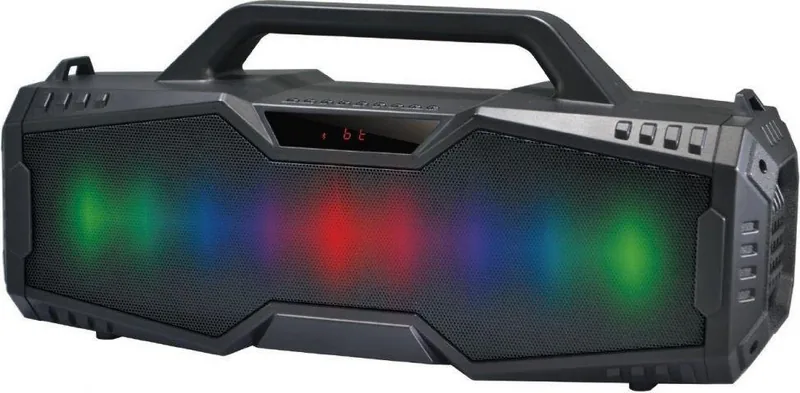
Rebeltec SoundBox 420 Manual
PDF manual · 4 Pages
English



Quick check
Incorrect answer, please try again.
Chat with your Rebeltec SoundBox 420 manual using AI
Get instant AI answers from your Rebeltec SoundBox 420 manual
Ask anything about the Rebeltec SoundBox 420. Answers come from this manual, with the pages they are based on.
Ask a Question
Do you recommend SoundBox 420?
Yes NoFrequently Asked Questions
The Rebeltec SoundBox 420 features a 4000mAh Li-ion battery that provides approximately 8 to 12 hours of continuous music playback after a full charge.
Is this answer helpful?
Yes, you can play music directly from a USB flash drive or TF card, or connect an external device using the 3.5mm AUX cable.
Is this answer helpful?
Yes, it includes an FM radio function that can auto-scan frequencies from 87.5MHz to 107MHz and save up to 50 channels.
Is this answer helpful?
No, the device is not waterproof. You should avoid using it in wet conditions or high humidity to prevent damage.
Is this answer helpful?
The speaker supports MP3, WAV, WMA, FLAC, and APE audio formats when playing from USB or TF card sources.
Is this answer helpful?
Press the MODE button until BT appears, then enable Bluetooth on your phone, search for the device, and select it to connect.
Is this answer helpful?
Advantages and Disadvantages
Advantages

- Bluetooth 5.0 ensures stable and fast wireless connectivity
- Large 4000mAh battery offers 8-12 hours of playtime
- Supports multiple input sources including USB, TF card, and AUX
- Built-in FM radio with auto-scan capability
- RGB lighting adds visual flair to the listening experience
Disadvantages

- Battery warranty is limited to only six months
- Not waterproof, requiring protection from moisture
- Fixed internal battery cannot be replaced by the user
- Charging speed depends on using the specific recommended adapter
- Voice prompts may be intrusive for some users in quiet environments
Product Specification
Power
30W RMS
Display
LCD
Tuner
FM
Frequency Range
21Hz-18kHz
Connections
AUX In (3.5mm Jack), USB-A, Cardreader (microSD)
Wireless
Bluetooth 5.0
Power Supply
Li-Ion Battery (3600mAh), USB
Playback Time
6h
Features
Hands-free, Light Effects
Color
Black
Dimensions
16.54x7.95x5.59in (WxDxH)
Weight
4.43lbs
Product Description
Experience the Rebeltec SoundBox 420
The Rebeltec SoundBox 420 stands out as a versatile portable audio solution designed for music lovers who demand flexibility and power. This Bluetooth speaker combines modern connectivity with robust hardware features, ensuring you can enjoy your favorite tracks anywhere. With its sleek design and powerful performance, it serves as an excellent companion for outdoor adventures, home parties, or casual listening sessions.
At the heart of this device is Bluetooth version 5.0 technology, which guarantees a stable and fast wireless connection to your smartphone, tablet, or laptop. The internal 4000mAh Li-on battery provides impressive endurance, offering between 8 to 12 hours of continuous playback on a single charge. Whether you are hiking, camping, or relaxing at home, the long-lasting battery ensures the music never stops when you need it most.
Versatility is key to the SoundBox 420 experience. Beyond wireless streaming, it supports direct playback from TF cards and USB flash drives, handling popular formats like MP3, WAV, WMA, FLAC, and APE. For those who prefer wired connections, the AUX input allows you to connect external devices via a 3.5mm jack. Additionally, the built-in FM radio lets you tune into local stations with ease, scanning frequencies automatically or allowing manual selection for saved channels.
Visual appeal meets functionality with the integrated RGB light effects. You can cycle through various colors or keep them off to focus purely on the sound. The user-friendly interface includes dedicated buttons for volume control, mode switching, and EQ adjustments to fine-tune bass and treble levels. Voice prompts guide you through mode changes, enhancing the overall user experience.
Important Usage Notes
To maintain optimal performance, always use a DC 5V/1A adapter for charging. Avoid exposing the device to high humidity, extreme temperatures, or water. The battery warranty covers only six months, so proper care is essential for longevity. Always turn off the speaker when not in use to preserve battery life.
Search for 67,706 Manuals online


Type-in Brand or Model